Public documentation edition. Account, subscription, and environment names are replaced with examples. Raw execution evidence, configuration files, and PDFs are not published here.
Microsoft Discovery Core Capabilities Hands-on Guide
English · Documentation revised 2026-10-02 · Work in progress · Azure cloud service
One goal: build a research workflow that finds evidence, verifies it with real computation, and evaluates the results again when a human changes the constraints.
The complete research workflow is still under validation. This guide provides procedures for customers and partners to follow in their own environment. Pause any stage whose prerequisites are not ready, and proceed only when actual results meet its pass criteria. Environment-specific installation history is kept in the separate reference below.
S00 — Start here
Choose your route
For a new environment, use the Azure Portal-led, single-region route. If an administrator has already prepared your environment, confirm H01–H06 and start on the researcher route. Select your own account, subscription and resource names in L00.
| Audience | Route |
|---|---|
| Administrator preparing an environment | L00 → L01 → L02 → L03, then L05 steps 1–5 to prepare the tool |
| Researcher using a prepared environment | Confirm H01–H06 below → L04 → L05 steps 6–8 → L06 → L07 → L09 |
| Team verifying collaboration and access | Add L08. Actual verification requires another test user |
| Developer extending tools | Add E01 and E02 after the core route |
| Reader reviewing without Azure | Review synthetic data/answers in S02 — Scenario and only local calculation step 1 in L05 |
If blocked: See A01 — Cost and quota and A02 — Troubleshooting. Independent foundation, data and tool preparation can proceed while Bookshelf is blocked, but cannot substitute for KB-dependent research completion. Use L09 to review remaining resources and costs even after a partial run.
What you will build
Start with the intended outcome. These are results to create and verify during your lab, not a claim that they already exist.
| Stage | Activity | Result to inspect |
|---|---|---|
| Prepare — L00–L03 | Set up the environment, data and knowledge index | Accessible Project, input files and indexed KB |
| Evidence — L04 | Compare documents with specialist agents | Openable source citations and structured evidence |
| Compute — L05 | Evaluate candidates with a CPU tool | Actual run ID/logs and verified ranking.json |
| Research workflow — L06–L07 | Connect tasks, review independently and change constraints | Research report and before/after comparison |
| Finish — L09 | Preserve results and execution evidence | Reviewable outputs/provenance and remaining work/costs |
Completion rule: Distinguish resource creation, actual execution and content validation. A direct API calculation does not prove that the agent or Engine labs have passed.
For readers investigating an installation: Environment-specific attempts, outcomes and progress are collected in the deployment reference, Korean. Those records are not required reading for this lab.
Obtain the administrator handoff
Role boundary: Bookshelf, node-pool, Registry, tool creation, and indexing preparation belong to administrators or explicitly authorized resource operators. Project Contributor alone does not authorize all these actions. Coordinate with an administrator rather than granting every researcher subscription Owner for convenience. S20
Researcher entry check: Start at L04 without repeating infrastructure creation when the administrator supplies these actual values and readiness evidence. Example names or a verbal assurance are not sufficient.
| ID | Handoff and readiness evidence |
|---|---|
| H01 | Actual Workspace/Project URLs and resource IDs, successful thermalhol, correct tenant |
| H02 | Existing, usable gpt-5-4 deployment |
| H03 | thermal-evidence version 1, four TXT sources, indexing Succeeded |
| H04 | Actual thermaldata, evidencepack/candidatecsv Asset IDs, eight source CSV rows |
| H05 | thermal-ranking Tool ID, definition version/image digest, full cpulab Node pool ID |
| H06 | Researcher's project/model/tool/KB permissions and Blob/network access to inputs and outputs |
H01–H06 are a handoff checklist, not this repository's completion status. If actual names differ from the examples, update subsequent prompts and connections too. Defer exercises that depend on any unmet item.
Access approval, deployment and indexing require separate time. Approximately 2–3 hours is an unverified planning estimate for researcher exercises, not a measured full-run duration. Every lab follows Goal → Before you start → Steps → Pass criteria.
Terms and product scope
Microsoft Discovery cloud became generally available on 2026-06-02. The separate Discovery desktop app and unified Workbench are in Preview and are not required. Use the Discovery Engine, not deprecated static kind: workflow agents. Distinguish a role's (Preview) display suffix from its actual permissions.S01 S03 S10 S28
Keep the concepts separate. A Workspace is the shared infrastructure boundary, a Project is the research and access boundary, and a Shared session groups related research tasks. Documentation and APIs also use investigation for the associated research container. A Discovery Storage Container is a storage-reference resource, not the Azure Blob container itself.S02 S12 S16
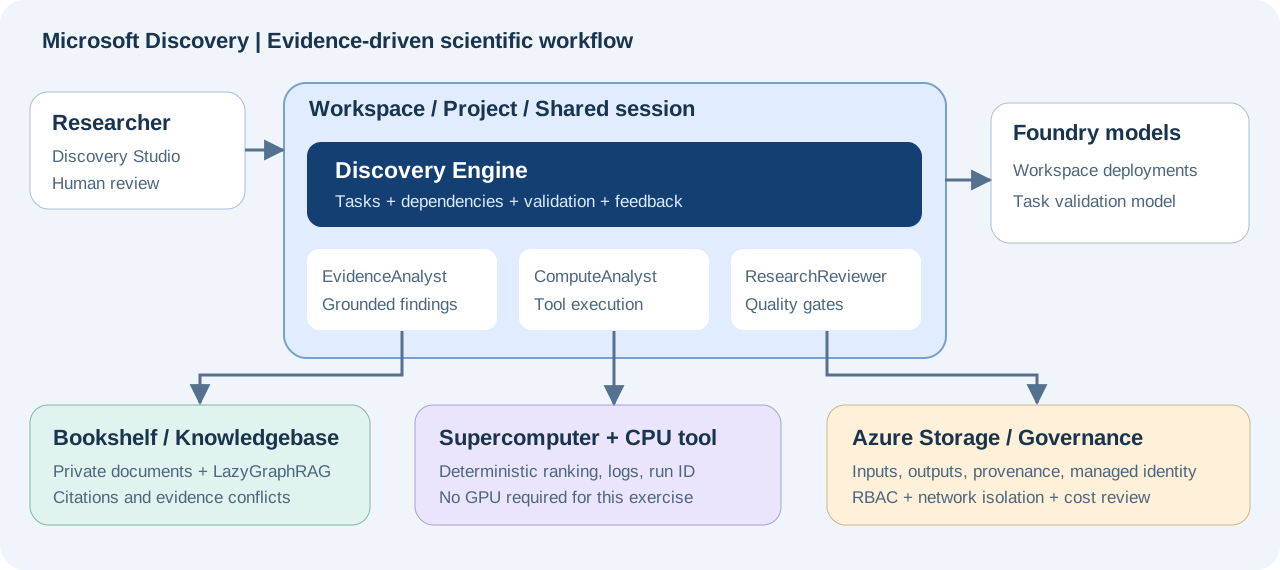
S01 — Core capability coverage
The core route covers the four central capabilities—agents, graph-based knowledge, computation, and the Discovery Engine—plus their data, security, and collaboration requirements. E01/E02 extend the same platform and require separate checks of permissions and connected-service availability.
| ID | Capability | Lab | Evidence to inspect |
|---|---|---|---|
| C01 | Studio, Workspace, Project, Shared session | L01, L04 | Resource IDs, successful state, session |
| C02 | Storage Container/Asset; reading, writing, sharing files | L02, L04, L06 | Source path, output Asset ID, file content |
| C03 | Bookshelf, GraphRAG, indexing, citations and evidence comparison | L03, L04 | Successful index and actual source citations |
| C04 | Prompt Agents, models, structured responses, versions and reuse | L04 | Deployment name, JSON fields, agent version |
| C05 | Supercomputer, node pools, Action Tools, execution and logs | L05 | Operation ID, success state, actual JSON |
| C06 | Cognition, task dependencies, validation and retries | L06 | Task hierarchy, execution history, validation comments |
| C07 | Hypothesis/constraint changes, human feedback and resume | L07 | Before/after results and a new operation ID |
| C08 | Collaboration, project RBAC, linked-resource access | L08 | Allowed and denied operations by another user |
| C09 | Traceability, retained artifacts and reproducibility | L06, L09 | Evidence/input/version/computation/output chain |
| C10 | Managed identity, networking, encryption, cost and shutdown | L00, L01, L09 | Access settings, remaining jobs/resources/cost |
| C11 | Code-environment and Hybrid Tools | E01 | Generated code, actual run logs and output |
| C12 | External MCP/OpenAPI and scientific-model integration patterns | E02 | MCP call evidence and integration-pattern selection |
Out of scope: installing the desktop app, enabling Preview Workbench, evaluating every partner model, physical experiments or robotics, and GPU benchmarking. Do not present these as outcomes of this lab.
S02 — Scenario and expected results
Question: Recommend the top two of eight fictional heat-sink materials that meet every hard constraint. Resolve conflicting documents using the latest correction, and never invent missing evidence.
All data was authored specifically for this exercise and is synthetic. It is not real supplier information, published research, measurements, or safety certification. Both editions use the same English source corpus; the guide and requested agent-response language differ.
| File | Purpose |
|---|---|
data/bookshelf/01_requirements.txt |
REQ-001: requirements and scoring formula |
data/bookshelf/02_candidate_catalog.txt |
CAT-001: initial candidate values |
data/bookshelf/03_screening_results.txt |
TEST-001: corrosion status and missing evidence |
data/bookshelf/04_revision_notes.txt |
REV-001: GAMMA correction and follow-up constraint |
data/materials.csv |
Resolved computational input; not independent additional evidence |
scripts/score_materials.py |
Reference calculator using only the standard library |
scripts/verify_ranking.py |
Validates the complete downloaded raw ranking-file contract, not its execution location |
tools/thermal-ranking/ |
CPU-tool Dockerfile and definition template |
config/lab.json |
Environment configuration read by Azure scripts; replace with your own values before use |
| Property | Hard requirement |
|---|---|
| Thermal conductivity | ≥ 180 W/(m·K) |
| Density | ≤ 3.00 g/cm³ |
| Material cost | ≤ 5.00 USD/kg |
| Recycled content | ≥ 50% |
| Corrosion screening | pass; unknown is not a pass |
Score only eligible candidates. recycled_pct is a value from 0 to 100. Round the final score to one decimal place and break ties by candidate ID in ascending order.
score = 50 * min(conductivity_w_mk / 250, 1)
      + 30 * max(0, 1 - cost_usd_kg / 5)
      + 20 * min(recycled_pct / 100, 1)
| Candidate | Baseline decision | Score / reason |
|---|---|---|
| ALPHA | eligible | 67.8 |
| BETA | excluded | Density and cost are too high; recycled content is too low |
| GAMMA | excluded | Use 175 from REV-001; conductivity is too low |
| DELTA | eligible | 68.6 |
| EPSILON | excluded | Cost exceeds the limit |
| ZETA | needs_review | No corrosion evidence |
| ETA | excluded | Recycled content is too low |
| THETA | eligible | 60.8 |
Baseline: DELTA → ALPHA → THETA; recommend DELTA/ALPHA. Follow-up: lower only the cost ceiling to 3.00; DELTA is the sole eligible candidate, still scoring 68.6. Keep the cost-normalization denominator at 5.
Decision order: Any known hard-constraint failure means excluded; otherwise missing evidence means needs_review; the remaining candidates are eligible. Under the follow-up ceiling, ZETA is therefore excluded on cost while its corrosion evidence remains missing.
L00 — Prepare access, cost and roles
Goal: Treat service approval, Azure permissions, networking, and spending approval as separate prerequisites.
Before you start: Identify the environment administrator and the people approving cost and access. No Azure resources need to be created yet.
Local preparation and environment values
Download the repository to use the inputs and tool. These are local setup commands for a first checkout. Run subsequent Bash examples from the repository root in the same session. On Windows, use a Bash environment rather than pasting them into PowerShell.
git clone https://github.com/junwoojeong100/microsoft-discovery-labs.git
cd microsoft-discovery-labs
npm ci
| Prerequisite | Used for |
|---|---|
| Git, Node.js 22+/npm, Python 3 | Repository setup, readiness, reference calculation/content checks |
| Azure CLI and normal user sign-in | Azure read/write commands below |
| Browser and approved private connectivity | Portal/Studio and private-only Blob files |
| Google Chrome | Only contributors regenerating browser/PDF documentation outputs |
config/lab.json contains environment-specific values. Edit the following fields in your own local checkout first. Do not add passwords, tokens or keys, and do not inadvertently commit environment identifiers or evidence to a public repository.
| Input | Value and constraint |
|---|---|
account, tenantId |
Actual CLI user's UPN and tenant ID |
subscriptionId, subscriptionName |
ID and display name of the approved lab subscription |
resourceGroup, labTag |
Dedicated rg-discovery-hol-<unique-suffix>, tag value microsoft-discovery-core-hol; repository scripts require this RG prefix |
location, targetComputeLocation |
Both swedencentral for the baseline. Another supported single region is possible after support/quota checks |
| Workspace, Supercomputer, Storage, ACR and Bookshelf names | Select your own; check service-specific naming rules and uniqueness |
| VNet, subnets and UAMI | L01 names are examples; check CIDR overlap and organizational policy |
runtime object |
Actual names for the operator's tool:run; unused by the normal Portal route |
Replace every <...> below. Shell variables do not automatically update JSON, Bicep or values embedded in scripts. Check agreement with the configuration separately.
TENANT_ID='<tenant-id>'
SUBSCRIPTION_ID='<subscription-id>'
RESOURCE_GROUP='rg-discovery-hol-<unique-suffix>'
LOCATION='swedencentral'
STORAGE_ACCOUNT='<globally-unique-storage-name>'
ACR_NAME='<globally-unique-acr-name>'
Steps:
- Complete normal MFA/security-key sign-in and select your subscription. Compare the displayed account, tenant and subscription with your edited
config/lab.json. These commands change local CLI sign-in context, not Azure resources.
az login --tenant "$TENANT_ID"
az account set --subscription "$SUBSCRIPTION_ID"
az account show --query "{subscription:id,tenant:tenantId,user:user.name}"
- Confirm with your Microsoft representative that the subscription is enabled for Discovery. Spending approval and Contributor permissions do not replace the service allow-list.S03 S04
- In Azure Portal → Subscriptions → your subscription → Resource providers, check/register
Microsoft.Discoveryand the dependencies listed in the official guide. Registration requires appropriate subscription permissions. The following command is read-only.
az provider show --namespace Microsoft.Discovery \
  --subscription "$SUBSCRIPTION_ID" \
  --query "{state:registrationState,types:resourceTypes[].resourceType}"
- Check actual
workspaces/supercomputers/bookshelvestypes and a successful Workspace listing with readiness below, not justRegistered. Do not fail access solely becauseDefaultFeature=Pending. Conversely, provider registration does not prove quota, deployment or execution readiness. Do not register arbitrary development features. - Have an administrator prepare the Platform Administrator persona and the managed identity's least-privilege roles. Permission to assign roles is separate. Verify the actual Owner/RBAC Administrator/User Access Administrator or equivalent authority. Researcher and reviewer project roles are covered in L08.
- The administrator reviews/configures the subscription-level Discovery NSP Perimeter Joiner + Reader assignments for the Discovery control-plane service App (
92c174ac-8e41-4815-a1b7-d81b19ab03ce) using the official procedure. Do not assume ordinary Contributor includes role-assignment authority.S18 - Choose a supported home region: East US / Sweden Central / UK South. The baseline uses
swedencentral, with support resources in the same region. If cross-region placement is required, separately apply the official procedure. Do not apply Microsoft-owned-subscription-only tags to an ordinary customer subscription. - Obtain approval for A01's model/VM quota, actual regional capacity, always-on costs and retention period. Prepare VPN/ExpressRoute or an approved VNet client for private Blob access. Check Portal sign-in, Studio access and Blob file opening separately, repeating the checks after resource creation.
Separate LoadBalancer network prerequisite: Check Microsoft.Network/AllowBringYourOwnPublicIpAddress using the official troubleshooting guidance. Discovery enablement and Microsoft.Network=Registered do not substitute for this feature registration.
az feature show --namespace Microsoft.Network \
  --name AllowBringYourOwnPublicIpAddress \
  --subscription "$SUBSCRIPTION_ID" \
  --query "{name:name,state:properties.state}"
Only when it is NotRegistered, an authorized administrator runs this mutation command within the approved scope.
az feature register --namespace Microsoft.Network \
  --name AllowBringYourOwnPublicIpAddress \
  --subscription "$SUBSCRIPTION_ID"
Use the preceding az feature show to confirm Registered before re-registering the provider. If Pending, wait or consult the responsible administrator.
az provider register --namespace Microsoft.Network \
  --subscription "$SUBSCRIPTION_ID" --wait
Approval timing can differ by subscription. This feature registration is separate from RBAC grants, AKS regional capacity and model quota increases.
Read-only precheck: This verifies the account, tenant and subscription in your edited config/lab.json without saving tokens. It updates artifacts/discovery-readiness.json; preserve prior evidence first if needed. Exit 0 means the selected access/model-quota checks passed, 2 means a prerequisite is blocked, and 1 means a lookup/authentication error.
npm run readiness
npm run readiness -- --require core
The default includes Bookshelf. --require core checks core access and the Workspace's GPT-5.4 requirement only. Model lookup uses targetComputeLocation, falling back to location only when that field is absent. This conservative precheck measures unallocated quota for new allocations; when reusing deployed models, inspect existing allocations rather than creating duplicates. Neither command proves VM quota, physical capacity, role propagation, network or Studio readiness.
If only Bookshelf quota is insufficient, prepare the L01 foundation/core separately, leave L03 and H03 incomplete, and do not claim the full research lab passed.
Pass criteria: The selected phase's service access, providers, roles, quota, client connectivity, and spending approval are ready. Do not deploy a blocked phase or its dependents.
L01 — Create the Workspace and Project
Goal: Prepare shared infrastructure for the researcher labs. For an existing environment, verify the pass criteria instead of redeploying.S03 S18
Before you start: L00's core access, permissions, model quota, regional capacity and spending checks have passed. This stage may proceed if only Bookshelf is blocked.
Steps:
- Use your dedicated RG and names selected in L00. Create a new RG in the chosen region and record tags
project=microsoft-discovery-core-hol,environment=lab. Workspace names use lowercase letters; example Projectthermalholis lowercase and at most 12 characters. Check actual naming and uniqueness rules in the creation form. - Prepare an example VNet
vnet-discovery-holand the subnets below. Use a separate VNet per Workspace.10.80.0.0/16and its subnet ranges are examples; replace them with approved, nonoverlapping ranges. For an existing VNet, add only the required subnets rather than redeploying its entire subnet array.
| Subnet | Example CIDR | Configuration |
|---|---|---|
supercomputerNodepoolSubnet |
10.80.1.0/24 |
Microsoft.Storage service endpoint |
aksSubnet |
10.80.2.0/24 |
Microsoft.Storage service endpoint |
workspaceSubnet |
10.80.3.0/24 |
Microsoft.App/environments delegation + Storage endpoint |
privateEndpointSubnet |
10.80.4.0/24 |
Dedicated to the Workspace |
agentSubnet |
10.80.5.0/24 |
Microsoft.App/environments delegation + Storage endpoint |
searchSubnet |
10.80.6.0/24 |
Dedicated to Bookshelf; Microsoft.App/environments delegation + Storage endpoint |
bookshelfPeSubnet |
10.80.7.0/24 |
Dedicated to Bookshelf |
storagePeSubnet |
10.80.8.0/24 |
Dedicated customer Blob Storage Private Endpoint |
blobClientSubnet |
10.80.9.0/24 |
Optional administrator-only private Blob client VM; inbound traffic denied |
- Create example UAMI
id-discovery-holor reuse an approved dedicated identity. The signed-in user, this UAMI and the Discovery control-plane service principal are distinct. - Create Standard LRS Storage using L00's
STORAGE_ACCOUNT, with Blob containersdiscoveryinputsanddiscoveryoutputs. Also prepare Basic ACR namedACR_NAME, or reuse an approved Registry. - With those resources available, assign the following roles at the exact scopes. Management-plane Owner does not replace Blob data access.
| Principal | Scope | Role/purpose |
|---|---|---|
| Discovery UAMI | Lab RG | Microsoft Discovery Platform Contributor |
| Same UAMI | VNet / that UAMI | Network Contributor / Managed Identity Operator; this example shares one UAMI across cluster, kubelet and workload |
| Same UAMI | Storage / ACR | Storage Blob Data Contributor / AcrPull; check the corresponding pull role separately for ABAC-enabled ACR |
| User uploading/opening files | Lab Storage | Blob data role appropriate to the operation |
| Tool-image builder | ACR | Roles required for ACR Tasks build/push, separate from pull permissions |
Storage connectivity: The baseline uses publicNetworkAccess=Disabled, with shared keys and anonymous blobs disabled. Create a Blob Private Endpoint in storagePeSubnet; verify connection approval and the record/VNet link for privatelink.blob.core.windows.net. Reuse an existing DNS zone rather than linking duplicate namespaces. From an approved VNet/VPN client, verify private-IP resolution of the Blob FQDN and Entra-authenticated container access. Creating the endpoint alone does not connect a laptop.
Example browser CORS: origins https://studio.discovery.microsoft.com, https://vscode.dev, https://*.vscode-cdn.net; methods GET/HEAD/PUT/DELETE/OPTIONS; allowed/exposed headers *; Max age 200. Check organizational policy and actual UI requirements. CORS replaces neither authentication, RBAC nor private connectivity. Policy may alter Storage settings, so inspect created values, not only the request.
- In Portal → Microsoft Discovery Supercomputers → Create, set your name/region, VNet,
aksSubnet, system SKUStandard_D4s_v6, and Cluster/Kubelet/Workload identity. This example'soutboundType=LoadBalancerprovides explicit egress: confirm policy permits it, and do not interpretdefaultOutboundAccess=falseas blocking every outbound path. After the parent is Succeeded, use Settings → Node pool → Create forcpulab:supercomputerNodepoolSubnet,Standard_D4s_v6, min 0 / max 1, GPU 0. This user pool is separate from the always-on system pool. - In Microsoft Discovery Workspaces → Create, connect your Workspace name,
workspaceSubnet,privateEndpointSubnet,agentSubnet, UAMI and successful Supercomputer. The baseline isNetworkIsolation=true+publicNetworkAccess=Enabled, only where organizational policy permits. Distinguish isolated managed resources from public network access to authenticated Studio/REST endpoints. A private-only Workspace additionally requires Discovery Private Endpoint, DNS and client connectivity.S18 - After the Workspace is Succeeded, check actual user data-plane access on its MRG. Assign the documented Foundry User role where needed, without duplicating equivalent existing access. In Settings → Chat Model Deployments, check validation deployment
gpt-5-4/ modelgpt-5.4, creating it only if absent. It is separate from automatic cognition.
| Model purpose | Lab planning allocation | Verify |
|---|---|---|
| Automatic cognition | Global Standard 250,000 TPM | Actual automatic deployment name, state and allocation |
Validation gpt-5-4 |
Global Standard 250,000 TPM | Exact deployment name and model gpt-5.4 |
| Total | 500,000 TPM | Additional allocatable quota after existing deployments |
If this GPT-5.4 field uses kTPM/sku.capacity, enter 250 each. Check supported model revisions in the creation screen and verify the stored values. Do not consume all remaining quota with cognition and block validation. Other models/deployment types require separate support and quota checks.S05
- In Studio https://studio.discovery.microsoft.com → Data → Storage Containers (new) → Create Container, create
thermaldataand link your Storage account. This is an account reference, not a file upload. - In Workspaces → your Workspace → Create Project, create
thermalholand linkthermaldata. Verify each resource's Succeeded state, actual IDs/MRGs and ability to open the project; record H01–H02. Do not add Preview Workbench tags. Use MMK by default; CMK needs separate design. Finalize creation-only tags and identity settings before creation.
If using Bicep
Do not apply both Portal and Bicep routes to the same resources. Repository templates are staged inputs from actual runs, not a finished installer that automatically adapts every value to a customer environment.
| Purpose | Reference inputs | Review before use |
|---|---|---|
| New single-region foundation | infra/main.bicep, infra/identity.bicep, infra/expand-network.bicep, infra/lab-foundation.bicep |
Names, CIDRs, allowed regions, administrator object ID and policy; main.bicep currently allows Sweden Central only |
| Service permissions/private Blob access | infra/access.bicep, infra/storage-private-access.bicep |
Control-plane tenant object ID; reuse existing roles/DNS |
| Discovery core | infra/discovery-core.bicep |
Actual support-resource bindings and model allocations; excludes Bookshelf/indexing pool |
| Cross-region placement when needed | Official cross-region procedure | Separately design Home/Target placement, network, permissions and quota |
Apply only after review: Adapt parameters, inspect validate/what-if targets, then apply approved stages. Retain Incremental mode for RG deployments. Reapplying an old complete subnet template to an expanded VNet can cause IncompatibleDelegations or change existing configuration.
Partial failure: Preserve causes, states and correlation IDs first. deployCompute=false is a separate preparation mode that can clear compute links, not a regional-capacity workaround. On Conflict in terminal Failed state, stop repeated PUTs and review the official recovery procedure. Do not delete failed resources/MRGs/RGs without approval or directly change managed AKS/Container Apps.
Pass criteria: Workspace, Supercomputer, CPU pool, Storage Container, Project and required model are Succeeded, and the project opens in Studio. Verify actual bindings, managed-identity roles, private DNS and user Blob-container access. Role assignment alone does not prove runtime file reading/writing.
L02 — Register data and move files through the workflow
Goal: Register Blob files and Discovery references, preparing the inputs that agents will use later.S15 S16 S17
Before you start: L01 Storage, Blob containers and thermaldata are ready; verify the uploading user's Blob data role and private connectivity. Bookshelf and agents are not yet required.
Steps:
- Use Azure Portal's Storage account → Containers or an approved storage tool to upload the four TXT files to
discoveryinputs/bookshelf/and the CSV todiscoveryinputs/compute/. Current documentation does not support directly uploading local files through Studio. - Under Discovery Storage Container
thermaldata, register Storage Assetsevidencepackandcandidatecsv. Use Data pathsdiscoveryinputs/bookshelf/anddiscoveryinputs/compute/materials.csv, respectively. Verify the RG, region, and backing account. - Use the creation form's Storage Asset tab or the official Storage Asset registration procedure. The resource-group-level Storage Container/Assets are referenced by the project. Check the backing account and both Assets' paths/states.
- Download the actual source CSV to verify eight candidates and GAMMA=175; record the Asset IDs for later attachment. Copy returned
discovery://URIs and Asset IDs; do not invent them. - Agent reading/writing/sharing occurs in L04, and Task-input attachment in L06. Typing a path in a prompt alone does not establish a data connection.
These mutation commands write Blob files. Check L00's STORAGE_ACCOUNT and subscription, and run with Entra sign-in over the private access path verified in L01. Compare existing files/hashes before a rerun; the commands below do not allow automatic overwrite. Asset templates create path references, not underlying uploaded files.
az storage blob upload-batch --account-name "$STORAGE_ACCOUNT" \
  --destination discoveryinputs --destination-path bookshelf \
  --source data/bookshelf --auth-mode login --overwrite false \
  --subscription "$SUBSCRIPTION_ID"
az storage blob upload --account-name "$STORAGE_ACCOUNT" \
  --container-name discoveryinputs --name compute/materials.csv \
  --file data/materials.csv --auth-mode login --overwrite false \
  --subscription "$SUBSCRIPTION_ID"
Stop here if no private client is available. Have an administrator prepare approved VNet connectivity or VPN/ExpressRoute. Additional permissions or public Storage access are not substitutes.
Verify access for each user. An administrator uploading from a remote client does not prove that a researcher can open the same file in a browser. Confirm the actual Blob permissions and network path for the user who will read the files.
| Data path | Support and constraints |
|---|---|
| Bookshelf indexing | Use only the four supported TXT files in this lab. Do not put CSV/Python computation inputs into the knowledge index |
| Built-in file tools | Text such as TXT/MD/CSV/JSON/PY/YAML. PreviewResource returns only the first 30 KB |
| Binary files such as PDF/images | Support for some Bookshelf document ingestion is separate from native PreviewResource, which cannot read these binaries. Use a suitable custom tool |
| User opening an output | Managed-identity write access does not give the user Blob data permissions, firewall access, or CORS |
Pass criteria: Source Blob files/content, the Storage Container's backing account, and both input Assets' actual IDs, paths, and successful state are verified. This lab can finish without an agent or computation tool.
L03 — Index a Bookshelf knowledgebase
Goal: Build the knowledge index for cross-document reasoning. Actual retrieval and citation verification follow in L04, after the index is ready.S06 S07
Before you start: Complete L01–L02; obtain Bookshelf model quota and always-on spending approval; confirm supported SKU, memory, vCPU quota and regional capacity for a separate indexing pool. Otherwise defer L03 and KB-dependent exercises.
Administrator check: Plan for 2,000,000 TPM each for
gpt-5-miniandtext-embedding-3-small, then confirm the current service's creation/indexing requirements and actual available quota. A01 explains the documentation differences. Successfulvalidate/what-ifdoes not guarantee creation.
Steps:
- In Microsoft Discovery Bookshelves → Create, set your Bookshelf name, the same subscription/RG/region, dedicated
searchSubnet/bookshelfPeSubnet, and UAMI. SetindexSize=smallin Tags at creation. Choose data-plane public access according to organizational policy; if disabled, also verify Bookshelf API Private Endpoint, DNS and client connectivity. Continue only after Bookshelf is Succeeded. The current documented limit is one Knowledgebase per Bookshelf. Do not manually duplicate its managed Search, SQL or Container Apps resources. - In Studio → Resources → Knowledge → select Bookshelf → Create new, create
thermal-evidence, version1. Describe it in Description/Copilot instruction as evidence for synthesizing fictional heat-sink requirements, candidate claims, gaps, and authoritative corrections. - Connect
thermaldata,evidencepack, and the same UAMI. - Use Supercomputer Settings → Node pool → Create to prepare memory-intensive indexing pool
indexlab. Resolve A01's differing SKU guidance with the administrator/product support path and record the approved SKU/limits. Do not substitute the small D4 computation pool for indexing requirements. - In Knowledgebase Details, verify Provisioning State=
Succeededand Status=NotStarted. Stop here if only creation was approved. With indexing execution and cost approved, select Index → Projectthermalhol→indexlab→ Start Indexing. - Wait for the actual indexing Status=
Succeeded. This is separate from the Azure resource's Provisioning State. - Record KB name/version, the linked source Asset, indexing operation, and successful state. Attach the querying agent in the next lab.
Pass criteria: The actual source link points to all four TXT files and KB indexing reports Succeeded. Indexing success alone does not verify retrieval quality or citations.
Updating the index: Only the initial full index is required. Official indexing/update guidance conflicts; follow A01. Do not assume deleting a Blob removes the corresponding KB document.
L04 — Specialist agents, models and versions
Goal: Create Prompt Agents with explicit roles, models, tools, and KBs, then interact with them directly.S08 S09 S10 S25
Before you start: Verify H01–H04 and H06, with L03 indexing Succeeded. Without the KB, evidence-agent and citation checks cannot pass.
Steps:
- In the project → Resources → + beside Agents → Create new agent, create the three agents below. Use type Agent/Prompt Agent and Chat model deployment
gpt-5-4. - Add the role instructions below. The default Discovery agent is for product guidance, not a substitute for these research agents.
- Under Knowledge Bases, attach
thermal-evidenceto EvidenceAnalyst and ResearchReviewer. Prepare only ComputeAnalyst's model and instructions here; its first tool attachment/run occurs in L05. - Create a New shared session and attach L02's actual input Assets using the data controls. Invoke EvidenceAnalyst/ResearchReviewer through
@AgentNameor the agent selector. - Have an agent discover the CSV through
GetResourceContext, read it throughPreviewResource, and useWriteResourceto createdata-check.mdconfirming eight candidates and GAMMA=175. UseShareResourcewhen needed, then open the actual output Asset.
EvidenceAnalyst instructions
You analyze evidence for fictional heat-sink materials.
Use connected thermal-evidence and attach actual source citations to every
quantitative claim and decision. Follow REQ-001; prefer GAMMA=175 from REV-001.
Never turn ZETA's unknown corrosion status into a pass or invent measurements.
Separate synthetic inputs, computations, interpretation, and unexecuted work.
Reply in English.
ComputeAnalyst instructions
You execute the thermal-ranking tool.
Use rank_baseline for the original case and rank_cost_revision for the 3 USD/kg case.
Report the actual operation ID, terminal state, logs, and output JSON Asset.
Never substitute mental arithmetic or local reference results for cloud execution.
If the tool is missing or fails, state the blocker. Reply in English.
ResearchReviewer instructions
You independently compare documentary evidence with actual computation JSON when available.
Without computation results, review evidence only and mark arithmetic verification incomplete.
Check all eight candidates, constraints, the GAMMA correction, ZETA's missing
evidence, rankings, and scores. Produce a report with method, recommendation,
exclusion reasons, evidence gaps, and limitations.
Discover files with GetResourceContext and read them with PreviewResource.
Never claim real experiments or safety certification. Reply in English.
- Send the following to EvidenceAnalyst. Ask about relationships and implications across the corpus, rather than isolated values, to exercise Bookshelf's strengths.
@EvidenceAnalyst
Synthesize all documents in thermal-evidence to explain the tradeoffs among
performance, cost, recycled content, and missing evidence that affect selection.
Include a decision table for all eight candidates and information that could
change the conclusions. Resolve GAMMA using REV-001 and retain ZETA as unknown.
Link every quantitative claim and decision to an actual retrievable source citation.
Defer final arithmetic ranking verification until the separate computation tool returns.
- Ask ResearchReviewer to return the evidence checks as JSON. This is the expected shape of the agent's evidence summary, not the computation tool's
ranking.json. Compare the actual response with the sources; do not copy the example and present it as execution evidence.
{
  "candidate_count": 8,
  "gamma_conductivity_w_mk": 175,
  "missing_evidence": [
    {
      "candidate_id": "ZETA",
      "source_field": "corrosion_status",
      "observed_value": "unknown"
    }
  ],
  "synthetic_data": true,
  "arithmetic_verified": false
}
Requesting JSON is not enforcing JSON Schema. Configure schema-constrained output explicitly if the model/UI supports it, and record which method was used. No computation has run at this stage, so do not set arithmetic_verified to true.
- Improve and save the instructions once, then record the new version. Versions are immutable; distinguish history from the version actually used. Use Copy from project when reusing an agent in another accessible project. This creates an independent copy, not a live synchronized reference.
Pass criteria: Verify all three agents' models/instructions, both evidence agents' KB bindings, actual file reading/writing, at least three source citations, a structured evidence response, and a new version. ComputeAnalyst's tool run is the next lab's criterion. Do not set unsupported temperature/top_p for reasoning models. Chat and Task contexts are separate; repeat important inputs and constraints in the Task.
L05 — Run the actual CPU tool
Goal: Verify results using a real Supercomputer execution, logs, and files—not an LLM's statement that it calculated them.S21 S22 S23 S32
Before you start: Administrator preparation needs L01's CPU pool, ACR and permissions. Researcher execution additionally needs L04's ComputeAnalyst and H05's actual tool/pool IDs. Local calculation step 1 needs no Azure.
Steps:
Steps 1–5 are administrator preparation; steps 6–8 are the researcher run.
- These commands produce local reference results, not evidence of an Azure run.
python3 scripts/score_materials.py --input data/materials.csv \
  --output artifacts/reference-ranking.json
python3 scripts/score_materials.py --input data/materials.csv --max-cost 3 \
  --output artifacts/reference-ranking-cost3.json
- Use an approved existing ACR or have an administrator create one for the lab. Builder/push permissions differ from the Supercomputer identity's pull permissions. Use roles appropriate to the Registry's RBAC/ABAC mode.
- From the repository root, check L00's
ACR_NAMEand subscription. Before uploading, verify that.dockerignorepermits only the calculator, synthetic CSV and Dockerfile.az acr builduploads the context for a billable ACR Tasks build, not a local build. No local Docker daemon is required.
az acr build --registry "$ACR_NAME" \
  --subscription "$SUBSCRIPTION_ID" \
  --file tools/thermal-ranking/Dockerfile \
  --image thermal-ranking:1.0.0 .
- Confirm build success, then obtain the actual login server and digest with these read commands. Stop on an empty value or lookup error. A version tag can be overwritten; its name alone does not ensure immutability.
ACR_LOGIN_SERVER=$(az acr show --name "$ACR_NAME" \
  --subscription "$SUBSCRIPTION_ID" --query loginServer -o tsv)
IMAGE_DIGEST=$(az acr repository show --name "$ACR_NAME" \
  --image thermal-ranking:1.0.0 --subscription "$SUBSCRIPTION_ID" \
  --query digest -o tsv)
- Copy
tools/thermal-ranking/tool-definition.template.jsonand setinfra[0].image.acrto the actual login server +/thermal-ranking@+ the actualsha256:...digest. In Portal → Microsoft Discovery Tools → Create → Basics, set Name=thermal-ranking, Region=L00's home region, Definition content file=the edited JSON, and Definition content version=1.0.0. Leave Environment variables empty. Retainworker, both actions and/outputs; verifySucceededand the Tool ID. GA API2026-06-01takes the definition object inproperties.definitionContentand the resource version inproperties.version. The definition's internalversionis separate. Do not copy S33's Preview fieldproperties.definitionContentVersioninto a GA request.S33 - Attach the registered tool under ComputeAnalyst's Tools. For the first manual conversation, Confirm before running tool can demonstrate the approval pause. Before Engine exercises, explicitly choose the approval policy for the two reviewed synthetic actions so unattended approval does not stall execution. Do not silently disable an approval requirement. Then request one actual
rank_baselinerun oncpulab. This tool uses the synthetic CSV baked into its image. It does not automatically mount the L02 Blob CSV; input changes require a rebuilt image or an explicit tool change. - Inspect the operation ID,
Succeeded, actualnodepoolId, logs, andranking.jsonAsset.nodepoolIdmust match the fullcpulabID from H05; putting a pool name in a prompt is not verification.auto_promote: trueconfigures output sharing. Do not count a Foundry Code Interpreter run as a Supercomputer run.S32 - Download the original tool-produced file and run the following check. Replace
<downloaded-ranking.json>with its actual path. Do not substitute an agent's summary JSON or the local reference file.
python3 scripts/verify_ranking.py \
  --input '<downloaded-ranking.json>' --case baseline
The checker compares all eight candidates, decisions/reasons/gaps/sources, ranking/scores, constraints, and JSON structure. Missing/extra fields, incorrect order, duplicate keys, and invalid numbers fail. Success reports content_verified: true and execution_verified: false. File content cannot establish where execution occurred; separately verify the Azure operation, pool, logs, and Asset.
Optional — Bicep tool registration: Use this preview only if the tool was not registered through Portal. Explicitly pass L00's values and step 4's digest rather than relying on the repository's Registry default. Confirm that only the intended Tool changes; after approval, replace what-if with create. ACR build, Tool registration and actual execution are separate completion states.
az deployment group what-if --name discovery-tool-review \
  --subscription "$SUBSCRIPTION_ID" --resource-group "$RESOURCE_GROUP" \
  --template-file infra/tool.bicep \
  --parameters location="$LOCATION" registryName="$ACR_NAME" \
    toolName=thermal-ranking imageDigest="$IMAGE_DIGEST"
Pass criteria: Require the actual cloud operation ID, cpulab, logs/Asset, and a passing raw-JSON content check. Values must be candidate_count=8, eligible_count=3, and DELTA 68.6 → ALPHA 67.8 → THETA 60.8. Accepted, NotStarted, failure, and cancellation are not success. The first tool call may incur additional cold-start time.
L06 — Discovery Engine and the validation loop
Goal: Execute a research workflow with dependencies, independent validation, and file inheritance.S11 S12 S13 S14 S15
Before you start: Complete L04–L05, verify H01–H06 and usable gpt-5-4, and confirm actual tool execution, cost and approval policy. Successful direct API computation alone does not pass this stage.
Steps:
- Create a new Shared session in the same project. Do not start the Engine yet.
- Create all Tasks below. Put the synthetic-data restriction, input Assets/KB/tool, output filenames, and validation requirements in each Description. Do not assume the Task knows earlier chat content.
| Task | Parent | Depends on | Output and required validation |
|---|---|---|---|
| R0 | — | — | baseline-summary.md: synthesize child results, recommend DELTA/ALPHA, include limitations |
| T1 | R0 | — | evidence-map.md: eight candidates, actual citations, GAMMA=175, ZETA=unknown |
| T2 | R0 | T1 | Actual rank_baseline operation ID, logs, and JSON; eight candidates, three eligible, exact scores |
| T3 | R0 | T1, T2 | research-report.md: compare sources with actual JSON; eight decisions, recommendation, gaps, method, limitations |
- Parent expresses decomposition; Depends on expresses prerequisites. Do not make R0 a dependency of T1 and create a cycle. Select an agent if the UI offers that control; otherwise add a Task comment naming the appropriate agent and why. Check the actual selection in history.
- Attach inputs to the Task or its parent. Parent inputs flow to children; dependency outputs flow to downstream Tasks. Siblings do not share outputs merely by being siblings, and files do not automatically cross Shared sessions.
- Start the Discovery Engine. Inspect
New → Executing → Validating → Completeand validation comments. Failed validation can lead toIncomplete, retries, orNeeds User Attention. - Confirm that T3 actually discovers and reads inherited files through
GetResourceContext/PreviewResource. File contents are not automatically injected into its prompt. Root-level output aggregation and downstream input inheritance are also different mechanisms. - Validate file content, not just
Completeor an Asset ID. Required Tasks that fail, remain on hold, or need human attention do not pass the lab. The Engine ending a session does not prove that all research succeeded.
Pass criteria: Relationships, actual execution, validation comments, and input/output Asset links are verified for R0/T1/T2/T3. Required outputs match S02, and the T3 and R0 reports are readable.
Autonomy extension: After the baseline passes, optionally give one bounded objective to a separate session and observe cognition create subtasks. Permit only the eight synthetic candidates; prohibit additional cloud deployments and physical experiments. This contrasts structured execution, guided exploration, and autonomous research without promising identical outcomes, duration, or cost.S29
L07 — Change constraints and provide human feedback
Goal: Preserve evidence and history while testing a new hypothesis and re-evaluating the result.
Before you start: L06's baseline Tasks/outputs are verified and you can inspect existing execution states.
Steps:
- Stop the Engine after all baseline Tasks finish. Inspect remaining executions and let them finish or normally cancel the intended operation when necessary. Preserve the baseline once no work is still running.
- Test “lowering the cost ceiling to 3.00 leaves only DELTA.” With the Engine off, configure all follow-up Tasks, dependencies, and validation requirements below in the same Shared session. Do not overwrite the baseline. This is constraint testing on synthetic data, not a real materials experiment.
| Task | Depends on | Output and required validation |
|---|---|---|
| T4 | T3 | Actual rank_cost_revision run, new operation ID, ranking-cost3.json, only DELTA eligible at 68.6 |
| T5 | T3, T4 | comparison.md: explain three → one eligible, retain denominator 5, preserve ZETA's unresolved gap |
- Put the following in the Task Description and comments.
Lower only the hard cost ceiling from 5.00 to 3.00 USD/kg.
Keep all other constraints and the cost-normalization denominator at 5.
Actually run thermal-ranking's rank_cost_revision and save a separate result.
Preserve prior evidence and outputs. Do not invent corrosion results or measurements.
Distinguish the hypothesis result from evidence that still needs to be acquired.
- Check the completed configuration and absence of duplicate running work, then Start the Engine. Confirm that earlier files/history persist and the new Tasks execute. Restart rebuilds working memory. Stop does not cancel already-running agents/tools. Do not arbitrarily change an executing Task's state or submit the same work again.S13
- After T4/T5 finish, Stop the Engine and inspect remaining work. Download the original
ranking-cost3.jsonand run:
python3 scripts/verify_ranking.py \
  --input '<downloaded-ranking-cost3.json>' --case cost3
- If file checks or Task validation fail, fix the cause. Use Stop → inspect remaining executions → edit → Start for corrections/retries as well. Do not remove correct GAMMA/ZETA requirements merely to obtain a pass.
Pass criteria: A separate operation ID, cpulab, original file, and passing cost3 check confirm only DELTA at 68.6. ZETA is excluded on cost but retains its missing-evidence record. Preserve baseline results/history and do not present counterfactual assumptions as observations.
L08 — Collaboration and project access control
Goal: Verify collaboration within a project and boundaries around other projects and linked resources.S19 S20
Before you start: Prepare L04's shared session/outputs, another test user, an unassigned comparison project and an administrator authorized to assign roles. Perform this lab when selecting collaboration verification.
Steps:
- An administrator prepares actual test users/groups and an unassigned comparison project for denial checks. Without another user or comparison project, defer the corresponding verification. Two browser windows using the same identity do not verify multi-user authorization. Obtain approval for the scope/cost before creating an additional comparison project.
- Assign roles at the exact ARM scope of existing project
thermalhol. Also inspect inherited Workspace/RG/subscription permissions.
| Persona | Project role | Linked-resource roles as needed |
|---|---|---|
| Authoring/running researcher | Microsoft Discovery Project Contributor (Preview) | Tools Reader and Chat Model Reader for authoring; required Storage Container/Blob and Bookshelf roles |
| Results reviewer | Microsoft Discovery Project Reader (Preview) | Storage Container Reader + Storage Blob Data Reader; optionally Bookshelf Index Data Reader |
- Scope each assignment to approved resources. Project Contributor does not create new Projects or assign roles. Storage Container metadata access does not replace Blob-content access.
- Verify that the researcher can open the same project's Shared session, Tasks, and outputs and make permitted changes. Verify that the reviewer can read but cannot create, change, or run work.
- Verify denial of access to an unassigned project. If the test user inherits broad access, do not claim isolation passed; correct the test scope.
- Distinguish running an existing agent from authoring one. Tools Reader/Chat Model Reader are not always required solely to run an administrator-created agent. Running the Engine with its platform
gpt-5-4does not necessarily need a separate Chat Model Reader assignment. - Linked tool/model access is checked when an agent is created or updated. Do not assume revoking the user's linked-resource role immediately prevents an existing agent from using that resource; review/update affected agents.
Pass criteria: Another user's allowed/denied outcomes and assignment scopes are recorded. Some Workbench status operations require Workspace access even for project-only users; do not resolve every error by granting broad Platform roles.
L09 — Preserve results, review cost and shut down
Goal: Leave an auditable result and distinguish running work from always-on costs when ending the lab.
Before you start: Perform this whenever Azure resources or operations were created, including partial failures and stopped runs.
Steps:
- Retain the
research-report.md,baseline-summary.md,comparison.md, actual computation JSON and content-check results that were produced. Record absent outputs from a partial run as not created. Keep local reference JSON separate and distinguish content validation from Azure execution evidence. - Complete the reproducibility record.
| Category | Record |
|---|---|
| Scope | Workspace/Project/Shared session/Task IDs |
| Inputs | Document IDs/versions, CSV, KB name/version/index status |
| Configuration | Model deployment, actual agent version, tool-definition version/image digest, node pool |
| Actual execution | Operation ID, time, terminal state, logs |
| Outputs | Storage Asset IDs, downloaded files, decisions/scores, validation comments |
| Limitations | Synthetic data, unperformed experiments, missing evidence, variable model responses |
- Stop the Engine and separately inspect running agents/tools. Cancel only the intended operations if needed. Cancellation itself can be a billable runtime action.
- In Cost Management, inspect the lab RG, each MRG, Microsoft Discovery - User Messages, models, compute, and storage. Do not estimate the bill from user-prompt count alone.S24
- When retention ends, agree deletion scope with the administrator. Exclude shared resources and first check running work and files to preserve.
- Distinguish reference deletion in Storage Asset → Storage Container order from actual Blob deletion. Removing references does not delete the backing Blob data/account. Clean up Bookshelf, Workspace, Supercomputer, and MRGs according to documented lifecycle and actual dependencies.S16 S17
- Record Engine state, remaining operations, node state, always-on resources, and retention/deletion outcomes separately. Closing the browser or setting min=0 does not make all costs zero.
- To reuse reviewed knowledge in another session, explicitly attach the Assets or follow a supported KB creation/update procedure. Do not assume a successful Task automatically reindexes the existing Bookshelf.
After partial failure: Successfully created Storage, ACR, Private Endpoints, and MRG Log Analytics/NSP resources can remain even when deployment fails. Deleting an RG does not remove subscription-scoped NSP Joiner/Reader assignments or the custom role. Other Discovery environments may share those service roles; do not remove them without administrator review. This guide does not execute automatic deletion commands.
Shared diagnostics: Exclude organizational central Log Analytics and resources shared with other environments from lab cleanup. Check their locations, retention, costs and deletion-protection tags separately. Diagnostic settings or policy Compliant alone do not prove actual log arrival. Do not assume the workload and logging regions are identical.
Pass criteria: The evidence→execution→output chain is retained and remaining work, resources, and cost exposure are clear. Do not claim collaboration verification if L08 was not performed.
E01 — Code-environment and Hybrid Tools
Goal: Compare a fixed Action with agent-generated code in the same compute environment. This is an optional developer extension after the core route.S21 S22
Before you start: Verify L05's actual Action execution and obtain permission for a separate tool/agent and an approved generated-code execution policy.
Steps:
- Copy the existing Action-only definition instead of overwriting it. Name it
thermal-hybrid, version1.1.0, and retain the validated image and CPU limits. - Add this top-level
code_environmentsarray to the JSON definition. If using YAML, convert it to the corresponding JSON when registering.
{
  "code_environments": [
    {
      "language": "python",
      "command": "python \"/{{scriptName}}\"",
      "description": "Python standard library only. Analyze original synthetic training data; no network access or new package installation is requested.",
      "infra_node": "worker"
    }
  ]
}
- This is an addition, not a complete tool definition. Retain
infraandactions. Combining fixed Actions with a Code-environment makes a Hybrid Tool. - Attach it to a separate test agent. Ask it to write and execute code on
/app/materials.csvthat calculates GAMMA's margin against the conductivity requirement and reads ZETA'scorrosion_status. Do not request network access or package installation. Instructions are not a network control; enforce actual restrictions through operational policy. - Verify generated code, the actual operation ID/logs,
175 - 180 = -5, andcorrosion_status = "unknown". The CSV column exists; its value is unknown.corrosion_resultin the computation JSON'smissing_evidenceis a derived missing-evidence label, not a CSV column name.
Pass criteria: A new Hybrid definition and actual generated-code execution evidence exist. Do not conflate Code-environment, Foundry Code Interpreter, and remote MCP execution runtimes.
E02 — External tools and scientific-model integration
Goal: Verify an extension through a public-documentation MCP example, then choose the appropriate integration pattern for scientific models. Separately verify connected-service feature status, model support, and organizational policy.S10 S22 S26
Before you start: Verify L04's agent-creation path and backing Foundry project, with external MCP connection/call policy approved. If the connection UI or feature is unavailable, defer only this extension.
Steps:
- Create a separate
DocsConnectoragent in the same Discovery project, isolated from research-data agents. - Open advanced settings for the Foundry project/agent backing that Discovery agent. Do not create an unrelated Foundry project.
- In Foundry Tools → Add a new tool → Custom → MCP, configure name
MicrosoftLearnPublic, endpointhttps://learn.microsoft.com/api/mcp, and AuthenticationUnauthenticated. This setting is specific to the public Learn server, not a template for authenticating private MCP services. - Ask only the public question “How do Storage Containers and Storage Assets differ in Microsoft Discovery?” Do not send lab documents, tenant/subscription details, or research data. Follow normal user-approval prompts for tool use.
- Verify actual MCP call logs and official source URLs. Confirm the same agent's connection is reflected in Discovery. If the UI, permissions, or connection feature is unavailable, defer this extension only.
| Asset to integrate | Appropriate pattern |
|---|---|
| Existing computational binary/simulator | Container Action → Supercomputer |
| Agent-authored analysis code | Code-environment / Hybrid → Supercomputer |
| Already-hosted REST model | OpenAPI schema + approved authentication/connection |
| Tools exposed by an MCP server | Foundry MCP connection + approval/policy |
| LLM used for agent reasoning | Select a Workspace Chat Model Deployment; distinguish Engine validation |
Property prediction by scientific/large quantitative models (LQMs) is different from LLM language reasoning. Integrate scientific models through the Container/OpenAPI/MCP patterns above as appropriate. This lab's Python scorer is not a physical simulator or a trained scientific model. If adding public-literature search, use approved search/scientific-database connections and verify sources, publication dates, and usage rights.
Pass criteria: Actual calls and sources demonstrate MCP use, not just a verbal claim. Reading the pattern table does not mean every OpenAPI integration or partner model was deployed and evaluated.
A01 — Cost, quota and conflicting documentation
There are two cost layers: Discovery runtime User Messages and separate Azure resource/model consumption. GET/list/status/log operations are not billed as Discovery runtime actions, but always-on infrastructure can keep accruing cost while you read. Azure Budgets generally alert; they are not hard spending caps.S24
| Preparation item | Planning baseline |
|---|---|
| GPT-5.4 | Check at least 500,000 TPM total, following the documentation's Important note; verify allocations per deployment |
| Bookshelf models | Preparation: GPT-5.2 200,000 TPM, GPT-5 Mini 2,000,000 TPM, text-embedding-3-small 2,000,000 TPM. Search recommendations are higher: GPT-5.2 2,000,000 / Mini 10,000,000 TPM. Check creation/search requirements separately |
| Always-on Bookshelf infrastructure | The indexing how-to specifies Search S1 with 2 replicas, SQL Hyperscale Gen5 with 20 vCores, and ACA Small E4. Four documents still incur fixed cost |
| Indexing memory | Resolve the difference between Small E20s_v6 (160 GB) in the how-to and D48s_v6 (192 GB) in the quota page before deployment |
| Computation pool | D4s_v6-family CPU tool; no GPU needed. Separate from the indexing pool |
| Other costs | Workspace/Project Cosmos DB, Storage, Registry/ACR Tasks, networking, and managed infrastructure |
Quota scope: Check subscription, model, version, deployment type and the Scope column in Foundry Quota. For models onboarded to subscription-level quota, Global Standard deployments of the same model/version share a pool across regions. A regional Scope indicates regional quota. Do not assume a region change creates new quota. The baseline uses Global Standard; check support, quota and processing location separately for Data Zone Standard or other types.S05
Calculate new allocations
available_tpm = total_limit_tpm - allocated_tpm
minimum_total_tpm = allocated_tpm + new_allocation_tpm
increase_tpm = max(0, minimum_total_tpm - total_limit_tpm)
allocated_tpm means quota assigned to existing deployments, not actual token consumption. If an existing model deployment can be reused, do not count its allocation again as a new requirement.
| Calculation example | Already allocated TPM | New allocation TPM | Minimum total limit TPM |
|---|---|---|---|
| Mini | 50,000 | 2,000,000 | 2,050,000 |
| Embedding | 100,000 | 2,000,000 | 2,100,000 |
These are arithmetic examples, not a customer's current headroom. A total limit of exactly 2,000,000 TPM can be insufficient after existing allocations. Agree the new total limit, including headroom and operational targets, with the administrator. Distinguish forms requesting an increase from those requesting a total: for example, 3,000,000 TPM total is 3000 in kTPM.
If Azure usage says One Thousand Tokens Per Minute or Tokens Per Minute (thousands), multiply by 1,000 before calculating. Do not infer units from Count alone or combine deployment-type quotas.
If capacity is insufficient
- Recheck model/version, Global/Data Zone/regional Scope and actual allocation. Do not confuse
gpt-5-miniwithgpt-5.4-mini, or TPM with PTU. - Select the correct directory/subscription and the Foundry project backing the Workspace. A Foundry project such as Discovery Default Project and Discovery Project
thermalholare different resources. Do not create another project merely to find the quota screen. - Follow the official Foundry guidance: New Foundry → the project → Manage → Quota → Token per minute → Request quota. Track existing requests before submitting duplicates; verify submission, approval and reflected limits separately.
- For regional-capacity errors such as
AKSCapacityHeavyUsage, use the support path rather than assuming model TPM or ordinary vCPU quota increases fix them. Do not interpret Cognitive Services quota lookup errors as unlimited/unused capacity, or shrink/delete another project's models without approval.
The following are observed documentation differences and this guide's treatment. Do not copy contradictory statements into a single supposedly deterministic setup.
| Topic | Documentation difference | Guide decision |
|---|---|---|
| GPT-5.4 quota | Summary 450,000 vs Important note 500,000 S05 | Use 500,000 as a conservative preparation baseline; verify actual deployment quotas |
| Bookshelf creation quota | The creation how-to says 200,000 TPM; the quota document gives a minimum of 2,000,000 TPM each for mini/embedding S05 S06 | Confirm actual creation gates; successful validate/what-if does not prove the resource can be created |
| Indexing SKU | E20s_v6 vs D48s_v6 S05 S06 | Confirm supported SKU/memory with the administrator/product team; do not substitute the small computation pool |
| Reindexing | Concept page says delete/reindex; how-to describes incremental enrichment plus a full graph rebuild S06 S07 | Require the first full index only. Confirm the deployed version before update/deletion decisions |
| Model response controls | Temperature recommendations in model selection vs unsupported reasoning-model controls S09 S10 S25 | Leave temperature/top_p unset for this reasoning-model route |
| Automatic model creation | Default automatic-model wording vs manual-deployment quickstart S03 S13 | Check actual gpt-5-4; create only if missing |
| Tool version field | Portal's Definition content version, Preview REST's definitionContentVersion, and the actual GA schema differ S33 |
Use verified GA 2026-06-01 field properties.version; keep the object in properties.definitionContent |
| Billing unit | User Message/operation wording conflicts with the 10-operation conversion example S24 | Do not multiply raw API-call count directly by a unit price. Confirm the regional meter, contract and actual bill |
| Storage hierarchy | Workspace-child wording in a concept table vs actual RG-level resource IDs S16 S17 | Use RG-level Storage Container/Assets referenced by the project |
| Regional scope | Infrastructure quickstart's production-region list differs in scope from the tool-deployment page including East US 2 S03 S33 | Use Sweden Central, present in both. Do not infer full-stack availability from a single tool resource |
Before deployment, review actual region, SKUs, quantities, retention time, and subscription terms in the Azure Pricing Calculator. Product/model GA does not make every model, SDK, API, or connection feature GA. Preserve preview status when it appears in an example API version.
A02 — Troubleshooting and completion
| Symptom | Check |
|---|---|
| Provider is Registered but resource types are unavailable | Service enablement, supported types/API; separate from spending/RBAC approval |
Access appears enabled despite DefaultFeature=Pending |
Check real features such as DiscoveryEnabled, required resource types, and Workspace GET together; do not reject access on Pending alone |
VNet expansion fails with IncompatibleDelegations |
Deploy only new child subnet resources instead of rewriting existing delegated subnets; do not reapply the old three-subnet VNet template |
| Supercomputer remains Accepted/Running | Inspect Activity Log under the same correlation ID and MRG child deployments, not just parent ARM state. AKSCapacityHeavyUsage is regional AKS capacity, not something vCPU quota increases or provider registration fix |
Workspace fails at containerAppsEnvironment |
Inspect the MRG Managed Environment error. ManagedEnvironmentCapacityHeavyUsageError with AKSCapacityHeavyUsage means Workspace-only cannot avoid the same capacity gate. Do not repeatedly resubmit; resolve regional capacity/support or plan the complete stack in another region |
| Blob roles and an allowed client IP exist, but Storage returns 403 | GET actual publicNetworkAccess. An inherited Azure Policy modify may set Disabled. Inspect Activity Log and prepare Private Endpoint/DNS/approved VNet connectivity; do not disable the policy |
MRG PolicyDeployment_* fails with ResourceNotFound |
Have the administrator verify the central Log Analytics target referenced by diagnostic policy. Distinguish the failed policy child deployment from the Discovery resource's own state; do not arbitrarily create or change shared governance resources |
| Engine cannot start | gpt-5-4, actual model quota, specialist agents and tools |
| Task stays New | Dependencies, Engine state, execution capacity. Do not force Complete |
| Repeated Incomplete / Needs User Attention | Validation comments, missing tools/inputs, impossible requirements; fix the cause |
| Output link returns 403 | User Blob data role, firewall/VPN and CORS; independent of managed-identity success |
| Model/tool unavailable during agent creation | Reader access on that linked resource; project access alone can be insufficient |
| Indexing fails | Format, source path, managed identity, memory pool, model quota |
| Tool creation or image pull fails | Definition content file/version, actual image reference, Registry connectivity and managed-identity pull role |
| Ranking JSON check fails | Original tool file vs summary, baseline/cost3 selection, data/tool version, candidate/decision/score mismatch. Do not overwrite it with the local answer |
| Agent lacks earlier chat context | Chat/Task separation; specify Task inputs and Description |
| Restart triggers another warmup | Working memory rebuild; verify retained results/history |
| Costs continue after computation | Running jobs, system pool, always-on Bookshelf/Workspace infrastructure |
Core completion: Require actual evidence for L00–L07 and L09, with matching values and citations. This is a criterion for future runs, not a declaration that this repository has passed. L08 requires another user's authorization checks; record E01/E02 separately. Label unexecuted capabilities “not run/unverified” and preparation-only work “prepared only.”
Local checks of the supplied package do not change Azure.
npm ci
npm run build:guide
npm test
Use npm run check:guides for browser rendering checks. The supplied script uses an installed Google Chrome in headless mode. If Chrome is missing, follow an approved installation process; installing Chromium alone does not satisfy channel: chrome.
A03 — Official sources
Original references were checked on 2026-09-25, with deployment, networking, quota and storage checks recorded on 2026-10-01. This 2026-10-02 revision rechecked the infrastructure quickstart (S03), quota (S05), Bookshelf creation/indexing (S06), cross-region deployment and Foundry quota Scope. Reading documentation does not validate a deployment or lab run. Recheck official guidance when executing because UI and support can change.
Both editions share Source IDs/URLs, Lab IDs, commands, data and expected results. Product UI labels remain in English. Environment-specific history is separated into Korean reference documents.