
Environment setup reference · access, authorization, and cleanup
Ten steps from the beginning · Lab checklist · Troubleshooting
Use this reference for your own steps 02 provisioning, 03 Agent setup, and 10 cleanup. Follow the hands-on guide in order and open only the linked sections you need. Notes are optional; keep short ones only in 07, 09, and 10 (see where the lab keeps its records).
Command shortcuts: Codespaces · CLI sign-in · Quick provisioning · Policies/Agent · Evaluation IDs · Reevaluation · Group deletion/verification. Run commands from your selected lab folder's terminal; do not repeat completed work.
To read inside unchanged commands, open 02 creation code/portal, 03 retrieval code/portal, Agent configuration, 09 submission/lookup, and 10 cleanup scope. Source panels are read-only, not instructions to run another program or duplicate creation in the portal.
Prepare your dedicated lab environment
| Situation | Action |
|---|---|
| Starting for the first time | Complete 01 account/Codespaces setup, then use 02's bootstrap setup. One command guides planning, checks, authorization, and provisioning. |
| Resuming your same lab | Use the read-only resume checks to compare the original config, manifest, receipts, and actual state; the optional worksheet lists the same evidence if you want it. Do not repeat completed creation or submission. |
| Only another workload's shared project is available | This lab does not adopt existing groups. Obtain subscription access and authorization to create your own dedicated environment before continuing. |
Verify CLI, SDK, and portal identities separately and use the same personal identity throughout. Never use another person's tokens, sign-in session, configuration, or ownership records. Run creation, ID lookup, v2 creation, reevaluation, and cleanup yourself.
Every participant uses their own dedicated environment and Agent. Do not have several people create the same Agent's v2 or submit the same paid job. The same example environment name on separate computers still produces Microsoft Azure resource names with unique suffixes.
Access and spending authorization are required starting conditions. Obtain an approved scope through organizational procedures if needed. This is not an alternative path where someone else performs the remaining exercises.
Default Agent names are lab-en-iq for English and lab-ko-iq for Korean. If the environment name changes, use the actual name returned by the CLI in every later step.
The program reads language and record settings
The default lab requires no environment-variable commands. bootstrap setup --environment lab-en saves English in the plan; lab-ko saves Korean. Names such as lab-en-02 and lab-ko-02 are supported too. Subsequent commands read LAB_LANGUAGE and LAB_ARTIFACTS_DIR from the generated .env through --config. Relative record paths resolve beside the configuration file.
If an older .env lacks language, it is inferred from the lab-en/lab-ko rule in LAB_PREFIX without rewriting the file or plan hash. Only legacy custom names outside that rule and separate tools with no selected configuration keep their existing environment-variable/default behavior. Those variables are not additional setup for the default lab.
Existing records are never moved or merged automatically. If earlier work used shared artifacts/ or another location, first compare the original configuration with the project, prefix, and language in workspace.json. Do not launch paid work against a different record folder or edit the original .env/manifest to bypass ownership checks.
Verify model roles and actual deployments
| Role | Configuration key | Default model/version |
|---|---|---|
| Agent | MODEL_DEPLOYMENT |
gpt-6-sol / 2026-09-22, Global Standard 100 |
| Managed evaluation Judge | JUDGE_DEPLOYMENT |
gpt-6-luna / 2026-09-22, Global Standard 100 |
| Optimizer/search planner | OPTIMIZER_DEPLOYMENT / IQ_PLANNER_DEPLOYMENT |
gpt-5.5 / 2026-04-24, one shared Global Standard 100 deployment |
| Policy embeddings | EMBEDDING_DEPLOYMENT |
text-embedding-3-large / 1, Global Standard 10 |
Numbers are requested ARM capacity units, not a universal TPM conversion. These defaults require availability checks; they are not a deployment guarantee for every subscription. Inspect deployment names, model names, versions, and readiness in Microsoft Foundry Models + endpoints/Build → Models. .env contains actual deployment names rather than product names.
The embedding model must match the index contract. The policy index uses 3072-dimensional text-embedding-3-large vectors, and embedding_supported_model in preflight checks the deployed model. An environment created with the former default text-embedding-3-small reports BLOCKED. Do not edit its plan or deployment; plan a new environment name instead.
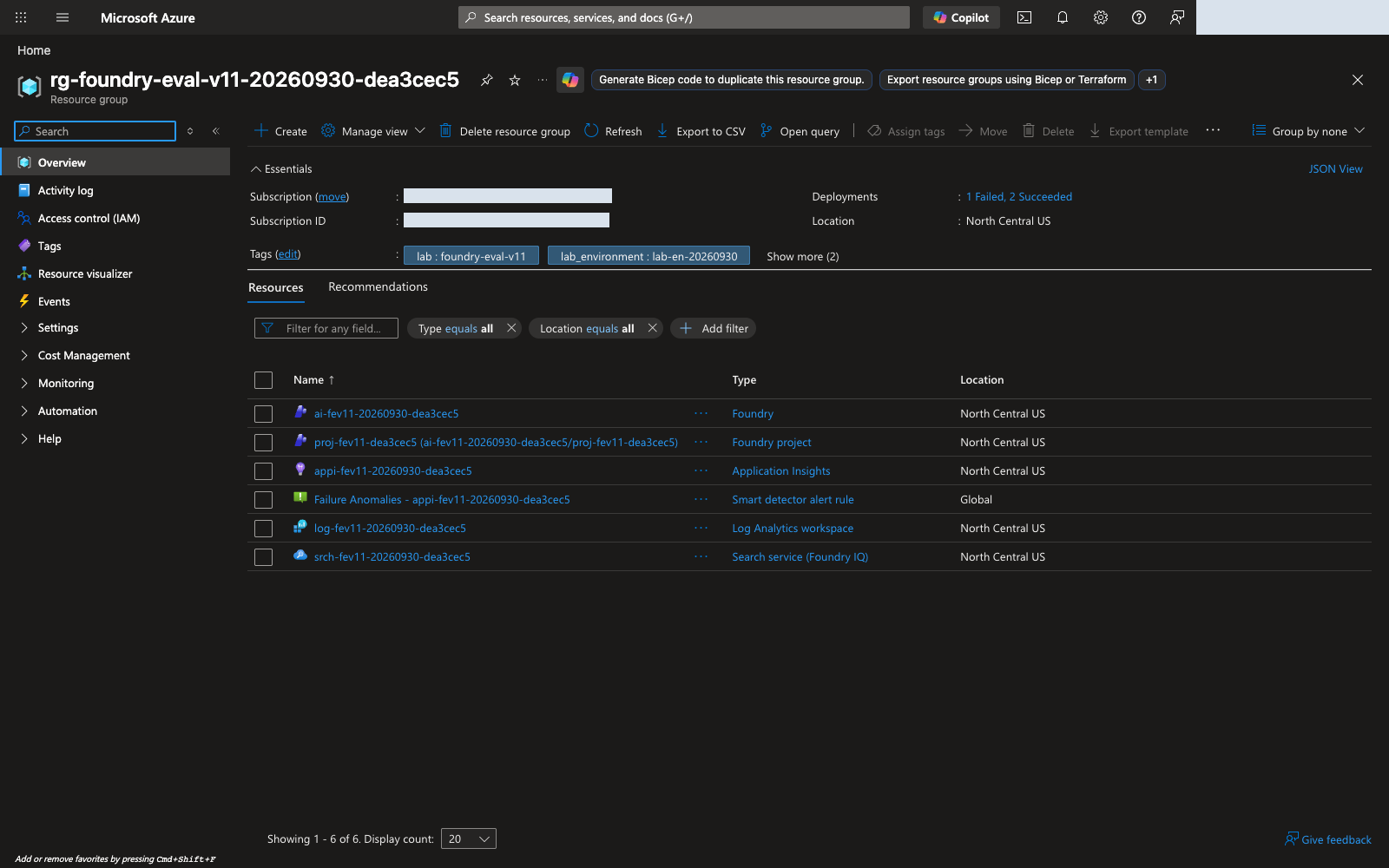
Distinguish additional monitoring resources. Application Insights can automatically add a default Failure Anomalies alert and Smart Detection action group. Bootstrap checks read-only that the alert targets only the owned Application Insights component and that the linked action group uses only the default role receivers. It does not adopt resources by name or modify/delete a shared action group in another resource group. If those links are not yet observable during provisioning, inspect the same bootstrap status again; do not edit the manifest or delete the alert to bypass the check.
Set TPM before starting model calls
The step-02 recommendations require 100,000 TPM per Agent, Judge, and shared Optimizer/planner deployment, and 10,000 TPM for embeddings. This assumes sequential jobs in one environment; quota pools remain model/SKU/region-specific. Sum per-model allocations across simultaneous dedicated environments. Count the Optimizer/planner deployment shared within one environment only once.
- New dedicated environment: Check generative capacity 100 and embedding capacity 10 in the updated
bootstrap plan, then authorize and provision that exact plan. Existing plans do not change automatically. For an unprovisioned lower-capacity plan, prepare a new environment name and authorization rather than editing the hashed plan. - Inspect actual deployments: Read Tokens per Minute Rate Limit under Microsoft Foundry Build → Models → Deployments → deployment name → Details. Distinguish capacity displayed in thousands of tokens from the final TPM value. Changing only the portal's Edit setting for this bootstrap environment causes plan drift. If insufficient, inspect the plan, actual limit, and authorization; prepare a newly authorized dedicated environment with sufficient capacity when needed. Never edit hashes or approvals to bypass checks.
- Verify the setting: With that environment's
.envand language-specific artifacts path, run the read-only check below. Inspect each*_tpmentry'sobserved,expected, andreason.
Run in your terminal · Shared terminal
python -m lab --config .lab/lab-en/.env preflight
Continue to step-03 smoke/retrieval and later evaluation/Optimizer only after overall status: PASS and all five TPM checks pass. The checker reads the actual deployment's rateLimits entry with key: token. If the CLI omits labels, it reads raw ARM metadata for that same deployment instead of guessing TPM from request counts or sku.capacity. Unverifiable limits are BLOCKED.
TPM accounting uses estimates rather than average billed tokens; RPM and short-window burst limits also apply. Allow more headroom for longer inputs/maximum outputs, shared users, and overlapping evaluation/optimization. These recommended minimums do not guarantee a 429-free run. See official rate-limit guidance.
Use the real response check in 03 to verify Agent and knowledge_base_retrieve calls. Optimizer has a separate supported-model list; Agent/Judge availability does not establish generator support.
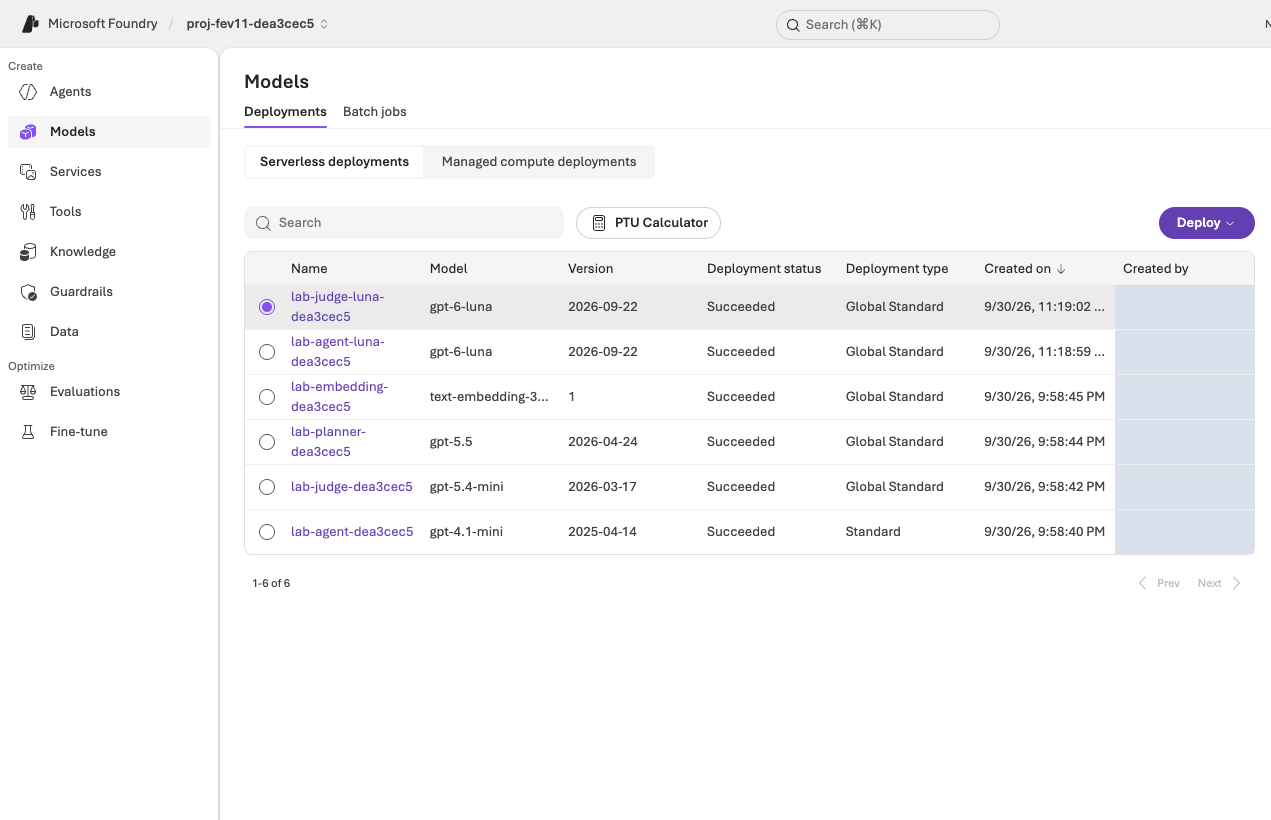
.env; verify actual calls to the prepared deployments as well. View full-size imagePrepare an executable Agent
01's Codespaces path prepares Python 3.12 within the supported 3.11–3.14 range, Git, Azure CLI, and the virtual environment. Only the local-computer path needs OS-specific installation and new-terminal version checks. Sign in, then run quick provisioning; language and record location are set automatically too. Do not treat fake IDs in .env.example as a live environment.
Use prompts/en/baseline.txt for English and prompts/baseline.txt for Korean. Never weaken the baseline to manufacture improvement. After policy upload and retrieval verification succeed, create a policy-connected v1:
Run in your terminal · Shared terminal
python -m lab --config .lab/lab-en/.env native-agent --version 1 --confirm
native-agent uses ensure_fixed_release to allow only 1 and 2, comparing local workspace ownership with remote metadata. It reuses matching configurations, rejects a different v2, and never creates v3. It also retains a model-deployment snapshot and rejects drift. Receipts agents/native-v1.json, agents/native-v2.json, and agents/native-model.json belong to that environment's artifacts folder.
native_response_format() projects the common schema into the supported strict-generation subset. Citation uniqueness and needs_human/route consistency still require post-generation checks. Valid JSON does not establish policy correctness.
Creating v2 is not completing evaluation. Create one v2 from the complete instructions reviewed in 08, run the same managed evaluation in 09, then decide whether to accept it. Use only released v1/v2; separate draft-… experiments are outside this lab. Do not publish the created v2 to production.
Run in your terminal · Shared terminal
python -m lab --config .lab/lab-en/.env native-agent --version 2 --prompt .lab/lab-en/candidate.txt --confirm
Do not use portal Promote in this lab; create v2 with 09's CLI. Promoting first can conflict with the CLI's local/remote ownership checks. V1/v2 are complete Agent versions; the same Agent, model, tools, and output settings must differ only in instructions.
Retrieve IDs with 06's complete lookup command, including the .env path and exact evaluation name. The reevaluation helper copies the baseline data source and checks the remote contract. Do not replace the remote definition with a stale local JUDGE_DEPLOYMENT.
Freeze the comparison conditions
| Item | Fixed requirement |
|---|---|
| Data | Same selected-language dev12 bytes, registration/version, questions and references |
| Relevance | Managed builtin.relevance, scale 1–5, threshold 4 |
| TaskAdherence | Managed builtin.task_adherence, binary 0/1, pass 1 |
| Judge | Same explicit Luna deployment in both evaluator definitions |
| Agent | Same Sol model/version, tools, reasoning and strict output schema |
| Change | Instructions only; releases remain v1/v2 |
| Optimizer | Instruction target only, model/tool-description changes off, bounded candidate count |
| Lab records | Keep same-condition v1/candidate results for all twelve cases in private run folders, separate from reusable guides |
Catalog evaluator versions are not proof that the private service rubric is fully pinned. Preserve the actual definition, settings and this limitation. A passing gate on reused dev12 does not guarantee future scores, independent generalization or production approval.
The required comparison uses Compare runs in Microsoft Foundry in 09. scripts/compare_foundry_eval.py is an optional standalone tool, not another command required in this path. When using it separately, its --language ko/--language en option selects report language and default dev12; match any explicit dataset to that language.
Check evaluation response mappings
Select the two evaluators and Judge in 05 and preserve automatic mappings. The following table supports missing-field or mismatch checks; a normal wizard flow does not require guessing SDK fields and entering them manually.
| Setting | Required value |
|---|---|
| Agent user input | Only {{item.query}}; leave the instruction override unset |
| Relevance response | response={{sample.output_text}} |
| TaskAdherence response | response={{sample.output_items}} |
| Judge/thresholds | Actual JUDGE_DEPLOYMENT; Relevance 4, TaskAdherence binary pass 1 |
If a required field is Unassigned, confirm the target is Agent, not Dataset, and inspect the query column and actual generated response mapping. Before submission, inspect the wizard; afterward, inspect the saved remote definition. Never map the reference answer as the response or copy old UI bindings. Use the official portal guide and response-mapping explanation. Do not submit until resolved. The helper in 09 checks the remote contract too.
Complete the actual authorization file
Quick bootstrap setup creates the same approval file through guided inputs. If already created, this table is for inspection; do not recreate or edit the file unnecessarily. Fill it manually only for the individual-command path or different actually authorized limits.
Open .lab/lab-en/approval.example.json and Save As approval.json in the same folder. Set limits yourself only if you can authorize spending and changes; otherwise follow the organizational approval procedure. Keep actual authorization evidence private. Neither this worksheet nor the JSON file independently proves approval or a signature. Use double quotes for JSON strings, but not for numbers, true, false, or null.
| Field | How to complete it |
|---|---|
schema_version, scope_sha256, models, retention_days |
Preserve generated values. Editing the model array or plan invalidates existing authorization. |
approved |
Set true only after actual approval. |
approved_by |
Your sign-in name matching expected_user in config.json. This binds the execution identity, not an organizational approver's digital signature. |
approved_at, expires_at |
Actual authorization start/end in timezone-aware ISO 8601, such as 2026-10-03T09:00:00+09:00. Do not reuse the example date. The current time must fall within the interval. |
currency, budget_amount, budget_policy |
Approved three-letter currency and positive numeric budget. Keep policy BOUNDED and enter the actually authorized amount. |
acknowledge_no_monetary_cap |
Keep false. Unlimited spending is not the default lab policy. |
max_hosting_hours |
Approved positive integer hours. If 8, the approval interval must also be no longer than 8 hours. |
max_wait_seconds |
Positive integer wait limit, for example 3600. Ending the wait does not cancel a remote job. |
max_calls, max_candidates |
Approved call/candidate limits; 08 requests 2 candidates. Account for internal Agent, Judge, and search calls. These fields do not automatically cap every portal call or charge. |
allow_global_inference |
true only when Global Standard processing is authorized; it is not NCUS-only processing. |
allow_resource_creation, allow_rbac_assignments |
Each is true only when this plan's resources and resource-scoped role assignments are authorized. |
acknowledge_continuous_hosting, acknowledge_unknown_cost |
Each is true only after acknowledging continuing hosting charges and an unconfirmed final cost. |
allow_training, allow_global_training |
false for this path. |
max_epochs, max_training_jobs |
0 for this path. |
accept_deprecated_models |
Default false; do not change it without reviewing a service deprecation notice. |
Validate with 02's bootstrap preflight --config ... --approval ... and read approval_reason on failure. Authorization covers only the exact plan hash, models, and retention scope. It does not authorize another lab, an automatic retry, or deletion.
Enforcement boundary: Bootstrap checks authorization validity, provisioning scope, and its wait bound. JSON budget and call limits do not automatically cap all Microsoft Azure or Optimizer spending. Budget alerts are not cutoffs. Monitor actual usage yourself and cancel jobs or clean up within the authorized scope.
Verify permissions and provider registration
Follow the current Microsoft Foundry RBAC guidance. Foundry User/Owner/Account Owner/Project Manager may still appear under their former Azure AI User/Owner/Account Owner/Project Manager names.
Use Access control (IAM) → Check access to inspect active assignments and Scope. Older UI versions may use View my access. The actual subscription/access illustration in 01 demonstrates inspection of existing access, not adding roles.
| Task or connection | Required permissions and scope |
|---|---|
| Your environment creation | Bootstrap checks effective subscription-scoped group/deployment/resource writes and Microsoft.Authorization/roleAssignments/write. Contributor alone cannot assign roles. Subscription quota-read access is also required. |
| Your Agent/evaluation operations | Foundry User or the required data-plane permissions on your project. The built-in Contributor or Owner role alone does not grant these data actions. |
| Your policy preparation | Search schema/upload permissions, such as Search Service Contributor and Search Index Data Contributor, on your Search service. |
| Project managed identity | Search Index Data Reader on this Search service, model invocation, and telemetry submission to the assigned monitoring resource. |
| Search managed identity | Model invocation on the assigned Microsoft Foundry resource. |
| Your log inspection | Read access to your Application Insights/Log Analytics resources, not subscription-wide log access by default. |
Authorized bootstrap assigns runtime roles at the new resources' scopes. It does not add subscription-wide roles. After creation, distinguish your user identity from service managed identities and use 03's actual tool call to verify propagation and data-plane access.
A provider registration enables a service type in your subscription. Follow the official provider-registration instructions:
- Open the Azure portal → Subscriptions → your subscription → Resource providers.
- Search for
Microsoft.CognitiveServices,Microsoft.Search,Microsoft.OperationalInsights, andMicrosoft.Insights; confirm Registered for each. - Select a missing provider and Register only with your own
/register/actionpermission and authorization. Do not register unrelated providers in bulk. - After registration/propagation, rerun the same preflight. If access is missing, obtain an approved execution scope before resuming. Bootstrap never auto-registers providers or expands permissions.
Allow registration/role propagation, then rerun the same preflight. For continuing 403, compare identity, role scope, and network access. Do not grant new subscription-wide Owner, disable network or organizational policies, or transfer tokens as a shortcut.
Costs and operational boundaries
Evaluation invokes the Agent and Judge; optimization makes additional internal calls. Search and monitoring can continue to incur charges after the lab page closes. Distinguish measured tokens, cost estimates, and actual billing; unknown billing is not zero.
| Cost component | How it is billed | What to do |
|---|---|---|
| Azure AI Search (Basic, one replica) | Per hour while the service exists, even when idle: about US$0.10 per hour in North Central US when this guide was prepared. Check the current AI Search prices. | The largest continuing cost. Delete the group as soon as you finish, as in 10. |
| Model deployments (Agent, Judge, Optimizer/planner, embeddings) | Global Standard bills by tokens used; an idle deployment adds no token charge. | Evaluation, Optimizer, and retrieval calls consume tokens. Do not resubmit work to "try again". |
| Application Insights and Log Analytics | By data ingested and retained; the quick path keeps logs for 30 days. | Usually small for this lab; still removed with the group. |
| GitHub Codespaces | Separate GitHub billing: compute while running, storage while it exists. | Stop or delete it as described in 10. |
In the Azure portal → Cost Management → Cost analysis, select the subscription, resource group, and date range. Configure authorized budget alerts where needed, but do not treat them as enforced caps. Keep the actual budget, end time, and deletion/retention plan somewhere you can find them again; the optional worksheet has a place for them.
Optional worksheet for actual values and completion evidence
This worksheet is optional; nothing in the lab reads it. If your organization or your own habits call for a fuller record, copy this table into your own notes (for example .lab/lab-en/notes.md), mark unexecuted items not run, and fill in actual values as each step completes. “The environment is ready” is not sufficient evidence.
| Required item | Actual values or evidence |
|---|---|
| Identity | User, tenant ID, and subscription ID; never passwords or tokens |
| Local paths | Your environment name, bootstrap config, and runtime .env; language/record location are automatic. Record .env only after successful creation. |
| Microsoft Azure environment | Resource group, Microsoft Foundry resource/project, project endpoint, and Search service |
| Models | Actual names, product/version, SKU, and capacity for all four deployments |
| Policy search | Source/language, eight uploaded documents, knowledge-base/connection names, and retrieval_verified |
| Agent | Actual name, pinned v1, strict output, and a successful real Agent tool call |
| Dataset | JSONL path, 12 rows, SHA-256, registration name, and version |
| Evaluation | Relevance 4, TaskAdherence 1, Judge deployment, and query-only input; add actual evaluation/v1-run IDs after the first run |
| Authorization | Scope hash, expiry, budget, candidate limit, and retention |
| Finish | Exact authorized deletion group/objects and planned time, or retention reason, cost responsibility, review date, and subsequent deletion plan; distinguish shared/external dependencies |
Keep English and Korean source data and private lab records separate; do not relabel another language's results as a new execution.
Raw service files can contain account metadata, tokens or signed URLs. Keep those local; the synthetic evaluation results themselves are not secret. Publish only allowlisted fields, including failures, and exclude credentials—not inconvenient outcomes. Historical attempts stay in the private audit, not as additional current-version reports.
Verify deletion and retention
Use step 10 as the exit checklist. Provisioning approval is not deletion approval, and workshop documentation does not authorize deleting another person's resources.
| Target | Deletion or retention check |
|---|---|
| Active evaluation/Optimizer jobs | Cancellation availability, actual terminal state, and unresolved job IDs |
| Locally owned objects | Exact cleanup plan and verified absence afterward |
| Portal-created objects | Individually inspect datasets, evaluations, conversations, Optimizer records, and empty Agent entries |
| Dedicated resource group | Default path: verify inventory and authorization, delete, and record a successful az group exists result of false |
| Retained/shared/external resources | Remaining item, reason, cost responsibility, retention review date, and follow-up plan |
| Billing/soft delete | Delayed charges, prior usage, and separate service retention/purge policy |
| Evidence | Keep outcomes and failures privately for the required period; do not delete .lab first |