
Evaluate and improve a customer-support Agent · v1
CONTOSO ATLAS CLOUD · ONE LEARNING PATH
Score a support AI on 12 questions, improve its instructions, then compare its answers to the same questions. No Microsoft Azure or Microsoft Foundry experience is required. GitHub Codespaces is the recommended path: start with a prepared terminal in your browser.
First time: start with step 01 → Resume your lab →
Prepare01–03 · Environment and v1 Agent
Evaluate04–07 · Score v1 on 12 questions
Improve · Compare08–09 · v2 with new instructions only
Clean up10 · Save records, then delete
Before you start
- Subscription, permissions, spending: You need your own Microsoft Azure subscription, both provisioning and role-assignment permissions for resources, and spending authorization.
- Lab terminal: GitHub Codespaces (recommended) needs only a GitHub account and a browser. On your own computer, install Python 3.11–3.14, Git, and Azure CLI.
- Time: Allow roughly half a day, plus permission/quota approvals and service execution time. Service waits are usually short (provisioning in 02 about 10 minutes, a 12-case evaluation a few minutes, an Optimizer job often 10–20 minutes) but can be longer when the service is busy.
- Ground rule: Every participant completes every step with their own account, from setup to cleanup. Never copy another person's configuration, sign-in session, or ownership records, or repeat completed creation/submission. When returning, follow the resume instructions and verify completed work using your own
config.json, manifest, and receipts.
Closing your browser does not end charges; finish the cleanup in 10. Microsoft Azure model/Search/logging charges are separate from GitHub Codespaces compute/storage charges. If you stop after creating resources, still preserve records and clean up.
Terms and scope
- Microsoft Azure is Microsoft's cloud platform, and Microsoft Foundry is the platform for building and evaluating AI models and Agents on Microsoft Azure.
- An Agent combines a model with instructions and tools. Here, a fictional Contoso Atlas Cloud support Agent searches policy documents before answering.
- V1 is the original Agent; v2 is the candidate with revised instructions. These are complete Agent versions; models, tools, and output format stay fixed. Retaining v1 when no improvement is found is a valid lab outcome; creating v2 is not production approval.
- Learning means reading evaluation results and improving instructions, not retraining model weights. Use only the supplied synthetic policies and questions. Do not upload private customer records or put the test answers into the instructions.
Three places you work
| Where you work | What you do there |
|---|---|
| Azure portal | Verify identity, subscription, permissions, actual resources, and deletion scope. |
| Lab terminal · Codespaces or your computer | Run the supplied commands. Codespaces avoids installing Python, Git, and Azure CLI on your computer. |
| Microsoft Foundry | Inspect the project, Agent, and policy tool; run evaluations and Optimizer; read comparisons. |
How to follow this guide: Follow Action order → perform the work → check completion criteria in each step. On your first pass, follow the expanded instructions and required reference links, including access and authorization.
| Guide label | What to do |
|---|---|
| Run in your terminal | Use your selected lab terminal. If you use Codespaces, edit files in its Visual Studio Code (VS Code) editor too. |
| Portal actions | Use a separate browser tab and your own account/project values, not the names in the illustrations. |
| Optional · how it works | Open only if you want implementation details. Actual implementation · read only is reference material; do not copy and execute it. |
| Creation/submission | Inspect code-created objects in the portal; do not recreate them. Submit evaluation/Optimizer jobs once in the specified portal UI, not through invented SDK code. |
| Evaluation setup in 04–06 | Continue in the same evaluation wizard. Do not create a separate evaluation for each step. |
| Reading marks | These are personal bookmarks. Use each step's completion criteria to verify actual work. |
01. Check your account, computer, and access
What: Confirm the Microsoft Azure subscription, access, and local execution environment.
Why: Different browser and CLI identities can cause access failures or create resources in the wrong environment.
How · where: Check subscription/access in the Azure portal, then compare tools and the signed-in account in the terminal. No Microsoft Azure resources are created yet.
Action order: Check account/access → Open Codespaces · recommended → Terminal · sign in. If Codespaces is unavailable, use local installation.
New terms only · accounts, subscriptions, and projects
Six terms to recognize before opening the portal. You do not need to memorize them; distinguish their roles.
- Tenant / Directory
- The boundary that manages an organization's users and access. One account can access several organizations, so check the selected directory too.
- Subscription
- The unit that groups Microsoft Azure usage and billing. Confirm which subscription will pay for this lab.
- Resource group
- A group of Microsoft Azure resources managed together. A dedicated lab group makes the eventual deletion scope easier to identify.
- Project
- The development boundary inside Microsoft Foundry for your Agents, data, and evaluations. Stay in the same project throughout the lab.
- Model
- The AI that generates answers. Deploying makes a model available to call; the deployment name identifies that callable deployment.
- Role / Scope
- A role defines allowed actions; its scope defines where they apply. Signing in does not automatically grant creation, evaluation, and deletion access.
Confirm your Microsoft Azure account and subscription
- Sign in to the Azure portal with your own lab account. If you have no account/subscription, follow the Microsoft Azure account instructions. For an organizational subscription, first obtain access and spending authorization for your own lab scope. A free or trial subscription does not guarantee the required model quota.
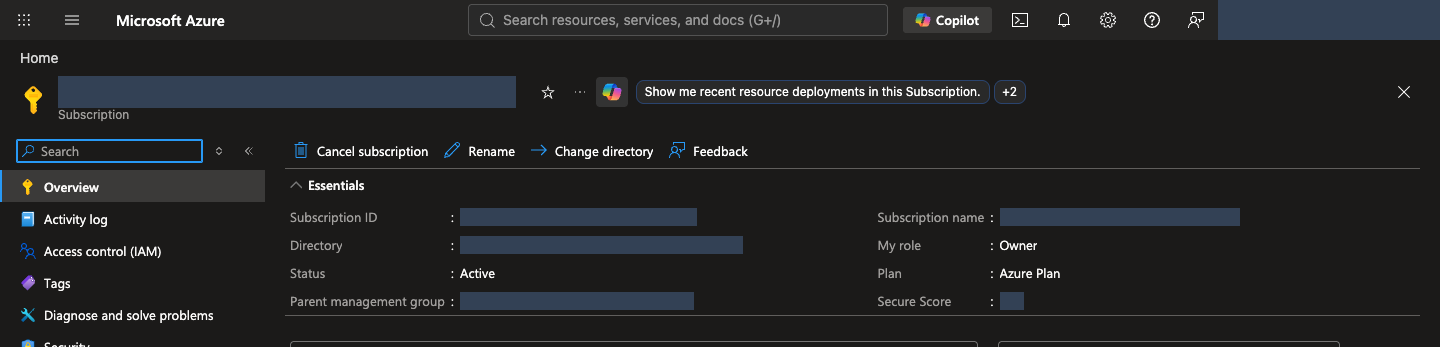
- Search for Subscriptions in the top search box and open the intended subscription. Confirm portal status Active and read its Subscription ID and Directory/Tenant ID. The CLI describes the same usable subscription as Enabled. If it is missing, check directory and subscription filters under your account.
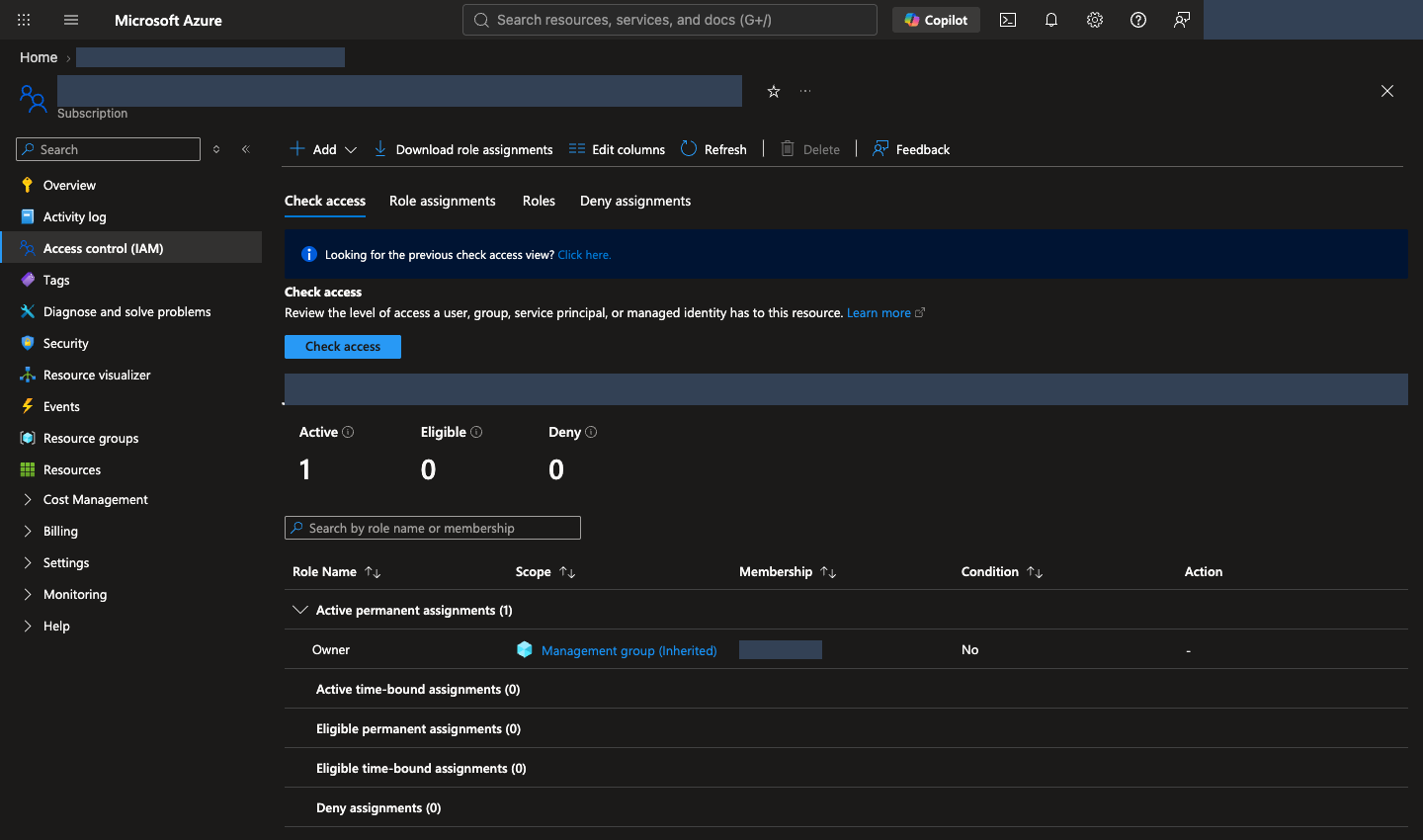
- Open the permissions menu Access control (IAM) → Check access and inspect your role and scope. Older UI versions may label this View my access. You create resources and resource-scoped role assignments in this lab, so both provisioning and role-assignment permissions are required. Contributor alone cannot assign roles. See permissions by task and provider registration.
- Set a budget, end time, and deletion or retention scope for your dedicated group. If access or authorization is missing, obtain an approved execution scope through your organization's procedures before continuing. Do not delegate the remaining exercises to another person, grant new subscription-wide Owner, or disable security controls as a shortcut.
Install tools and download the lab
Recommended: use GitHub Codespaces. A GitHub account and browser can prepare this repository's Python, Git, Azure CLI, and locked dependencies. Codespaces does not provide Microsoft Azure subscriptions, permissions, or model quota. If organizational policy does not permit Codespaces, use the local path below.
Command rules
- Run one command at a time, and stop at an error instead of running the next command. A long command can wrap across screen lines; do not insert a line break within it.
- Copy buttons copy the whole block. For multiple lines, paste into an editor first and run the commands individually.
- Replace
YOUR_...with your values, keeping the quotes. Shared terminalblocks work in every environment. ForCodespaces/macOS/LinuxorWindows PowerShellblocks, run only the one for your environment.
Open GitHub Codespaces in your browser · recommended
- With your own GitHub account, open this repository's Codespace creation page. You can also use Code → Codespaces → Create codespace on main in the repository.
- Check Codespaces access and your account's pricing/included usage, then select Create codespace. Free usage is not guaranteed.
- Wait for the browser VS Code environment and initial package setup to finish. The repository is cloned automatically;
.devcontainer/devcontainer.jsonprepares the tools and.venv. Stop if the creation log reports an error. - Open Terminal → New Terminal and check readiness below. Codespaces runs Linux, so use Codespaces/macOS/Linux commands even if your own computer runs Windows.
Run in your terminal · Codespaces/macOS/Linux
source .venv/bin/activate
python --version
git --version
az version
python -m lab --help
python scripts/build_datasets.py --language en --check
Confirm Python 3.12.x, Git/Azure CLI versions, the lab command list, and a successful dataset check. The command list is long, but this guide uses only bootstrap, preflight, smoke, iq, native-agent, native-evals, and cleanup; ignore the others. Continue to sign-in without reinstalling tools, cloning, or recreating the virtual environment. If initial setup fails, see Codespaces troubleshooting.
Keep the codespace active during waits. By default, a codespace stops after 30 minutes without interaction, and stopping it ends any running command. Stay with the terminal while 02 provisions and 09 waits for the reevaluation. If it stops, restart it, open Terminal → New Terminal, and follow the resume instructions; check status instead of repeating apply or a submission. A stopped codespace that stays unused is deleted after 30 days by default, so back up .lab/ as described in 10 before a long break. Your account or organization may use different codespace lifecycle rules.
Local computer only · Windows/macOS/Linux installation
Select the local installation path
Install Python 3.11–3.14, Git, and the Azure CLI. Python runs the supplied programs, Git downloads the lab, and Azure CLI provides the az sign-in/query commands. Obtain an approved installation path if your work computer restricts installation.
If the tools are already installed, start with installation checks and do not reinstall working tools. The Windows/macOS examples below explicitly select 3.13 so an unsupported newer Python is not selected. If you already use another supported version, replace py -3.13 or python3.13 with its version-specific command, using the same Python for verification and virtual-environment creation. Python 3.10 or earlier and 3.15 or later are outside this lab's supported range.
First open your computer's terminal. Search for PowerShell in Windows Start, Terminal in macOS Spotlight, or the terminal in your Linux app menu. This guide does not run in the Azure portal's Cloud Shell or the Python prompt showing >>>. Follow the command rules above.
Follow only your own operating system's Windows installation, macOS installation, or Linux installation, then continue to installation checks.
Windows · install in PowerShell
Run winget --version in PowerShell. If it prints a version, use the Windows package manager WinGet to run the following commands one at a time. Personally review installation agreements and elevation prompts within your organization's authorization.
Run in your terminal · Windows PowerShell
winget install --exact --id Python.Python.3.13 --source winget
winget install --exact --id Git.Git --source winget
winget install --exact --id Microsoft.AzureCLI --source winget
If WinGet is missing or unavailable, use the official installers instead. You do not need to use both methods.
| Tool | Download and installer choices |
|---|---|
| Python | From Windows downloads, choose the latest Python 3.13 patch release and an installer matching your computer. Use the regular installer, not the embeddable package; select Add python.exe to PATH and include pip and the Python Launcher. |
| Git | Download the appropriate installer from Git for Windows. Keep Git from the command line and also from 3rd-party software on the PATH selection screen so Git works in PowerShell. |
| Azure CLI | Follow Microsoft Installer (MSI) in the official Windows instructions. Choose the 64-bit MSI for a typical x64 computer. |
Continue to checking all three tools in a new terminal. If py is not recognized, check the Python installer's Launcher option.
macOS · install with Homebrew
Run brew --version in Terminal. If the command is missing, follow the official Homebrew installation instructions, complete the PATH configuration printed under Next steps, then check again in a new terminal. Do not bypass your organization's software or Command Line Tools approval process.
Run in your terminal · Codespaces/macOS/Linux
brew update
brew install python@3.13 git azure-cli
This uses Homebrew's versioned Python package and Microsoft's macOS Azure CLI instructions. Use python3.13 for this path. An existing python3 can still point to macOS's system Python or another version; do not overwrite or forcibly relink the system interpreter.
Linux · Ubuntu 24.04 LTS example
The following targets Ubuntu 24.04 LTS, which provides Python 3.12 by default. For another distribution, follow its Python instructions, Git installation guidance, and official Azure CLI installation instructions. If Python is outside the supported range, request a supported execution environment rather than replacing the system interpreter.
Run in your terminal · Codespaces/macOS/Linux
sudo apt update
sudo apt install python3 python3-venv python3-pip git curl
curl -fsSL 'https://azurecliprod.blob.core.windows.net/$root/deb_install.sh' -o install-azure-cli.sh
The last command only downloads Microsoft's Ubuntu/Debian installation script. Open install-azure-cli.sh in a text editor and inspect it before running the following command with the required system-installation permissions and authorization. Without sudo access, obtain an approved installation path before continuing.
Run in your terminal · Codespaces/macOS/Linux
sudo bash install-azure-cli.sh
Verify installation in a new terminal
After installation, close all existing terminal windows and open a new one. PATH is the list of locations used to find commands; an existing window might not receive the newly installed paths. If you use VS Code's terminal, exit and reopen VS Code too.
Windows PowerShell:
Run in your terminal · Windows PowerShell
py -3.13 --version
git --version
az version
macOS · the Homebrew path above:
Run in your terminal · Codespaces/macOS/Linux
python3.13 --version
git --version
az version
Linux · the Ubuntu path above:
Run in your terminal · Codespaces/macOS/Linux
python3 --version
git --version
az version
| Check | Expected output and requirement |
|---|---|
| Lab Python | A version such as Python 3.13.x; x is the actual patch number. The minor version must be 3.11, 3.12, 3.13, or 3.14. |
| Git | An installed version such as git version 2.x.... |
| Azure CLI | JSON containing a version such as "azure-cli": "2.x...". This check does not require Microsoft Azure sign-in. |
Python information in az version describes Azure CLI's own runtime, not verification of the lab's Python installation. All three commands must succeed before downloading the lab or creating its virtual environment. For command not found, not recognized, or Microsoft Store opening instead of Python, see installation and PATH troubleshooting.
Download the lab files
Run in your terminal · Shared terminal
git clone --depth 1 https://github.com/junwoojeong100/foundry-evaluation-labs-v1.git
cd foundry-evaluation-labs-v1
--depth 1 downloads only the latest files, not the repository history, which keeps the download small because the repository also stores demonstration videos. If you already downloaded the repository, enter its folder rather than cloning it again. With GitHub Code → Download ZIP, extract the archive first and open the folder containing pyproject.toml and requirements.lock. Downloading only an HTML file omits the code, data, and images.
Create a virtual environment with the verified Python
Run subsequent commands from the lab folder containing pyproject.toml and requirements.lock. .venv is an isolated Python package environment for this lab. Create it with the same Python you verified above, running only the one path matching your operating system.
macOS · the Homebrew path above:
Run in your terminal · Codespaces/macOS/Linux
python3.13 -m venv .venv
source .venv/bin/activate
Linux · the Ubuntu path above:
Run in your terminal · Codespaces/macOS/Linux
python3 -m venv .venv
source .venv/bin/activate
In Windows PowerShell, run:
Run in your terminal · Windows PowerShell
py -3.13 -m venv .venv
.\.venv\Scripts\Activate.ps1
If PowerShell policy blocks activation, do not change organizational policy. Replace python in subsequent commands with .\.venv\Scripts\python.exe. If .venv already exists, confirm that it belongs to this lab rather than overwriting another task's environment.
After preparing the virtual environment, run these shared commands. Confirm Python 3.11–3.14 and a pip path inside .venv from the first two commands before installing packages.
Run in your terminal · Shared terminal
python --version
python -m pip --version
python -m pip install -r requirements.lock
python -m lab --help
python scripts/build_datasets.py --language en --check
Confirm that the command list appears and the dataset check succeeds. For ModuleNotFoundError, use python -m pip --version to check that Python and pip belong to .venv. Do not install packages into an unrelated system interpreter.
Verify the CLI sign-in identity
Run these commands in Codespaces or your selected local terminal. --use-device-code displays a Microsoft sign-in URL and a one-time code to enter yourself in your browser. Do not share the code or tokens. Sign in with the same Microsoft Azure account as the portal, then replace YOUR_SUBSCRIPTION_ID with your subscription ID.
Run in your terminal · Shared terminal
az login --use-device-code
az account list --query "[].{name:name,id:id,state:state}" -o table
az account set --subscription "YOUR_SUBSCRIPTION_ID"
az account show --query "{user:user.name,tenant:tenantId,subscription:id,state:state}" -o json
Confirm state is Enabled and compare user, tenant, and subscription with the portal. Browser and CLI sign-ins are separate. For another authorized directory, use az login --use-device-code --tenant "YOUR_TENANT_ID". If your organization blocks device-code sign-in, follow sign-in troubleshooting, not a policy bypass.
Language and record location are applied automatically
There is no separate settings command to run. Step 02's --environment lab-en automatically saves English and that environment's record location. The Korean guide uses lab-ko. Subsequent commands read the same settings through their --config argument, including in a new terminal; no environment-variable setup is needed.
Resume the existing environment for the same lab. For a separate English lab, use a name starting with lab-en-, such as lab-en-02, and update subsequent paths consistently. Records are saved automatically; do not delete them before cleanup.
Resuming only · restore your terminal settings
Resume the same lab in a new terminal
First enter your existing lab folder. Your .venv already exists; do not repeat cloning, virtual-environment creation, or package installation. Choose only your operating system below. If you changed the environment name, use the paths from your original records.
Codespaces/macOS/Linux:
Run in your terminal · Codespaces/macOS/Linux
source .venv/bin/activate
Windows PowerShell:
Run in your terminal · Windows PowerShell
.\.venv\Scripts\Activate.ps1
If PowerShell activation is blocked, leave organizational policy unchanged and replace subsequent python commands with .\.venv\Scripts\python.exe.
Run in your terminal · Shared terminal
python --version
python -m lab --help
az account show --query "{user:user.name,tenant:tenantId,subscription:id,state:state}" -o json
Confirm Python 3.11–3.14, the command list, and your original user, tenant, subscription, and Enabled state. If sign-in expired or differs, sign in with the same account and check again.
Do not repeat language or record-folder setup. Keep the original --config path in subsequent commands to apply the saved settings automatically.
Find where you stopped with read-only lookups; no notes file is needed. Check provisioning with 02's read-only status, submitted evaluation IDs/states with 06's lookup, and candidate result collection with 09's same-receipt resume. The portal's Evaluations and Optimization runs lists show the same jobs. Do not resubmit completed work; inspect running work by its existing ID. Step 01 does not create Microsoft Azure resources or call the SDK.
Optional · how it works: sign-in and local settings
Code ↔ portal · verify sign-in and local settings
Where to act: Run the terminal sign-in commands. The automatic language/record settings are an explanation, not an additional command.
| Executed command/setting | What to check now | Portal actions and verification |
|---|---|---|
az login, az account set, az account show |
Check the signed-in account, tenant, subscription, and state: Enabled. |
Compare Directory under your Azure portal account and the IDs/state under Subscriptions → intended subscription → Overview yourself. |
--environment lab-en → subsequent --config |
Step 02 saves language/record settings; later commands read them. No shell-variable setup is needed. | This is separate from portal display language. Use the English corpus and that environment's records. |
Completion criteria: Python 3.11–3.14, Git, and Azure CLI versions are verified; the user, tenant, and subscription match; the virtual environment's Python commands and English dataset check succeed. For blockers, see environment troubleshooting.
Next: 02. Create the Microsoft Foundry environment →
02. Create the Microsoft Foundry environment
What: Prepare a Microsoft Foundry project, models, Search, and monitoring in a dedicated resource group.
Why: The group bounds cost and cleanup; the project organizes Agents and evaluations. An empty project alone does not provide policy retrieval.
How · where: One command in your lab terminal guides planning, readiness, authorization records, and provisioning. Then verify actual portal deployments and runtime checks.
Action order: Terminal · quick setup → Where records live → Portal/runtime checks.
Prepare the environment with one provisioning command
After signing in during 01, run this command. It reads your selected CLI subscription, tenant, and user, then sets language, record location, resource names, and configuration files automatically. No separate environment variables, language flag, or hand-edited approval JSON is required.
Run in your terminal · Shared terminal
python -m lab bootstrap setup --environment lab-en
lab-en selects English; lab-ko selects Korean. Separate names such as lab-en-02 and lab-ko-02 follow the same rule. English command results are saved under .lab/lab-en/artifacts/.
The program guides you through these stages:
- Plan: It uses
northcentralusand this lab's four pinned model deployments, without automatically substituting models or regions. Search and logging are included because later steps need them.- The four roles: Agent (answers), Judge (scoring), Optimizer/search planner (instruction improvement and retrieval planning), and embeddings (numerical representations for search)
- You prepare an environment that calls existing models; you do not build a model from scratch.
- Permission/model/quota checks: It confirms readiness before creating anything.
- Actual authorization inputs: After readiness passes, enter the five values below.
- Provision: It creates resources only if you approve at the final confirmation.
Before you enter values: Use your actual authorization from 01. If it is not established, stop with Ctrl+C and obtain authorization first.
| Prompt | What to enter |
|---|---|
| Approved currency | A three-letter currency code such as USD or KRW |
| Approved budget amount | A positive amount in that currency, not an arbitrarily accepted default |
| Maximum hosting duration | Approved positive integer hours covering provisioning and your lab end time |
| Model-call allowance | An approved positive integer. Even 12 cases can make multiple Agent, Judge, retrieval, and Optimizer calls. |
| Actual authorization reference | A private note identifying your own authorized decision or organizational approval. Never enter passwords/tokens. |
How to size the numbers: Choose hours that cover provisioning (usually about 10 minutes), your work, and the cleanup in 10, and keep the resources only that long. The largest continuing cost is Azure AI Search (Basic), billed per hour while the service exists, even when idle: about US$0.10 per hour in North Central US when this guide was prepared, roughly US$2.4 per day. Model charges depend on tokens and current model prices. Estimate your own budget with the Microsoft Azure pricing calculator, the current AI Search prices, and Microsoft Foundry model prices, then add room for retries you did not plan. The prompts record your numbers; they are not spending caps.
{: .note}
Final review before creation: Read the displayed account, subscription, region, resources, models, and limits. This quick path records at most two candidates, a one-hour job wait, and 30-day log retention. Use the individual configuration path below if different limits are required. Type CREATE lab-en only if you actually authorize Global Standard worldwide processing, resource creation, resource-scoped roles, continuing charges, and an unconfirmed final cost.
No Microsoft Azure resources are created before confirmation, and Enter cancels. After confirmation, provisioning and charges can begin. Budget, call counts, and hosting hours are not automatic spending cutoffs, nor authorization for deletion, training, or automatic retries.
Successful result
- The output reports
status: APPLIEDand creates.lab/lab-en/.env. - The same folder preserves
config.json,approval.json, andmanifest.json. Do not edit these to bypass checks. .envholds the project connection address (Project endpoint) and model deployment names, unlike.venv, the Python package folder. Subsequent commands read it with--config; do not execute orsourceit. If provisioning failed, do not substitute a copy of.env.example.- For errors, follow provisioning troubleshooting.
If you run the same command again
- It continues preparation only for a plan with no creation attempt. If an attempt is recorded, it inspects status without submitting another deployment. Running/failed states are not success; use status lookup when resuming.
- If a valid approval file already exists, review its recorded limits instead of entering them again. Existing plans/approvals are not reset to new defaults and their expiry is never extended automatically.
Only if you use an older-version environment or set environment variables manually
The program reads language and record location from the selected configuration file. Selected configuration takes precedence over stale shell variables. Existing lab-en/lab-ko environments from older versions work without editing their files or recreating them. Records from another language are never relabeled or overwritten.
Where the lab keeps its records
You do not need to create a record file. As it runs, the program saves what later steps need in .lab/lab-en/: config.json, manifest.json, approval.json, .env, and the receipts under artifacts/. Values you may need again, such as the project endpoint or Agent version, can be read back from those files or looked up with read-only commands.
A notes.md of your own is optional. If you keep one, write short notes only where a step asks for a conclusion: the learning note in 07, the v1/v2 comparison in 09, and the closing note in 10. Resuming never depends on it; use the read-only checks in 01. Never write passwords or tokens in a note. For a longer optional checklist, see the worksheet; nothing in the lab reads it.
Short execution-record paths such as agents/native-v1.json and knowledge/config-snapshot.json are relative to .lab/lab-en/artifacts/. In contrast, data/, prompts/, and scripts/ are under the downloaded lab folder.
After provisioning, continue to portal/runtime checks. Do not also run the individual commands below.
Optional · inspect planning, TPM, and authorization with individual commands
Use either this path or quick setup, not both. These are the same bootstrap's individual steps, not instructions to recreate an existing environment. Use them to inspect plans/approvals or configure different authorized limits.
- Microsoft Azure subscriptionUsage and billing
- Resource groupThis lab's resources
- Microsoft Foundry resourceAI service and deployments
- ProjectAgents, data, evaluations
An endpoint is the address a program uses to connect to a service. Use the project's Project endpoint for this lab, not the adjacent Azure OpenAI endpoint.
Create a local provisioning plan
Replace the placeholders with the values from az account show (run it again if you need them). An ID identifies a resource; it is not its display name. Do not enter a subscription name in an ID field.
| Placeholder | Your value |
|---|---|
YOUR_SUBSCRIPTION_ID |
subscription from az account show |
YOUR_TENANT_ID |
tenant from the same output |
YOUR_SIGN_IN_NAME |
user from the same output |
This command writes only a plan and unapproved authorization example under .lab/lab-en/ on your computer; it does not call Microsoft Azure.
Run in your terminal · Shared terminal
python -m lab bootstrap plan --subscription "YOUR_SUBSCRIPTION_ID" --tenant "YOUR_TENANT_ID" --expected-user "YOUR_SIGN_IN_NAME" --environment lab-en --location northcentralus
Confirm plan_status: CREATED_LOCAL_ONLY, mutations_performed: false, and config_path. BLOCKED_AWAITING_APPROVAL means that spending is not yet authorized, not that Microsoft Azure provisioning failed or completed.
| Generated file | What to check |
|---|---|
.lab/lab-en/config.json |
Identity, generated resource names, and exact model/version/capacity selections. Do not edit this hashed plan. |
.lab/lab-en/approval.example.json |
The initially unapproved cost and change scope. |
.lab/lab-en/manifest.json |
Provisioning, ownership, and interruption records. Preserve this file. |
.lab/lab-en/.env |
Not present yet. Successful provisioning creates this runtime configuration. |
Use your text editor's Open file action to inspect these files. .lab stores lab records and may appear as a hidden folder. JSON stores settings as name/value pairs. Do not convert these files to Word documents or change their extensions.
Implementation reference: plan() selects names/models, calculates hashes, and writes local files only. It contains no Microsoft Azure creation request. Seeing no new resources in the portal after plan is expected.
Actual implementation · read only · lab/bootstrap.py:plan
Read-only source, not another command to run. The complete named function or object is shown as written, including its original messages; dependencies and imports are in the linked file. Run the lab command only once.
Full source file · 661–737 · View on GitHub
def plan(
    *, subscription_id: str, tenant_id: str, expected_user: str,
    environment: str | None = None, root: Path | str = Path(".lab"),
    location: str = REGION, retention_days: int = 30, models: list[dict] | None = None,
    resource_group: str | None = None, agent_sku: str | None = None,
) -> dict:
    """Create a private local plan only; never query Azure or overwrite .env/artifacts."""
    from lab.config import LabError, environment_language
    from lab.content import selected_language

    instance = uuid4()
    suffix = instance.hex[:8]
    date = _now().strftime("%Y%m%d")
    environment = environment or f"lab-{date}-{suffix}"
    try:
        language = environment_language(environment) or selected_language()
    except LabError as exc:
        raise BootstrapError(str(exc)) from exc
    root = Path(root)
    if root.is_symlink() or any(parent.is_symlink() for parent in root.parents):
        raise BootstrapError("Environment root must not traverse symlinks.")
    directory = root.resolve() / environment
    selected = deepcopy(list(DEFAULT_MODELS) if models is None else models)
    if agent_sku is not None and agent_sku not in {"Standard", "GlobalStandard"}:
        raise BootstrapError("Explicit agent SKU must be Standard or GlobalStandard.")
    for model in selected:
        if not isinstance(model, dict) or not isinstance(model.get("roles"), list) or not model["roles"]:
            raise BootstrapError("Each model requires a nonempty roles array.")
        model.setdefault("sku", "GlobalStandard")
        if agent_sku is not None and "agent" in model["roles"]:
            model["sku"] = agent_sku
        model.setdefault("deployment", f"lab-{model.get('roles', ['model'])[0]}-{suffix}")
    config = {
        "schema_version": SCHEMA_VERSION, "instance_id": str(instance), "created_at": _stamp(),
        "environment": environment, "environment_dir": str(directory), "language": language,
        "subscription_id": subscription_id, "tenant_id": tenant_id, "expected_user": expected_user,
        "location": location, "retention_days": retention_days, "models": selected,
        "deployment_name": f"lab-bootstrap-{suffix}",
        "template_sha256": _file_digest(TEMPLATE),
        "names": {
            "resource_group": resource_group or f"rg-foundry-eval-v11-{date}-{suffix}",
            "account": f"ai-fev11-{date}-{suffix}", "project": f"proj-fev11-{suffix}",
            "search": f"srch-fev11-{date}-{suffix}", "workspace": f"log-fev11-{date}-{suffix}",
            "insights": f"appi-fev11-{date}-{suffix}",
        },
    }
    config["scope_sha256"] = _scope(config)
    _validate(config)
    try:
        root.mkdir(parents=True, exist_ok=True, mode=0o700)
        directory.mkdir(mode=0o700)
    except FileExistsError as exc:
        raise BootstrapError("Environment already exists; use its config to inspect/resume, never overwrite it.") from exc
    _write(directory / ".gitignore", "*\n", text=True)
    (directory / "artifacts").mkdir(mode=0o700)
    (directory / "evidence").mkdir(mode=0o700)
    manifest = {
        "schema_version": SCHEMA_VERSION, "scope_sha256": config["scope_sha256"],
        "phase": "planned", "created_at": _stamp(), "resources": _resources(config),
        "attempts": [], "operator_principal_id": None, "env_sha256": None,
    }
    _write(directory / "config.json", config)
    _write_bytes(directory / "template.json", TEMPLATE.read_bytes())
    _write(directory / "approval.example.json", approval_template(config))
    _write(directory / "group-authorization.example.json", group_authorization_template(config))
    _write(directory / "manifest.json", manifest)
    _write(directory / "cost-ledger.json", cost_ledger(manifest))
    return {
        "status": AWAITING_APPROVAL, "plan_status": "CREATED_LOCAL_ONLY",
        "approval_status": "MISSING", "live_status": "NOT_RUN", "mutations_performed": False,
        "scope_sha256": config["scope_sha256"],
        "config_path": str(directory / "config.json"),
        "approval_example_path": str(directory / "approval.example.json"),
        "env_path": str(directory / ".env"), "artifacts_dir": str(directory / "artifacts"),
        "models": selected,
        "warning": "No Azure calls made. Candidate versions/SKUs/quota require fresh preflight and explicit approval.",
    }
The model roles are answer generation (Agent), scoring (Judge), instruction suggestions/search planning (Optimizer/planner), and numerical representations for search (embedding). You do not develop a new model in this lab.
This repository's setup region is North Central US (northcentralus). Defaults are Agent gpt-6-sol, Judge gpt-6-luna, Optimizer/search planner gpt-5.5, and embedding text-embedding-3-large. Check the exact versions, SKUs (deployment types), and capacity units in the model table and plan. Do not silently substitute a different region or model.
Allocate the recommended minimum TPM
TPM (Tokens Per Minute) is a per-deployment token rate limit, not the model's context window or guaranteed processing speed. These starting requirements cover one environment running one 12-case evaluation or Optimizer job at a time. They are recommended minimums with headroom for evaluation/retrieval calls, not proven absolute lower bounds or a guarantee against 429 errors.
| Role/model | Recommended minimum TPM to start | Azure Resource Manager (ARM) capacity in a new default plan |
|---|---|---|
Agent · gpt-6-sol |
100,000 | 100 |
Judge · gpt-6-luna |
100,000 | 100 |
Optimizer / search planner · gpt-5.5 |
100,000 | 100, one deployment shared by both roles |
Embedding · text-embedding-3-large |
10,000 | 10 |
New bootstrap plan output requests these capacities. ARM units depend on the model/SKU; do not universally multiply capacity by 1,000. After deployment, confirm actual TPM with runtime preflight below. Unallocated subscription quota does not establish that an individual deployment has enough TPM assigned.
Existing plans and deployments are not automatically increased. Check your actual deployments and authorization with the TPM setup reference. Do not edit config.json, approval hashes, or the manifest to bypass checks.
Shared users or overlapping jobs require additional capacity. Microsoft Azure rate-limits estimated tokens based on inputs and maximum-output settings, not only billed tokens. RPM (Requests Per Minute) and short-window request bursts are separate constraints. See the official TPM/RPM explanation.
Check readiness and obtain cost authorization
Run in your terminal · Shared terminal
python -m lab bootstrap preflight --config .lab/lab-en/config.json
Preflight checks readiness before execution. Look for readiness_status: READY. Quota is your subscription's allowed usage; capacity is actual availability in a region. If blocked, read reason and follow provisioning troubleshooting. Without an approval file, the overall status can still await approval even when readiness is READY. Do not keep creating new environments or switching regions.
Read the cognitiveservices model list, usage list, and ARM modelCapacities requests. This checks availability; it does not invoke or deploy the models.
Actual implementation · read only · lab/bootstrap.py:_preflight
Read-only source, not another command to run. The complete named function or object is shown as written, including its original messages; dependencies and imports are in the linked file. Run the lab command only once.
Full source file · 1318–1350 · View on GitHub
def _preflight(config: dict, manifest: dict, run: Run) -> tuple[dict, dict, dict]:
    identity = _identity(config, manifest, run)
    prerequisites = _prerequisites(config, run)
    args = ["--location", REGION, "--subscription", config["subscription_id"]]
    catalog = run(["cognitiveservices", "model", "list", *args])
    usage = run(["cognitiveservices", "usage", "list", *args])
    if not isinstance(catalog, list) or not isinstance(usage, list):
        raise BootstrapError("Regional model catalog/quota response is invalid.")
    capacities = {}
    for model in config["models"]:
        query = urlencode({
            "api-version": "2024-10-01", "modelFormat": "OpenAI",
            "modelName": model["name"], "modelVersion": model["version"],
        })
        capacities[model["deployment"]] = run([
            "rest", "--method", "GET", "--url",
            f"{ARM}/subscriptions/{config['subscription_id']}/providers/Microsoft.CognitiveServices/locations/{REGION}/modelCapacities?{query}",
        ])
    observed = _inspect(config, manifest, run)
    checks = _model_checks(config, catalog, usage, capacities, observed)
    report = {
        "status": "READY", "scope_sha256": config["scope_sha256"], "checked_at": _stamp(),
        "region": REGION, "identity_verified": True, **prerequisites, "models": checks,
        "owned_resource_count": len(observed), "mutations_performed": False,
        "not_verified": [
            "No paid inference, training, runtime data-plane access, or RBAC propagation tested.",
            "MCP principal is not inferred from matching subscription/tenant.",
            "Available quota is unallocated capacity, not free pricing or a spend cap.",
            "Fine-tuning region, training quota, deployment availability, and cost require separate preflight/approval.",
        ],
    }
    raw = {"identity": identity, "catalog": catalog, "usage": usage, "capacities": capacities, "observed": observed}
    return report, raw, observed
After confirming authorization for your spending and changes, open .lab/lab-en/approval.example.json in an editor and Save As .lab/lab-en/approval.json. If you can authorize spending on your own subscription, set and record its limits yourself. For an organizational subscription, follow its actual approval procedure. Preserve scope_sha256, models, and retention_days, and complete every field in the approval worksheet.
Required reference: Open the approval worksheet in another tab, complete it, then return here. Confirm you saved approval.json in the same folder, not changes to the original approval.example.json, and run the check below. Do not repeat provisioning commands from the reference document.
Set approved_by to your sign-in name, matching the plan's expected_user. This binds the execution identity; it is not an organizational approver's digital signature. Confirm actual authorization evidence, currently valid timestamps, currency/budget, wait/retention bounds, and resource/RBAC/global-processing consent. Changing only approved to true is insufficient; the budget value is not a Microsoft Azure spending cutoff.
Run in your terminal · Shared terminal
python -m lab bootstrap preflight --config .lab/lab-en/config.json --approval .lab/lab-en/approval.json
Proceed only when both readiness_status: READY and status: READY_FOR_APPROVED_APPLY are present.
Provision and confirm the resources in the portal
Run in your terminal · Shared terminal
python -m lab bootstrap apply --config .lab/lab-en/config.json --approval .lab/lab-en/approval.json
This command creates resources, deployments, connections, and resource-scoped roles. It can take time; do not launch a second apply in another terminal. A successful completion reports APPLIED. After a timeout or an unknown response, do not resubmit apply; inspect status below first.
Inspect provisioning status · use this when resuming too
Run in your terminal · Shared terminal
python -m lab bootstrap status --config .lab/lab-en/config.json --approval .lab/lab-en/approval.json
Confirm phase: succeeded, the expected resources, and a generated .lab/lab-en/.env. If still running or failed, follow provisioning recovery. This lookup does not submit a new deployment.
The .env created here supplies connection settings for subsequent commands. It records user, tenant, subscription, and actual project/model-deployment values. It is configuration, not a script: specify it with --config, never execute or source it. If it is absent, do not copy .env.example and call provisioning complete.
Optional · how it works: provisioning and status
Code ↔ portal · inspect created resources and deployments
Where to act: After authorization, run bootstrap apply and status above, then complete the portal/runtime checks below. Inspect created resources in the portal rather than creating them again.
| Code/input | Actual action | Portal actions and verification |
|---|---|---|
bootstrap setup |
Guides the same plan, preflight, approval checks, and apply; existing creation attempts use status only. | This creates the same dedicated environment as the individual commands. Verify in the portal without creating duplicates. |
config["names"], ARM PUT location/tags |
Check for collisions and create a new dedicated group. | Azure portal → Resource groups → your group → Overview: inspect name, region, and Tags. Do not create another group. |
deployment group create, template.json, _parameters(...) |
Deploy the Microsoft Foundry resource/project, Search, monitoring, models, connections, and roles in the actual ARM template. | Group Deployments → your deployment → Deployment details/Inputs/Outputs: compare inputs and created resources. |
Model/version/SKU/capacity in config["models"] |
Create four planned model deployments. | Microsoft Foundry Home → View deployments → deployment → Details: inspect model, version, type, and Tokens per Minute Rate Limit. |
Existing group/deployment/resource reads in bootstrap status |
Compare actual state with the same plan/local records; do not submit another ARM deployment. | Refresh the same group's Deployments → existing deployment and actual inventory, not Create. |
AZURE_AI_PROJECT_ENDPOINT in .env |
Save the actual project connection after successful creation. | Compare Home → Project endpoint in Microsoft Foundry, not Azure OpenAI endpoint. |
| Role assignments and project/Search managed identities | Assign distinct permissions to user and service identities. | Inspect each Microsoft Azure resource's Identity and Access control (IAM) → Check access. Do not add the same roles again just to verify them. |
Read group creation → ARM validation/deployment → status polling → inventory verification → .env saving in apply(). bounded(...) checks authorization/wait bounds before executing the Azure CLI argument lists shown in the source. Local records, resumption, and ownership protections are real parts of the implementation, not omitted details.
Actual implementation · read only · lab/bootstrap.py:apply
Read-only source, not another command to run. The complete named function or object is shown as written, including its original messages; dependencies and imports are in the linked file. Run the lab command only once.
Full source file · 1917–2108 · View on GitHub
def apply(
    config_path: Path | str, approval_path: Path | str | None = None, *,
    run: Run = az_json, what_if: bool = False, retry: bool = False,
    sleep: Callable[[float], None] = time.sleep,
    clock: Callable[[], float] = time.monotonic,
) -> dict:
    """Provision only this plan's owned scope. Calling this function can incur cost."""
    directory, config, manifest = _load(config_path)
    if what_if and retry:
        raise BootstrapError("--retry cannot be combined with read-only --what-if.")
    if not what_if:
        approval = _approved_record(config, approval_path)
    else:
        approval = {}
    with _lock(directory):
        directory, config, manifest = _load(config_path)
        _check_outputs(directory, manifest)
        try:
            report, raw, observed = _preflight(config, manifest, run)
        except BootstrapError as exc:
            _record_failure(directory, "pre-apply", exc)
            raise
        _write(directory / "evidence" / f"pre-apply-{uuid4().hex}.local.json", raw)
        if what_if:
            if "resource_group" not in observed:
                raise BootstrapError("Read-only group what-if needs the already-owned group; it never creates a group.")
        elif any(m["deprecated"] for m in report["models"]) and not approval["accept_deprecated_models"]:
            raise ApprovalError("A selected model is deprecating; explicit acceptance or a newly approved plan is required.")
        principal = raw["identity"]["user"]["id"]
        if what_if:
            path = directory / "evidence" / f"what-if-parameters-{uuid4().hex}.local.json"
            _write(path, _parameters(config, principal))
            result = run([
                "deployment", "group", "what-if", "--subscription", config["subscription_id"],
                "--resource-group", config["names"]["resource_group"], "--name", config["deployment_name"],
                "--template-file", str(directory / "template.json"), "--parameters", f"@{path}", "--mode", "Incremental",
                "--no-pretty-print",
            ])
            _write(directory / "evidence" / f"what-if-{uuid4().hex}.local.json", {"result": result})
            return {"status": "WHAT_IF_ONLY", "scope_sha256": config["scope_sha256"], "mutations_performed": False}
        start = clock()
        deadline = start + approval["max_wait_seconds"]

        def bounded(args: list[str]) -> Any:
            try:
                validate_approval(config, approval)
            except BootstrapError as exc:
                raise ApprovalError(str(exc)) from exc
            remaining = deadline - clock()
            if remaining <= 0:
                raise BootstrapError("Approved wait exhausted; inspect status and resume, never delete or recreate blindly.")
            return az_json(args, timeout=min(remaining, 120)) if run is az_json else run(args)

        manifest["operator_principal_id"] = principal
        manifest["approved_currency"] = approval["currency"]
        manifest["approved_budget"] = approval["budget_amount"]
        manifest["approved_budget_policy"] = approval.get("budget_policy", "BOUNDED")
        initial_attempts = len(manifest["attempts"])
        stage = "ownership"
        active_command = None
        submitted_attempt = None
        try:
            if "resource_group" not in observed:
                if manifest["resources"]["resource_group"]["status"] not in {"planned", "pending"}:
                    raise BootstrapError("Previously owned resource group is missing; automatic restore/recreation is forbidden.")
                if manifest["resources"]["resource_group"]["status"] == "pending":
                    raise ProvisioningRetryError(
                        "UNKNOWN_GROUP_SUBMISSION",
                        "A pending resource-group creation intent exists but the group is absent. "
                        "Inspect original submission/activity evidence; do not issue another create blindly.",
                    )
                # Recheck immediately before conditional create; az group create would silently upsert.
                if _get(manifest["resources"]["resource_group"], bounded) is not None:
                    raise BootstrapError("Resource group name collision; no adoption or overwrite.")
                _pending(directory, manifest, ["resource_group"], "creating_group", approval)
                group = manifest["resources"]["resource_group"]
                stage = "group-create"
                active_command = [
                    "rest", "--method", "PUT", "--url", f"{ARM}{group['id']}?api-version={group['api_version']}",
                    "--headers", "If-None-Match=*", "--body", _json({"location": REGION, "tags": _tags(config)}),
                ]
                bounded(active_command)
                remote = _get(group, bounded)
                if remote is None:
                    raise BootstrapError("Group creation is not yet observable; use status before resume.")
                _owned(config, "resource_group", group, remote, manifest, {})
                manifest["resources"]["resource_group"]["status"] = "present"
                _save(directory, manifest)
            observed = _inspect(config, manifest, bounded)
            if "resource_group" not in observed:
                raise BootstrapError("Owned group must exist before any ARM deployment.")
            arm = observed.get("arm_deployment", {}).get("properties", {}).get("provisioningState")
            stage, active_command = "arm-retry-check", None
            if _submission_required(manifest, observed, approval, retry):
                stage = "arm-validation"
                validation = _validate_arm(directory, config, principal, bounded)
                manifest["last_validation"] = validation
                parameter_path = Path(validation["parameters_path"])
                observed = _inspect(config, manifest, bounded)
                if not _submission_required(manifest, observed, approval, retry):
                    raise BootstrapError("Deployment state changed during validation; inspect status instead of issuing another create.")
                _pending(directory, manifest, [k for k in manifest["resources"] if k != "resource_group"], "deploying", approval)
                submitted_attempt = manifest["attempts"][-1]
                submitted_attempt.update(
                    submission_outcome="pending", retry_requested=retry,
                    validation_evidence_file=validation["evidence_file"],
                )
                _save(directory, manifest)
                stage = "arm-create"
                active_command = [
                    "deployment", "group", "create", "--subscription", config["subscription_id"],
                    "--resource-group", config["names"]["resource_group"], "--name", config["deployment_name"],
                    "--template-file", str(directory / "template.json"), "--parameters", f"@{parameter_path}",
                    "--mode", "Incremental", "--no-wait",
                ]
                response = bounded(active_command)
                submitted_attempt["submission_outcome"] = "submitted"
                _save(directory, manifest)
                _write(directory / "evidence" / f"create-{uuid4().hex}.local.json", {
                    "command": active_command, "response": response, "recorded_at": _stamp(),
                    "status": "SUBMITTED_NOT_VERIFIED",
                })
                arm = None
            stage = "arm-status"
            while arm != "Succeeded":
                deployment = _get(manifest["resources"]["arm_deployment"], bounded)
                arm = (deployment or {}).get("properties", {}).get("provisioningState")
                if arm in {"Failed", "Canceled", "Cancelled"}:
                    payload = (deployment or {}).get("properties", {}).get("error")
                    if payload:
                        spec = manifest["resources"]["arm_deployment"]
                        raise _azure_error("", _json(deployment), [
                            "rest", "--method", "GET", "--url",
                            f"{ARM}{spec['id']}?api-version={spec['api_version']}",
                        ])
                    raise AzureCommandError("DeploymentFailed", payload=deployment, message="ARM deployment failed; inspect saved results before an explicitly budgeted retry.")
                if arm != "Succeeded":
                    remaining = deadline - clock()
                    if remaining <= 0:
                        raise BootstrapError("Approved wait exhausted; deployment may still run. Inspect status.")
                    sleep(min(5, remaining))
            observed = _inspect(config, manifest, bounded)
            if set(observed) != set(manifest["resources"]):
                raise BootstrapError("ARM succeeded but the complete owned inventory is not observable; do not claim success.")
            routing = observed["insights_connection"].get("properties", {}).get("metadata", {}).get(TRACE_ROUTING_KEY)
            expected_routing = observed["insights"].get("properties", {}).get("ConnectionString")
            if not expected_routing or routing != expected_routing:
                raise BootstrapError("ARM success is insufficient: trace routing metadata must match the owned component's ConnectionString.")
            for key, remote in observed.items():
                state = remote.get("properties", {}).get("provisioningState")
                if state is not None and str(state).lower() != "succeeded":
                    raise BootstrapError(f"Resource is not ready: {key}.")
                if state is None and (key in RESOURCE_TYPES or key.startswith("model:")):
                    raise BootstrapError(f"Resource readiness is missing: {key}.")
                manifest["resources"][key]["status"] = "succeeded"
            content = _env(config, observed["insights"], approval_path)
            if not (directory / ".env").exists():
                manifest["env_sha256"] = hashlib.sha256(content.encode()).hexdigest()
                manifest["phase"] = "writing_env"
                _save(directory, manifest)
                _write(directory / ".env", content, text=True)
            manifest["env_sha256"] = _file_digest(directory / ".env")
            manifest["phase"] = "succeeded"
            _save(directory, manifest)
            return {
                "status": "APPLIED", "scope_sha256": config["scope_sha256"],
                "env_path": str(directory / ".env"), "artifacts_dir": str(directory / "artifacts"),
                "resource_count": len(observed), "data_plane_verified": False,
                "live_status": "NOT_VERIFIED",
                "server_side_trace_connection": "CONFIGURED_PROJECT_MANAGED_IDENTITY",
                "trace_ingestion_verified": False,
            }
        except BootstrapError as exc:
            if submitted_attempt is not None and submitted_attempt.get("submission_outcome") == "pending":
                submitted_attempt["submission_outcome"] = "unknown"
            evidence_file = _record_failure(directory, stage, exc, command=active_command)
            if submitted_attempt is not None:
                submitted_attempt["failure_evidence_file"] = evidence_file
            manifest.setdefault("failures", []).append({
                "recorded_at": _stamp(), "stage": stage, "error_code": getattr(exc, "code", None),
                "evidence_file": evidence_file,
            })
            if isinstance(exc, ApprovalError) and len(manifest["attempts"]) > initial_attempts:
                exc.mutations_performed = None
            manifest["phase"] = "interrupted"
            manifest["last_error"] = str(exc)
            manifest["last_error_code"] = getattr(exc, "code", None)
            manifest["last_error_evidence_file"] = evidence_file
            if getattr(exc, "validation_evidence_file", None):
                manifest["last_validation"] = {"status": "FAILED", "evidence_file": exc.validation_evidence_file}
            _save(directory, manifest)
            raise
Inspect the actual ARM template inputs too. This object passes names, models, the user ID, scoped role assignments, tags, and retention.
Actual implementation · read only · lab/bootstrap.py:_parameters
Read-only source, not another command to run. The complete named function or object is shown as written, including its original messages; dependencies and imports are in the linked file. Run the lab command only once.
Full source file · 1402–1411 · View on GitHub
def _parameters(config: dict, principal: str) -> dict:
    return {
        "$schema": "https://schema.management.azure.com/schemas/2019-04-01/deploymentParameters.json#",
        "contentVersion": "1.0.0.0",
        "parameters": {key: {"value": value} for key, value in {
            "location": REGION, "names": config["names"], "tags": _tags(config),
            "models": config["models"], "roles": _roles(config),
            "operatorPrincipalId": principal, "retentionDays": config["retention_days"],
        }.items()},
    }
Read status() too: it shows which remote state is inspected after an apply timeout.
Actual implementation · read only · lab/bootstrap.py:status
Read-only source, not another command to run. The complete named function or object is shown as written, including its original messages; dependencies and imports are in the linked file. Run the lab command only once.
Full source file · 2111–2138 · View on GitHub
def status(
    config_path: Path | str, *, run: Run = az_json, approval_path: Path | str | None = None,
) -> dict:
    """Inspect only declared resources; no deletes, provider registration, or permission repair."""
    directory, config, manifest = _load(config_path)
    _identity(config, manifest, run)
    try:
        observed = _inspect(config, manifest, run)
    except BootstrapError as exc:
        return {"status": "BLOCKED", "scope_sha256": config["scope_sha256"], "reason": str(exc)}
    result = {
        **_authorization(config, approval_path),
        "observation_status": "OBSERVED", "live_status": "NOT_VERIFIED",
        "scope_sha256": config["scope_sha256"], "phase": manifest["phase"],
        "resources": {key: {
            "present": key in observed,
            "provisioning_state": observed.get(key, {}).get("properties", {}).get("provisioningState", "UNKNOWN"),
            "recorded_state": spec["status"], "sku": spec["sku"],
        } for key, spec in manifest["resources"].items()},
        "mutations_performed": False,
        "warning": "Search and any separately deployed fine-tuned model may still incur continuous hosting costs.",
    }
    if result["approval_status"] == "APPROVED":
        result["status"] = "OBSERVED_APPROVAL_VALID"
        result["live_status"] = "PENDING_EXECUTION"
    result["readiness_status"] = "NOT_CHECKED_BY_STATUS"
    _write(directory / "evidence" / f"status-{uuid4().hex}.local.json", {"observed": observed, "summary": result})
    return result
The quick-path guide function reuses the same provisioning and ownership checks. It does not introduce another infrastructure template or broader permissions.
Actual implementation · read only · lab/bootstrap.py:setup
Read-only source, not another command to run. The complete named function or object is shown as written, including its original messages; dependencies and imports are in the linked file. Run the lab command only once.
Full source file · 2141–2256 · View on GitHub
def setup(
    environment: str, *, root: Path | str = Path(".lab"), run: Run = az_json,
    read: Callable[[str], str] = input, write: Callable[[str], None] = print,
) -> dict:
    """Guide a participant through the existing exact-scope bootstrap, without retries."""
    from lab.config import LabError, environment_language
    from lab.content import selected_language, text as localized_text

    try:
        language = environment_language(environment) or selected_language()
    except LabError as exc:
        raise BootstrapError(str(exc)) from exc
    if not re.fullmatch(r"[a-z][a-z0-9-]{2,23}", environment):
        raise BootstrapError("Environment must be a lowercase 3–24 character lab prefix.")
    directory = Path(root) / environment
    if any(path.is_symlink() for path in (directory, *directory.parents)):
        raise BootstrapError("Environment root must not traverse symlinks.")
    config_path = directory / "config.json"
    if not directory.exists():
        account = run(["account", "show"])
        if (
            not isinstance(account, dict) or account.get("state") != "Enabled"
            or not isinstance(account.get("user"), dict)
            or str(account["user"].get("type", "")).lower() != "user"
            or not isinstance(account["user"].get("name"), str)
            or not _uuid(account.get("id")) or not _uuid(account.get("tenantId"))
        ):
            raise BootstrapError("Sign in to Microsoft Azure with your own user and select an Enabled subscription first.")
        plan(
            subscription_id=account.get("id"), tenant_id=account.get("tenantId"),
            expected_user=account["user"].get("name", ""), environment=environment, root=root,
        )
    directory, config, manifest = _load(config_path)
    language = config.get("language", language)
    text = partial(localized_text, language=language)
    config_path = directory / "config.json"
    approval_path = directory / "approval.json"
    if manifest["phase"] != "planned" or manifest["attempts"]:
        write(text(
            "기존 생성 기록이 있습니다. 새 배포를 제출하지 않고 같은 환경의 상태만 조회합니다.",
            "A creation record already exists. Inspecting the same environment without submitting another deployment.",
        ))
        return status(config_path, run=run, approval_path=approval_path if approval_path.exists() else None)

    write(text(
        "권한·모델·할당량을 읽기 전용으로 검사합니다. 아직 Microsoft Azure 자원을 생성하지 않습니다.",
        "Checking permissions, models, and quota read-only. No Microsoft Azure resources are being created yet.",
    ))
    report = preflight(config_path, run=run)
    if report["readiness_status"] != "READY":
        return report
    write(_json({
        "config_path": str(config_path), "user": config["expected_user"],
        "subscription": config["subscription_id"], "tenant": config["tenant_id"],
        "location": config["location"], "resources": config["names"], "models": config["models"],
        "language": language, "artifacts_dir": str(directory / "artifacts"),
        "log_retention_days": config["retention_days"],
    }))
    write(text(
        "이 계획은 전용 그룹, Microsoft Foundry 프로젝트·4개 모델 배포, Search·로그 및 자원 범위 역할을 만듭니다.\n"
        "Global Standard의 전 세계 처리, 지속 과금, 확정되지 않은 총비용을 승인한 경우에만 계속합니다.\n"
        "예산·호출 한도는 기록이며 포털 과금을 자동 차단하지 않습니다. 삭제·학습·재시도는 승인하지 않습니다.",
        "This plan creates a dedicated group, Microsoft Foundry project/four model deployments, Search/logging, and resource-scoped roles.\n"
        "Continue only with authorization for Global Standard worldwide processing, continuous hosting, and an unconfirmed total cost.\n"
        "Budget/call limits are records, not automatic portal spending cutoffs. Deletion, training, and retries are not authorized.",
    ))
    existing_approval = approval_path.exists()
    try:
        if existing_approval:
            approval = _approved_record(config, approval_path)
            write(text("기존의 유효한 승인을 재사용합니다. 한도·만료를 늘리지 않습니다.", "Reusing valid existing authorization without extending limits or expiry."))
        else:
            approval = approval_template(config)
            currency = read(text("승인 통화 (예: USD, KRW): ", "Approved currency (for example USD, KRW): ")).strip().upper()
            try:
                amount = float(read(text("승인 예산 금액 (양수): ", "Approved budget amount (positive number): ")).strip())
                hours = int(read(text("승인된 최대 사용 시간 (양의 정수, 시간): ", "Approved maximum hosting duration (positive integer hours): ")).strip())
                calls = int(read(text("승인된 모델 호출 한도 (양의 정수): ", "Approved model-call allowance (positive integer): ")).strip())
            except ValueError as exc:
                raise BootstrapError("Enter a numeric budget and positive integer hosting/call limits; no approval was saved.") from exc
            evidence = read(text("실제 승인 근거 (비공개 메모, 비밀번호·토큰 제외): ", "Actual authorization reference (private note, no passwords/tokens): ")).strip()
            if not _integer(hours, 1) or not _integer(calls, 1) or not evidence:
                raise BootstrapError("Positive hosting/call limits and actual authorization evidence are required.")
            start = _now()
            try:
                end = start + timedelta(hours=hours)
            except OverflowError as exc:
                raise BootstrapError("The hosting duration is too large.") from exc
            approval.update(
                approved=True, approved_by=config["expected_user"], approved_at=_stamp(start), expires_at=_stamp(end),
                currency=currency, budget_amount=amount, max_hosting_hours=hours, max_calls=calls,
                max_candidates=2, max_wait_seconds=3600, request_evidence=evidence,
                allow_global_inference=True, allow_resource_creation=True, allow_rbac_assignments=True,
                acknowledge_continuous_hosting=True, acknowledge_unknown_cost=True,
            )
        validate_approval(config, approval)
        write(_json({key: approval[key] for key in (
            "currency", "budget_amount", "expires_at", "max_hosting_hours", "max_calls",
            "max_candidates", "max_wait_seconds", "retention_days",
        )}))
        confirmation = f"CREATE {environment}"
        answer = read(text(
            f"위 자원 생성·역할 할당·처리/비용 범위를 실제로 승인했다면 {confirmation} 입력, 아니면 Enter로 취소합니다: ",
            f"If you actually authorize the resources, role assignments, processing and cost scope above, type {confirmation}; otherwise press Enter to cancel: ",
        ))
        if answer.strip() != confirmation:
            return {"status": "CANCELLED_LOCAL_ONLY", "config_path": str(config_path), "mutations_performed": False}
    except (EOFError, KeyboardInterrupt):
        return {"status": "CANCELLED_LOCAL_ONLY", "config_path": str(config_path), "mutations_performed": False}
    if not existing_approval:
        _write(approval_path, approval)
    write(text(
        "승인된 계획을 생성합니다. 다른 터미널에서 같은 작업을 실행하지 않습니다. 중단되면 status로 조회합니다.",
        "Applying the authorized plan. Do not start the same work in another terminal; inspect status if interrupted.",
    ))
    return apply(config_path, approval_path, run=run)
Verify the created environment and runtime settings
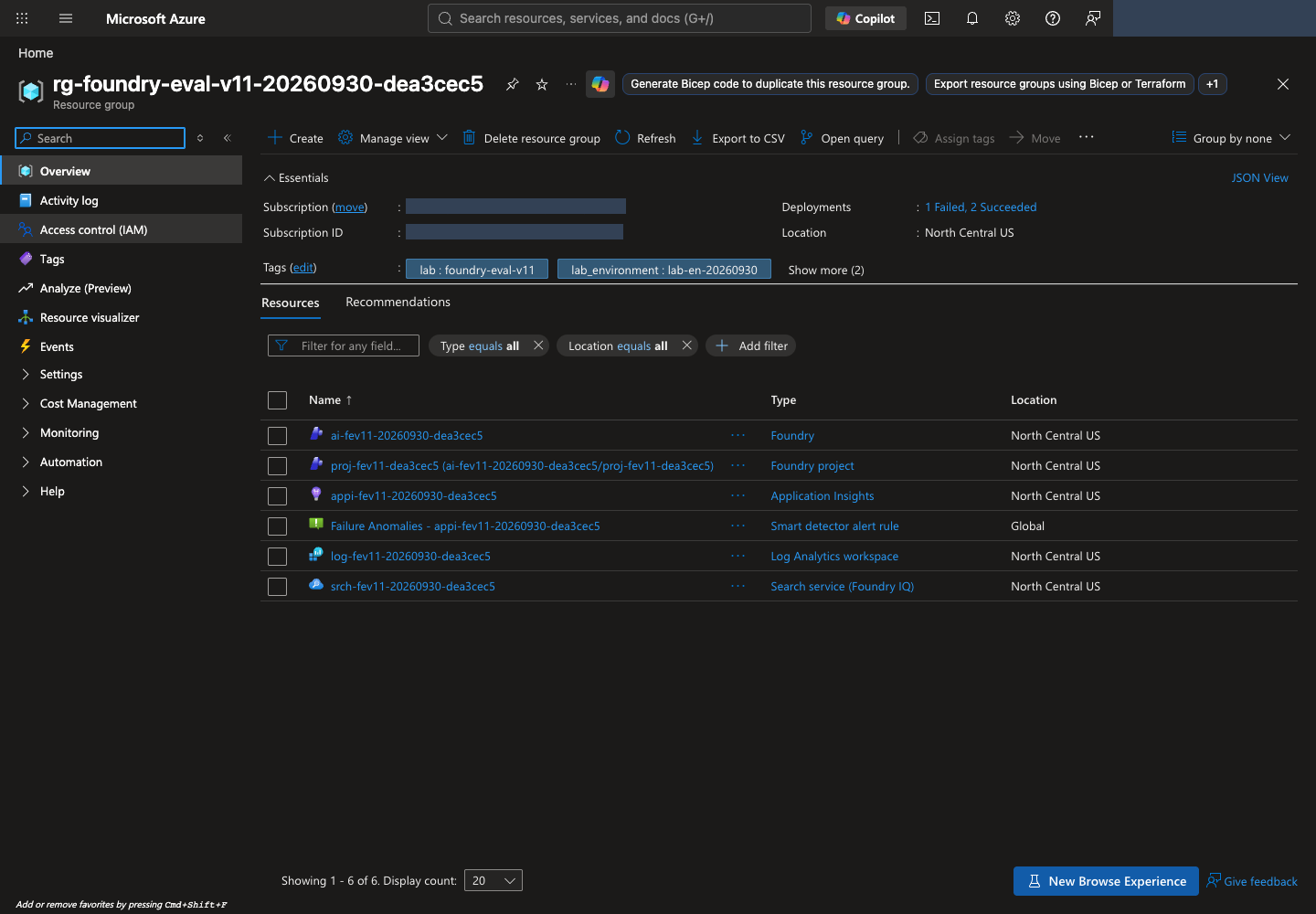
- In the Azure portal → Resource groups, search for
names.resource_groupfromconfig.json. Confirm the subscription, region, and complete resource list. - Open Microsoft Foundry with New Foundry enabled. If Select a project to continue appears, choose
names.projectand select Let's go. Read and Close the welcome tour if shown. If already in New Foundry, use the upper-left project selector. Do not use a Classic hub-based project. - In the project's Home (Overview in some layouts), find Project endpoint. It must match
AZURE_AI_PROJECT_ENDPOINTin.env, in the formhttps://account.services.ai.azure.com/api/projects/project. - In Models + endpoints or Build → Models, locate the deployments matching
.envvaluesMODEL_DEPLOYMENT,JUDGE_DEPLOYMENT,OPTIMIZER_DEPLOYMENT, andEMBEDDING_DEPLOYMENT. See portal orientation if labels differ.
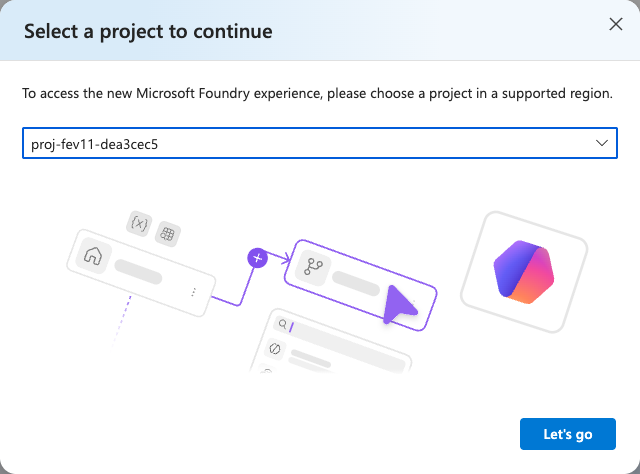
names.project and open it with Let's go. This selects an existing project; it does not create another. After bootstrap, do not use Create a new project to duplicate the environment. View full-size image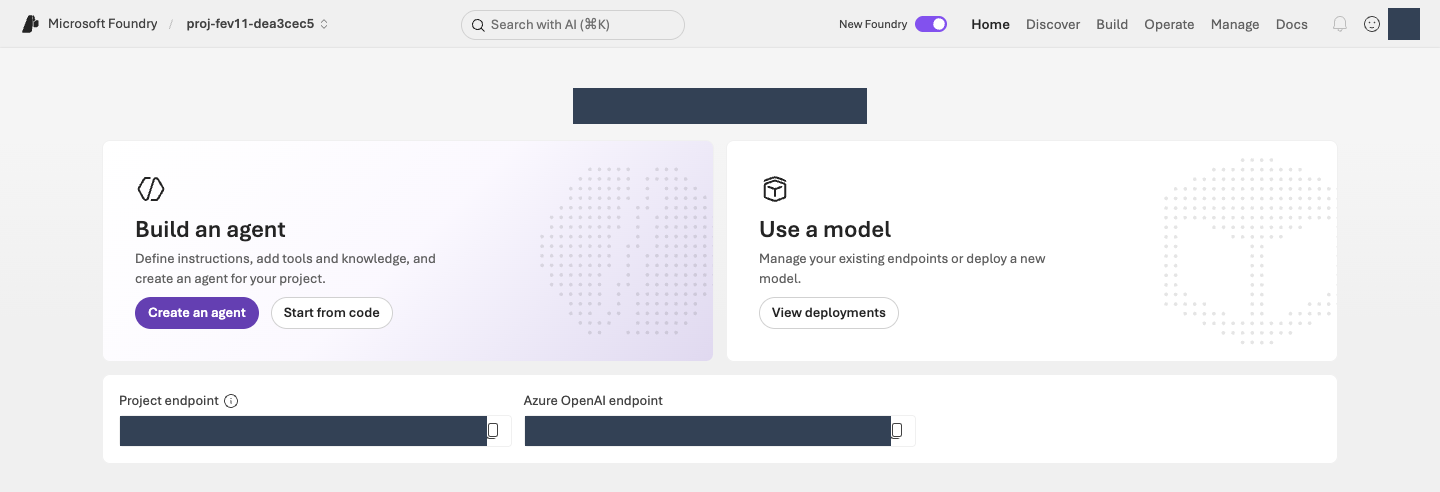
Check identity, deployments, and TPM in your terminal
Run this read-only command after provisioning creates .lab/lab-en/.env. It also performs the identity check internally.
Run in your terminal · Shared terminal
python -m lab --config .lab/lab-en/.env preflight
Inspect agent_tpm, judge_tpm, optimizer_tpm, iq_planner_tpm, and embedding_tpm under checks. Each observed value is actual deployment TPM; expected is the recommended minimum for that model. Insufficient or unverifiable token limits report BLOCKED: do not continue to model calls. Prepare the deployment allocation, then rerun the same read-only preflight.
Optional · how it works: identity, deployments, and TPM
Code ↔ portal · compare generated settings with the execution identity
Where to act: Run the runtime-check command above. It compares the generated configuration with your current CLI identity; do not type the identity-check function separately.
| Command/setting | Actual action | Portal verification |
|---|---|---|
AZURE_SUBSCRIPTION_ID, AZURE_TENANT_ID, and EXPECTED_AZURE_USER from --config .lab/lab-en/.env |
Read the subscription, tenant, and user recorded for this provisioned environment. | Compare the Azure portal account's Directory and subscription Overview checked in 01. |
az account show --subscription ... inside check_identity() |
Automatically compare configured user, tenant, subscription, and Enabled state with the CLI. A mismatch stops execution before resource lookup. | Confirm the same account/subscription; successful sign-in does not permit a different identity. |
This function performs the command's identity check. Subscription selection does not replace tenant verification. This check is not an SDK token request or a model call.
Actual implementation · read only · lab/preflight.py:check_identity
Read-only source, not another command to run. The complete named function or object is shown as written, including its original messages; dependencies and imports are in the linked file. Run the lab command only once.
Full source file · 80–105 · View on GitHub
def check_identity(config: Config, run: Callable = az_json) -> dict:
    account = run(["account", "show", "--subscription", config.subscription_id])
    if not isinstance(account, dict):
        raise LabError(text(
            "az account show 응답 형식이 올바르지 않습니다.",
            "The az account show response has an unexpected format.",
        ))
    actual_user = account.get("user", {}).get("name", "")
    checks = {
        "subscription": account.get("id") == config.subscription_id,
        "tenant": account.get("tenantId") == config.tenant_id,
        "user": actual_user.lower() == config.expected_user.lower(),
        "enabled": account.get("state") == "Enabled",
    }
    if not all(checks.values()):
        failed = ", ".join(key for key, ok in checks.items() if not ok)
        raise LabError(text(
            f"로그인 환경 불일치({failed}). 작업을 중단했습니다. "
            f"az login --tenant {config.tenant_id} 후 지정 계정으로 로그인해야 합니다. "
            "SDK는 다른 환경 자격 증명으로 자동 전환하지 않습니다.",
            f"The sign-in environment does not match ({failed}). Work stopped. "
            f"Run az login --tenant {config.tenant_id} and sign in with the designated account. "
            "The SDK never switches to another environment's credentials automatically.",
            language=config.language,
        ))
    return {"user": actual_user, "subscription": account["id"], "tenant": account["tenantId"]}
The following runtime run_preflight() reads the resources/deployments named in .env. Connect rateLimits entries with key: token, including the raw ARM lookup, to the portal TPM display. Subscription quota and a deployment's actual TPM are separate checks.
Actual implementation · read only · lab/preflight.py:run_preflight
Read-only source, not another command to run. The complete named function or object is shown as written, including its original messages; dependencies and imports are in the linked file. Run the lab command only once.
Full source file · 108–258 · View on GitHub
def run_preflight(config: Config, *, run: Callable = az_json) -> dict:
    identity = check_identity(config, run)
    account = run([
        "cognitiveservices", "account", "show", "--subscription", config.subscription_id,
        "--resource-group", config.resource_group, "--name", config.account,
    ])
    project = run([
        "resource", "show", "--ids", config.project_id, "--api-version", "2025-06-01",
    ])
    search = run([
        "search", "service", "show", "--subscription", config.subscription_id,
        "--resource-group", config.resource_group, "--name", config.search_service,
    ])
    deployments = run([
        "cognitiveservices", "account", "deployment", "list",
        "--subscription", config.subscription_id, "--resource-group", config.resource_group,
        "--name", config.account,
    ])
    checks: list[dict] = []
    for name, resource in (("foundry", account), ("project", project), ("search", search)):
        region = str(resource.get("location", "")).lower().replace(" ", "")
        checks.append({
            "name": f"{name}_region",
            "status": "PASS" if region == config.location else "BLOCKED",
            "observed": region,
            "expected": config.location,
        })
    endpoint = project.get("properties", {}).get("endpoints", {}).get("AI Foundry API")
    checks.append({
        "name": "project_endpoint",
        "status": "PASS" if endpoint == config.project_endpoint else "BLOCKED",
        "observed": endpoint,
    })
    deployment_map = {d["name"]: d for d in deployments}
    model_evidence = {}
    roles = (
        ("agent", config.model), ("judge", config.judge), ("optimizer", config.optimizer),
        ("iq_planner", config.planner), ("embedding", config.embedding),
    )
    rate_limit_sources = {}
    for name in dict.fromkeys(name for _, name in roles):
        deployment = deployment_map.get(name)
        if not deployment:
            continue
        limits = deployment.get("properties", {}).get("rateLimits")
        source = "Azure CLI deployment metadata"
        if not isinstance(limits, list) or not any(
            isinstance(limit, dict) and limit.get("key") == "token" for limit in limits
        ):
            # Use raw ARM when CLI metadata lacks token/request labels instead of inferring TPM.
            identifier = f"{config.account_id}/deployments/{quote(name, safe='')}"
            deployment = run([
                "rest", "--method", "GET", "--url",
                f"https://management.azure.com{identifier}?api-version=2025-06-01",
            ])
            if (
                not isinstance(deployment, dict) or deployment.get("name") != name
                or str(deployment.get("id", "")).lower() != identifier.lower()
                or not isinstance(deployment.get("properties"), dict)
            ):
                raise LabError(text(
                    "TPM 조회 응답이 요청한 모델 배포와 다릅니다.",
                    "The TPM lookup response does not match the requested model deployment.",
                ))
            deployment_map[name] = deployment
            source = "Raw ARM deployment metadata"
        rate_limit_sources[name] = source
    for role, name in roles:
        deployment = deployment_map.get(name)
        ready = deployment and deployment.get("properties", {}).get("provisioningState") == "Succeeded"
        checks.append({
            "name": f"{role}_deployment", "status": "PASS" if ready else "BLOCKED",
            "observed": name,
        })
        if deployment:
            limits = deployment.get("properties", {}).get("rateLimits")
            minimum_tpm = LAB_MINIMUM_TPM[role]
            try:
                observed_tpm = _tokens_per_minute(limits)
                sufficient = observed_tpm >= minimum_tpm
                reason = (
                    "Meets the lab starting TPM requirement; RPM and shared load still apply."
                    if sufficient else
                    f"Allocate at least {minimum_tpm:,} TPM with operator approval, then rerun preflight."
                )
            except ValueError as exc:
                observed_tpm, sufficient, reason = None, False, str(exc)
            checks.append({
                "name": f"{role}_tpm", "status": "PASS" if sufficient else "BLOCKED",
                "observed": observed_tpm, "expected": minimum_tpm, "reason": reason,
            })
            model_evidence[role] = {
                "deployment": name,
                "model": deployment.get("properties", {}).get("model"),
                "sku": deployment.get("sku"),
                "tokens_per_minute": observed_tpm,
                "rate_limit_source": rate_limit_sources[name],
            }
        if role == "iq_planner":
            observed_model = (deployment or {}).get("properties", {}).get("model", {}).get("name")
            checks.append({
                "name": "iq_planner_supported_model",
                "status": "PASS" if observed_model == "gpt-5.5" else "BLOCKED",
                "observed": observed_model,
                "expected": "gpt-5.5",
            })
        if role == "embedding":
            observed_model = (deployment or {}).get("properties", {}).get("model", {}).get("name")
            checks.append({
                "name": "embedding_supported_model",
                "status": "PASS" if observed_model == "text-embedding-3-large" else "BLOCKED",
                "observed": observed_model, "expected": "text-embedding-3-large",
            })
    public_access = account.get("properties", {}).get("publicNetworkAccess")
    if public_access == "Disabled":
        checks.append({
            "name": "network", "status": "BLOCKED",
            "observed": text(
                "PublicNetworkAccess=Disabled: 승인된 VNet 연결 환경에서 실행해야 합니다.",
                "PublicNetworkAccess=Disabled: run from an approved VNet-connected environment.",
            ),
        })
    return {
        "checked_at": datetime.now(timezone.utc).isoformat(),
        "kind": "read-only-management-preflight",
        "status": "PASS" if all(c["status"] == "PASS" for c in checks) else "BLOCKED",
        "identity": identity,
        "checks": checks,
        "models": model_evidence,
        "identities": {
            "foundry_project_managed_identity": project.get("identity", {}).get("principalId"),
            "search_managed_identity": search.get("identity", {}).get("principalId"),
        },
        "not_verified": [
            text("데이터 평면 RBAC와 모델 추론 성공", "Data-plane RBAC and successful model inference"),
            text("Foundry IQ 지식 베이스 생성·검색 권한", "Foundry IQ knowledge-base creation and retrieval permissions"),
            text(
                "Prompt Optimizer 및 Frontier Tuning 테넌트 접근 권한",
                "Tenant access to Prompt Optimizer and Frontier Tuning",
            ),
            text(
                "Global Standard는 North Central US 내부 처리를 보장하지 않습니다.",
                "Global Standard does not guarantee processing inside North Central US.",
            ),
            text(
                "TPM 충족은 남은 토큰, 공유 부하, RPM·버스트 제한 또는 429 없는 실행을 보장하지 않습니다.",
                "Meeting the TPM minimum does not guarantee remaining tokens, absence of shared load, "
                "RPM or burst limits, or a run without 429 errors.",
            ),
        ],
    }
Completion criteria: Runtime preflight and all five TPM checks report PASS; your project and role-specific deployments are present. This is read-only configuration evidence. The next step verifies actual model responses.
Next: 03. Connect policies and create the Agent →
03. Connect policies and create the Agent
What: Connect a read-only synthetic-policy tool to the pinned v1 baseline Agent.
Why: Recalling a policy is not the same as retrieving it. Retrieval under your user identity does not establish access for the Agent's managed identity.
How · where: Prepare model, retrieval, and Agent from the terminal; inspect instructions, tools, and an actual response in Microsoft Foundry. Transmit data and make calls once within the approved scope.
Action order: Terminal · model check → Upload policies → Verify retrieval → Create v1 → Microsoft Foundry · test response.
Verify the model and policy retrieval
These three commands perform actual uploads/model calls and can incur charges. Check each result yourself before continuing. When resuming, check the saved receipts for completed work rather than repeating unnecessary calls.
1. Verify that the model responds
smoke is a short functional check.
First pass the runtime checks in 02, including deployment TPM. One successful short response does not establish sufficient throughput for the full evaluation.
Run in your terminal · Shared terminal
python -m lab --config .lab/lab-en/.env smoke --run-id model-smoke --confirm
Confirm status: completed in the output.
Optional · how it works: SDK authentication and model calls
Code ↔ portal · connect the SDK with the verified CLI identity
Where to act: Run the model-check command above. The authentication function is used automatically inside actual SDK calls, not as a separate terminal command.
| Actual code | Actual action | Portal verification |
|---|---|---|
AzureCliCredential(subscription=...) in credential_for() |
Recheck the CLI identity against 02's configuration and create a credential object. The SDK requests tokens with that identity when calling the service. Do not switch to API keys or another credential. | Compare the signed-in Microsoft Foundry resource and project subscription with the configuration. There is no action to paste tokens into the portal. |
The first function below creates the credential passed to the SDK; the next sends the actual model request. Authentication and response verification belong to this step.
Actual implementation · read only · lab/auth.py:credential_for
Read-only source, not another command to run. The complete named function or object is shown as written, including its original messages; dependencies and imports are in the linked file. Run the lab command only once.
Full source file · 12–16 · View on GitHub
def credential_for(config: Config) -> AzureCliCredential:
    check_identity(config)
    # Azure CLI rejects get-access-token when both tenant and subscription are
    # supplied. The identity check above binds the subscription to the tenant.
    return AzureCliCredential(subscription=config.subscription_id, process_timeout=30)
client.responses.create(model=config.model, ...) inside smoke_model() is the real Sol model call. It tests a short input with at most 128 output tokens before creating an Agent. The request is recorded first so an unknown submission is not replayed.
Actual implementation · read only · lab/agents.py:smoke_model
Read-only source, not another command to run. The complete named function or object is shown as written, including its original messages; dependencies and imports are in the linked file. Run the lab command only once.
Full source file · 168–216 · View on GitHub
def smoke_model(config: Config, run_id: str) -> dict:
    directory = safe_run_dir(run_id)
    path = directory / "model-smoke.json"
    if path.exists():
        previous = read_json(path)
        require_content_language(previous)
        if previous.get("project_endpoint") != config.project_endpoint or previous.get("deployment") != config.model:
            raise LabError(text(
                "기존 model smoke의 환경/배포가 다릅니다.",
                "The environment or deployment of the earlier model smoke check differs.",
            ))
        if previous.get("status") != "completed":
            raise LabError(text(
                "이 model smoke는 실패 또는 결과 불명입니다. 원본을 확인하기 전 재호출하지 않습니다.",
                "This model smoke check failed or its outcome is unknown. Do not call it again before checking the original record.",
            ))
        return previous
    snapshot = model_snapshot(config, config.model)
    record = {
        **language_metadata(),
        "kind": "LIVE_MODEL_SMOKE_NOT_QUALITY_EVALUATION", "status": "submitting",
        "started_at": datetime.now(timezone.utc).isoformat(),
        "code": code_provenance(),
        "project_endpoint": config.project_endpoint, "deployment": config.model,
        "model_snapshot": snapshot, "response_id": None, "cost": {"status": "NOT_OBSERVED"},
        "request": {"input": "Synthetic Contoso lab connectivity check. Reply with the single word READY.", "max_output_tokens": 128},
    }
    write_once_json(path, record)
    started = time.perf_counter()
    with credential_for(config) as credential:
        with AIProjectClient(endpoint=config.project_endpoint, credential=credential, retry_total=0) as project:
            with project.get_openai_client(max_retries=0, timeout=120.0) as client:
                response = client.responses.create(model=config.model, **record["request"], store=True)
                record["response_id"] = response.id
                record["response"] = response.model_dump(mode="json")
                record["usage"] = record["response"].get("usage")
                record["latency_ms"] = (time.perf_counter() - started) * 1000
                record["status"] = "completed" if (
                    record["response"].get("status") == "completed"
                    and isinstance(response.id, str) and response.id.strip()
                    and isinstance(response.output_text, str) and response.output_text.strip()
                ) else "failed"
                save_json(path, record)
    if record["status"] != "completed":
        raise LabError(text(
            "모델 smoke가 완료된 비어 있지 않은 응답을 반환하지 않았습니다.",
            "The model smoke check did not return a completed, non-empty response.",
        ))
    return record
2. Prepare policy retrieval
Upload the eight supplied synthetic policies to the search service.
Run in your terminal · Shared terminal
python -m lab --config .lab/lab-en/.env iq prepare --confirm
Confirm uploaded_documents: 8. The program prepares a search index (searchable documents), a knowledge base, and an MCP connection. MCP (Model Context Protocol) connects an Agent to tools; this lab connects only a read-only policy-retrieval tool. You do not need to edit the implementation.
Optional · how it works: policy upload and retrieval
Code ↔ portal · configure policy retrieval
Where to act: Run iq prepare above, then iq probe below in your terminal. The panels show those commands' internals, not additional programs to execute.
| Actual code/setting | Actual action | Portal actions and verification |
|---|---|---|
fields, vectorSearch, semantic in knowledge_payloads()["index"] |
Define policy fields, 3072-dimensional vectors, HNSW, embeddings, and semantic settings. | Azure portal → Search → Indexes → created index → Fields/JSON. Inspect, do not recreate, the index. |
client.embeddings.create(...) in embed() |
Send eight policy titles/contents to the actual embedding deployment. | Microsoft Foundry View deployments → embedding deployment → Details: check the model/name. Vectors are stored in Search, not in the Agent's Playground settings. |
PUT/POST in prepare_knowledge() |
Create the index, upload documents, then create the knowledge source, base, and project connection. | Inspect Search Indexes and Microsoft Foundry Build → Knowledge → Knowledge bases for matching names/sources. |
Connection authType, audience, target |
Connect the project's managed identity to Search's MCP endpoint. | Inspect Knowledge Connection. If the UI has no authType/audience editor, read knowledge/config-snapshot.json; do not guess settings. |
/retrieve, references, activity in probe_knowledge() |
Verify actual policy retrieval. | Active is registration state, not a probe result. Inspect the probe's output/records, then verify the Agent's tool call separately in Playground. |
First read the complete service-setting objects, then the actual creation/upload code. config.* comes from 02's .env; names contains the actual object names in your records.
Actual implementation · read only · lab/knowledge.py:knowledge_payloads
Read-only source, not another command to run. The complete named function or object is shown as written, including its original messages; dependencies and imports are in the linked file. Run the lab command only once.
Full source file · 33–108 · View on GitHub
def knowledge_payloads(config: Config, names: dict, planner_model: str) -> dict:
    if not config.embedding:
        raise LabError(text(
            "벡터 검색을 위해 EMBEDDING_DEPLOYMENT를 명시해야 합니다.",
            "EMBEDDING_DEPLOYMENT must be set explicitly for vector search.",
        ))
    analyzer = f"{selected_language()}.microsoft"
    return {
        "index": {
            "name": names["index"],
            "fields": [
                {"name": "id", "type": "Edm.String", "key": True, "filterable": True, "retrievable": True},
                {"name": "title", "type": "Edm.String", "searchable": True, "retrievable": True, "analyzer": analyzer},
                {"name": "content", "type": "Edm.String", "searchable": True, "retrievable": True, "analyzer": analyzer},
                {"name": "effective_date", "type": "Edm.String", "filterable": True, "retrievable": True},
                {"name": "content_vector", "type": "Collection(Edm.Single)", "searchable": True,
                 "retrievable": False, "dimensions": DIMENSIONS, "vectorSearchProfile": "contoso-vector"},
            ],
            "vectorSearch": {
                "algorithms": [{"name": "contoso-hnsw", "kind": "hnsw", "hnswParameters": {"metric": "cosine"}}],
                "profiles": [{"name": "contoso-vector", "algorithm": "contoso-hnsw", "vectorizer": "contoso-embedding"}],
                "vectorizers": [{
                    "name": "contoso-embedding", "kind": "azureOpenAI",
                    "azureOpenAIParameters": {
                        "resourceUri": config.openai_endpoint, "deploymentId": config.embedding,
                        "modelName": "text-embedding-3-large",
                    },
                }],
            },
            "semantic": {
                "defaultConfiguration": "support-semantic",
                "configurations": [{
                    "name": "support-semantic",
                    "prioritizedFields": {
                        "titleField": {"fieldName": "title"},
                        "prioritizedContentFields": [{"fieldName": "content"}],
                    },
                }],
            },
        },
        "source": {
            "name": names["source"],
            "kind": "searchIndex",
            "searchIndexParameters": {
                "searchIndexName": names["index"],
                "semanticConfigurationName": "support-semantic",
                "sourceDataFields": [{"name": field} for field in ("id", "title", "content", "effective_date")],
                "searchFields": [{"name": field} for field in ("title", "content", "content_vector")],
            },
        },
        "base": {
            "name": names["base"],
            "description": "Synthetic Contoso policies. Stable ATLAS document IDs are in titles and source data.",
            "knowledgeSources": [{"name": names["source"]}],
            "models": [{
                "kind": "azureOpenAI",
                "azureOpenAIParameters": {
                    "resourceUri": config.openai_endpoint,
                    "deploymentId": config.planner,
                    "modelName": planner_model,
                },
            }],
            "retrievalReasoningEffort": {"kind": "low"},
            "outputMode": "extractiveData",
        },
        "connection": {
            "properties": {
                "authType": "ProjectManagedIdentity",
                "category": "RemoteTool",
                "target": search_url(config, "knowledgebases", names["base"], "/mcp"),
                "isSharedToAll": False,
                "audience": "https://search.azure.com/",
                "metadata": {"ApiType": "Azure"},
            },
        },
    }
The next short function performs GET → create-only PUT → ownership recording. prepare_knowledge() then applies it to the index, source, base, and connection.
Actual implementation · read only · lab/knowledge.py:_ensure_created
Read-only source, not another command to run. The complete named function or object is shown as written, including its original messages; dependencies and imports are in the linked file. Run the lab command only once.
Full source file · 111–134 · View on GitHub
def _ensure_created(config: Config, http: JsonHttp, kind: str, name: str, url: str, payload: dict) -> dict:
    state = workspace(config)
    owned = [item for item in state["created"] if item.get("kind") == kind and item.get("name") == name]
    try:
        existing = http.request("GET", url)
    except CloudRequestError as exc:
        if exc.status != 404:
            raise
        existing = None
    if existing is not None:
        if not owned:
            raise LabError(text(
                f"{name}이 이미 존재하지만 이 실습의 생성 기록이 없습니다. 덮어쓰지 않습니다.",
                f"{name} already exists, but this lab has no creation record for it. Not overwriting.",
            ))
        return existing.body
    result = http.request("PUT", url, payload, create_only=True)
    if result.status not in {200, 201}:
        raise LabError(text(
            f"{name}: 비동기/예상 밖 상태 {result.status}. 완료로 기록하지 않습니다.",
            f"{name}: asynchronous or unexpected status {result.status}. Not recorded as complete.",
        ))
    record_created(config, {"kind": kind, "name": name, "url": url, "etag": result.etag})
    return result.body
Actual implementation · read only · lab/knowledge.py:prepare_knowledge
Read-only source, not another command to run. The complete named function or object is shown as written, including its original messages; dependencies and imports are in the linked file. Run the lab command only once.
Full source file · 137–274 · View on GitHub
def prepare_knowledge(config: Config) -> dict:
    state = workspace(config, create=True)
    names = resource_names(config, state)
    documents_path = content_path(ROOT, "data/knowledge/documents.json")
    documents = read_json(documents_path)
    content_hash = sha256_file(documents_path)
    setup_path = artifacts_dir() / "knowledge/setup.json"
    previous = None
    if setup_path.exists():
        previous = read_json(setup_path)
        require_content_language(previous)
        if previous.get("documents_sha256") != content_hash or previous.get("names") != names:
            raise LabError(text(
                "기존 지식 준비와 원본/범위가 다릅니다. 다른 실험을 기존 인덱스에 덮어쓰지 않습니다.",
                "The source or scope differs from the earlier knowledge preparation. A different experiment is never written over the existing index.",
            ))
        if previous.get("status") in {"created_not_retrieval_tested", "retrieval_verified"}:
            retrieval = previous.get("retrieval", {})
            if (
                retrieval.get("embedding_deployment") != config.embedding
                or retrieval.get("embedding_model") != "text-embedding-3-large"
                or retrieval.get("dimensions") != DIMENSIONS
            ):
                raise LabError(text(
                    "준비된 인덱스의 embedding 계약이 다릅니다. 새 실험을 생성해야 합니다.",
                    "The embedding contract of the prepared index differs. Create a new experiment.",
                ))
            return previous
    with credential_for(config) as credential:
        planner = az_json([
            "cognitiveservices", "account", "deployment", "show",
            "--subscription", config.subscription_id, "--resource-group", config.resource_group,
            "--name", config.account, "--deployment-name", config.planner,
        ])
        model = planner.get("properties", {}).get("model", {})
        if not model.get("name"):
            raise LabError(text(
                "IQ planner의 실제 모델 이름을 확인할 수 없습니다.",
                "Could not confirm the actual model name of the IQ planner.",
            ))
        # This workshop's main lane was researched for gpt-5.5, not arbitrary
        # answer models that may be unsupported by the knowledge-base planner.
        if model["name"] != "gpt-5.5":
            raise LabError(text(
                "이 경로의 IQ planner는 확인된 gpt-5.5 배포를 요구합니다. 다른 모델로 자동 전환하지 않습니다.",
                "The IQ planner on this path requires a verified gpt-5.5 deployment. It never switches to another model automatically.",
            ))
        payloads = knowledge_payloads(config, names, model["name"])
        payload_hash = hashlib.sha256(json.dumps(payloads, sort_keys=True).encode()).hexdigest()
        if previous and previous.get("payload_sha256") != payload_hash:
            raise LabError(text(
                "미완료 검색 설정의 구성 계약이 바뀌었습니다. 같은 인덱스에 덮어쓰지 않습니다.",
                "The configuration contract of the unfinished search setup changed. Not overwriting the same index.",
            ))
        setup = {
            **language_metadata(),
            "status": "preparing", "workspace_id": state["workspace_id"], "names": names,
            "project_id": config.project_id, "documents_sha256": content_hash,
            "planner": {"deployment": config.planner, "model": model},
            "search_api_version": SEARCH_API,
            "payload_sha256": payload_hash,
            "retrieval": {
                "reasoning": "low", "output": "extractiveData",
                "embedding_model": "text-embedding-3-large", "embedding_deployment": config.embedding,
                "dimensions": DIMENSIONS, "index_algorithm": "hnsw", "metric": "cosine",
                "query_modes": ["vector", "hybrid", "agentic-iq-mcp"],
                "direct_probe_is_agent_evidence": False,
            },
        }
        save_json(setup_path, setup)
        save_json(artifacts_dir() / "knowledge/config-snapshot.json", payloads)
        search = JsonHttp(credential, scope=SEARCH_SCOPE, allowed_origin=config.search_endpoint)
        index_url = search_url(config, "indexes", names["index"])
        _ensure_created(config, search, "search_index", names["index"], index_url, payloads["index"])
        embedding = embed(
            config, [f"{doc['title']}\n{doc['content']}" for doc in documents],
            artifacts_dir() / "knowledge/document-embeddings.json",
        )
        vectors = validate_vectors(embedding["response"], len(documents))
        uploaded = [{
            "@search.action": "mergeOrUpload",
            "id": doc["id"], "title": f"{doc['id']} | {doc['title']}",
            "content": f"[{doc['id']}]\n{doc['content']}",
            "effective_date": doc["effective_date"],
            "content_vector": vector,
        } for doc, vector in zip(documents, vectors, strict=True)]
        upload_path = artifacts_dir() / "knowledge/upload-response.json"
        upload_contract = {"documents_sha256": content_hash, "payload_sha256": payload_hash,
                           "embedding_sha256": sha256_file(artifacts_dir() / "knowledge/document-embeddings.json")}
        if upload_path.exists():
            upload_record = read_json(upload_path)
            if upload_record.get("contract") != upload_contract or upload_record.get("status") != "completed":
                raise LabError(text(
                    "업로드 계약 변경 또는 결과 불명입니다. 업로드를 반복하지 않고 실제 인덱스 상태를 확인해야 합니다.",
                    "The upload contract changed or its outcome is unknown. Do not repeat the upload; check the actual index state.",
                ))
            upload_body = upload_record["response"]
        else:
            write_once_json(upload_path, {"status": "submitting", "contract": upload_contract})
            upload = search.request(
                "POST", search_url(config, "indexes", names["index"], "/docs/index"), {"value": uploaded},
            )
            upload_body = upload.body
            save_json(upload_path, {"status": "response_received", "contract": upload_contract, "response": upload_body})
        statuses = upload_body.get("value", [])
        if (
            len(statuses) != len(uploaded)
            or {item.get("key") for item in statuses} != {doc["id"] for doc in documents}
            or any(item.get("status") is not True for item in statuses)
        ):
            save_json(artifacts_dir() / "knowledge/upload-error.json", upload_body)
            raise LabError(text(
                "일부 문서 업로드가 실패했습니다. knowledge/upload-error.json을 확인해야 합니다.",
                "Some document uploads failed. Check knowledge/upload-error.json.",
            ))
        save_json(upload_path, {"status": "completed", "contract": upload_contract, "response": upload_body})
        _ensure_created(
            config, search, "knowledge_source", names["source"],
            search_url(config, "knowledgesources", names["source"]), payloads["source"],
        )
        _ensure_created(
            config, search, "knowledge_base", names["base"],
            search_url(config, "knowledgebases", names["base"]), payloads["base"],
        )
        connection_url = (
            f"https://management.azure.com{config.project_id}/connections/"
            f"{names['connection']}?api-version={CONNECTION_API}"
        )
        arm = JsonHttp(credential, scope=ARM_SCOPE, allowed_origin="https://management.azure.com")
        _ensure_created(config, arm, "project_connection", names["connection"], connection_url, payloads["connection"])
        setup["status"] = "created_not_retrieval_tested"
        setup["mcp_endpoint"] = payloads["connection"]["properties"]["target"]
        setup["connection_name"] = names["connection"]
        setup["uploaded_documents"] = len(uploaded)
        setup["embedding_usage"] = embedding["response"].get("usage")
        save_json(setup_path, setup)
        save_json(artifacts_dir() / "knowledge/documents-snapshot.json", documents)
        return setup
Embedding is not hidden local scoring. This function invokes the Azure OpenAI embeddings API and preserves the original response, input hash, model, and usage.
Actual implementation · read only · lab/embeddings.py:embed
Read-only source, not another command to run. The complete named function or object is shown as written, including its original messages; dependencies and imports are in the linked file. Run the lab command only once.
Full source file · 51–122 · View on GitHub
def embed(config: Config, texts: list[str], cache_path: Path) -> dict:
    if not config.embedding or not texts or any(not isinstance(text, str) or not text.strip() for text in texts):
        raise LabError(localized_text(
            "EMBEDDING_DEPLOYMENT와 비어 있지 않은 embedding 입력이 필요합니다.",
            "EMBEDDING_DEPLOYMENT and non-empty embedding input are required.",
        ))
    deployment = model_snapshot(config, config.embedding)
    if deployment["model"].get("name") != "text-embedding-3-large":
        raise LabError(localized_text(
            "이 인덱스의 동결 계약은 text-embedding-3-large/3072입니다. 자동 대체하지 않습니다.",
            "This index's frozen contract is text-embedding-3-large/3072. It is never replaced automatically.",
        ))
    contract = {
        "endpoint": config.openai_endpoint, "deployment": deployment,
        "dimensions": DIMENSIONS,
        "input_sha256": hashlib.sha256(json.dumps(texts, ensure_ascii=False).encode()).hexdigest(),
        "count": len(texts),
    }
    if cache_path.exists():
        previous = read_json(cache_path)
        if previous.get("contract") != contract:
            raise LabError(localized_text(
                "기존 embedding 실행과 입력/모델/범위가 다릅니다. 기존 기록을 보존해야 합니다.",
                "The input, model or scope differs from the earlier embedding run. Preserve the existing record.",
            ))
        if previous.get("status") != "completed":
            raise LabError(localized_text(
                "이 embedding 요청은 실패 또는 결과 불명입니다. 원격 요청을 확인하기 전 재호출하지 않습니다.",
                "This embedding request failed or its outcome is unknown. Do not call it again before checking the remote request.",
            ))
        validate_vectors(previous["response"], len(texts))
        return previous
    from azure.identity import get_bearer_token_provider
    from openai import APIError, OpenAI
    from azure.core.exceptions import AzureError
    from lab.auth import credential_for

    record = {"kind": "LIVE_AZURE_EMBEDDING", "contract": contract, "status": "submitting",
              "code": code_provenance(),
              "started_at": datetime.now(timezone.utc).isoformat(), "cost": {"status": "NOT_OBSERVED"}}
    cache_path.parent.mkdir(parents=True, exist_ok=True)
    try:
        with cache_path.open("x", encoding="utf-8") as stream:
            json.dump(record, stream, ensure_ascii=False, indent=2)
    except FileExistsError as exc:
        raise LabError(localized_text(
            "동시 embedding 실행을 차단했습니다. 기존 기록을 확인해야 합니다.",
            "A concurrent embedding run was blocked. Check the existing record.",
        )) from exc
    started = time.perf_counter()
    try:
        with credential_for(config) as credential:
            with OpenAI(
                base_url=f"{config.openai_endpoint}/openai/v1/",
                api_key=get_bearer_token_provider(credential, "https://ai.azure.com/.default"),
                max_retries=0, timeout=120,
            ) as client:
                response = client.embeddings.create(
                    model=config.embedding, input=texts, dimensions=DIMENSIONS, encoding_format="float",
                )
                record["response"] = response.model_dump(mode="json")
                record["request_id"] = getattr(response, "_request_id", None)
                save_json(cache_path, record)
                validate_vectors(record["response"], len(texts))
    except (APIError, AzureError, LabError) as exc:
        record.update(status="failed_or_unknown", error={"type": type(exc).__name__, "message": str(exc)})
        save_json(cache_path, record)
        raise
    record.update(status="completed", latency_ms=(time.perf_counter() - started) * 1000,
                  completed_at=datetime.now(timezone.utc).isoformat())
    save_json(cache_path, record)
    return record
3. Verify that a query retrieves policies
Run in your terminal · Shared terminal
python -m lab --config .lab/lab-en/.env iq probe --confirm
Confirm status: retrieval_verified with nonempty references. created_not_retrieval_tested means creation only. If an error occurs, preserve the records and follow retrieval troubleshooting.
Read the query/reference request and actual response checks around POST .../retrieve. Direct retrieval verifies your signed-in user path, not the Agent's managed-identity path.
Actual implementation · read only · lab/knowledge.py:probe_knowledge
Read-only source, not another command to run. The complete named function or object is shown as written, including its original messages; dependencies and imports are in the linked file. Run the lab command only once.
Full source file · 294–343 · View on GitHub
def probe_knowledge(config: Config, query: str) -> dict:
    setup = load_knowledge(config)
    if not query.strip():
        raise LabError(text("지식 검색 질문이 비어 있습니다.", "The knowledge retrieval question is empty."))
    names = setup["names"]
    request = {
        "messages": [{"role": "user", "content": [{"type": "text", "text": query}]}],
        "outputMode": "extractiveData",
        "maxOutputSize": 6000,
        "knowledgeSourceParams": [{
            "knowledgeSourceName": names["source"], "kind": "searchIndex",
            "includeReferences": True, "includeReferenceSourceData": True,
            "resultsProcessing": "rerank", "failOnError": True,
        }],
    }
    key = hashlib.sha256(query.encode("utf-8")).hexdigest()[:16]
    directory = artifacts_dir() / "knowledge/probes" / key
    intent_path, response_path = directory / "iq-request.json", directory / "iq-response.json"
    if response_path.exists():
        if read_json(intent_path) != request:
            raise LabError(text(
                "기존 IQ 요청 계약이 다릅니다. 원본 기록을 보존해야 합니다.",
                "The earlier IQ request contract differs. Preserve the original record.",
            ))
        body = read_json(response_path)
    else:
        if intent_path.exists():
            raise LabError(text(
                "이 IQ probe는 결과 불명입니다. planner를 다시 유료 호출하지 않고 원격 요청을 확인해야 합니다.",
                "This IQ probe's outcome is unknown. Do not call the planner again at a cost; check the remote request.",
            ))
        write_once_json(intent_path, request)
        with credential_for(config) as credential:
            http = JsonHttp(credential, scope=SEARCH_SCOPE, allowed_origin=config.search_endpoint)
            result = http.request(
                "POST", search_url(config, "knowledgebases", names["base"], "/retrieve"), request,
            )
        body = result.body
        save_json(response_path, body)
    if not (artifacts_dir() / "knowledge/retrieve-response.json").exists():
        save_json(artifacts_dir() / "knowledge/retrieve-response.json", body)
    if not body.get("response") or not body.get("references") or not body.get("activity"):
        raise LabError(text(
            "검색 응답·출처·활동 중 일부가 없습니다. 보존한 iq-response.json을 확인해야 하며 완료 처리하지 않습니다.",
            "The search response, references or activity is missing. Check the preserved iq-response.json; this is not recorded as complete.",
        ))
    setup["status"] = "retrieval_verified"
    setup["probe_scope"] = "Human CLI identity; deployed-agent managed identity must still be verified by an agent call."
    save_json(artifacts_dir() / "knowledge/setup.json", setup)
    return {"status": setup["status"], "references": body["references"], "activity": body["activity"], "scope": setup["probe_scope"]}
In the portal, open Build → Knowledge → Knowledge bases and inspect Connection, the created knowledge base, and Knowledge sources. One knowledge-base row does not mean there is only one policy document.
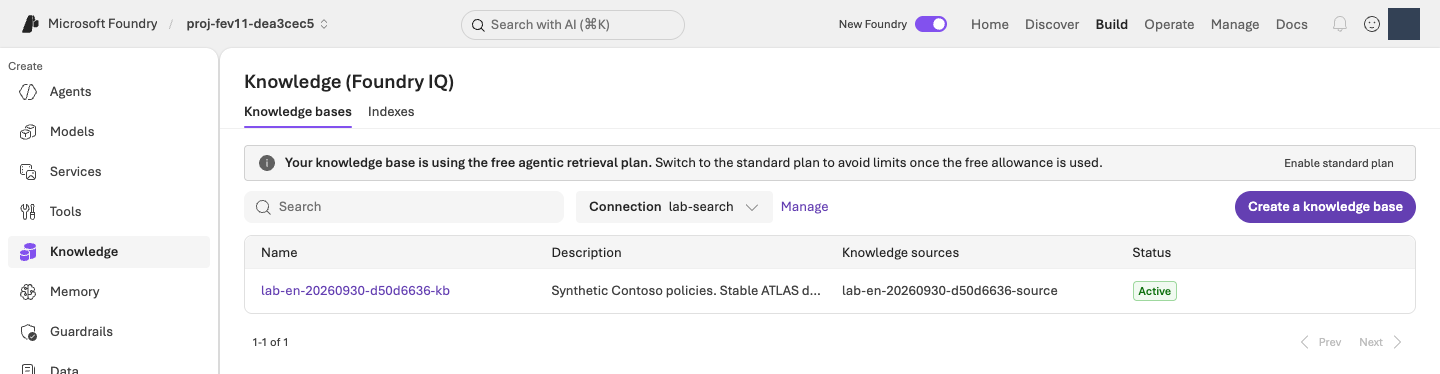
iq probe. The free-retrieval banner does not make the whole lab free, and setup inspection does not require changing the billing plan. View full-size imageCreate v1 with the fixed comparison configuration
Run in your terminal · Shared terminal
python -m lab --config .lab/lab-en/.env native-agent --version 1 --confirm
This creates lab-en-iq version 1 using the instructions in prompts/en/baseline.txt and the verified policy tool. Check agent_name, version, and receipt in the output. A receipt is a file recording the operation's result, so the Agent name and version stay readable there. The command reuses an identical v1 in the same owned workspace; it does not adopt another Agent or create v3.
Optional · how it works: Agent configuration and fixed versions
Code ↔ portal · inspect the full Agent configuration
Where to act: Run v1 creation above, then inspect the version, configuration, and actual response in the Playground below. Do not recreate it or save another version in the portal.
| Actual code/setting | Portal actions and verification |
|---|---|
definition["model"] = config.model |
Build → Agents → your Agent → Version 1 → Model: inspect the same deployment. |
definition["instructions"] = prompt.read_text(...) |
Compare Instructions with the original prompt. Do not Save/create a version while inspecting. |
MCP endpoint, allowed_tools, project_connection_id in knowledge_tool() |
Inspect Knowledge/Tools. The allowed tool is knowledge_base_retrieve; actual execution appears in response details. |
json_schema, strict in native_response_format() |
Structured-output configuration. If the UI does not expose the whole schema, inspect agent.definition.text in agents/native-v1.json; do not recreate it by guessing natural-language instructions. |
project.agents.create_version(...), draft=False |
Check the actual Version 1 after creation. A new version is not production publication. |
Read the connected tool and Agent definition, then the actual project.agents.create_version call. Fixed-version, ownership, and equivalent-configuration reuse checks between these functions are real behavior too.
Actual implementation · read only · lab/knowledge.py:knowledge_tool
Read-only source, not another command to run. The complete named function or object is shown as written, including its original messages; dependencies and imports are in the linked file. Run the lab command only once.
Full source file · 400–414 · View on GitHub
def knowledge_tool(config: Config) -> MCPTool:
    setup = load_knowledge(config)
    if setup["status"] != "retrieval_verified":
        raise LabError(text(
            "먼저 python -m lab iq probe --confirm 으로 실제 검색을 확인해야 합니다.",
            "First verify real retrieval with python -m lab iq probe --confirm.",
        ))
    return MCPTool(
        server_label="contoso-knowledge",
        server_url=setup["mcp_endpoint"],
        server_description="Read-only Contoso Atlas Cloud policies. Cite stable ATLAS document IDs shown in the returned title/content, not numeric retrieval reference IDs.",
        allowed_tools=["knowledge_base_retrieve"],
        require_approval="never",
        project_connection_id=setup["connection_name"],
    )
Actual implementation · read only · lab/agents.py:create_native_agent
Read-only source, not another command to run. The complete named function or object is shown as written, including its original messages; dependencies and imports are in the linked file. Run the lab command only once.
Full source file · 124–165 · View on GitHub
def create_native_agent(config: Config, version: str, prompt: Path) -> dict:
    """Connect the prepared policy tool to a fixed, strict-output workshop Agent."""
    from lab.knowledge import knowledge_tool

    if version not in {"1", "2"}:
        raise LabError("The native workshop Agent permits only versions 1 and 2.")
    if not prompt.is_file() or not prompt.read_text(encoding="utf-8").strip():
        raise LabError(f"A nonempty instruction file is required: {prompt}")
    state = workspace(config)
    tool = knowledge_tool(config)
    snapshot = model_snapshot(config, config.model)
    snapshot_path = artifacts_dir() / "agents/native-model.json"
    if snapshot_path.exists():
        if read_json(snapshot_path) != snapshot:
            raise LabError("The Agent model deployment changed after setup; preserve the original comparison.")
    elif version == "2":
        raise LabError("Create and verify native Agent v1 before preparing v2.")
    else:
        write_once_json(snapshot_path, snapshot)
    definition = {
        "kind": "prompt",
        "model": config.model,
        "instructions": prompt.read_text(encoding="utf-8"),
        "tools": [tool.as_dict()],
        "text": native_response_format(),
    }
    receipt = artifacts_dir() / "agents" / f"native-v{version}.json"
    with credential_for(config) as credential:
        with AIProjectClient(endpoint=config.project_endpoint, credential=credential, retry_total=0) as project:
            result = ensure_fixed_release(
                project, project_endpoint=config.project_endpoint, agent_name=config.agent_name("iq"),
                version=version, definition=definition, receipt=receipt,
                workspace_id=state["workspace_id"],
            )
    created = {"kind": "agent_version", "name": config.agent_name("iq"), "version": version}
    if created not in workspace(config)["created"]:
        record_created(config, created)
    return {
        "status": result["status"], "agent_name": config.agent_name("iq"), "version": version,
        "receipt": str(receipt), "model_snapshot": snapshot,
        "evaluation_status": "NOT_RUN", "production_approval": "NOT_GRANTED",
    }
Actual implementation · read only · lab/agents.py:ensure_fixed_release
Read-only source, not another command to run. The complete named function or object is shown as written, including its original messages; dependencies and imports are in the linked file. Run the lab command only once.
Full source file · 49–121 · View on GitHub
def ensure_fixed_release(project: AIProjectClient, *, project_endpoint: str, agent_name: str,
                         version: str, definition: dict, receipt: Path,
                         workspace_id: str | None = None) -> dict:
    if version not in {"1", "2"}:
        raise LabError("This workshop permits only released v1 and v2; use drafts for experiments.")
    if definition.get("kind") != "prompt" or not isinstance(definition.get("instructions"), str) or not definition["instructions"].strip():
        raise LabError("A nonempty prompt-agent definition is required.")
    expected_definition = _definition_for_comparison(definition)
    intent = {
        "project_endpoint": project_endpoint, "agent_name": agent_name, "version": version,
        "definition_sha256": hashlib.sha256(
            json.dumps(definition, sort_keys=True, separators=(",", ":")).encode()
        ).hexdigest(),
    }
    if workspace_id is not None:
        intent["workspace_id"] = workspace_id
    previous = read_json(receipt) if receipt.exists() else None
    if previous is not None and previous["intent"] != intent:
        raise LabError("The fixed-version receipt belongs to a different definition or environment.")
    try:
        existing = project.agents.get_version(agent_name=agent_name, agent_version=version).as_dict()
    except ResourceNotFoundError:
        existing = None
    if existing is not None:
        if workspace_id is not None and (existing.get("metadata") or {}).get("workspace") != workspace_id:
            raise LabError("The existing Agent version belongs to a different workspace; no changes were made.")
        if _definition_for_comparison(existing["definition"]) != expected_definition:
            raise LabError("The released version is immutable and differs from this source; no new version was created.")
        record = {"intent": intent, "status": "verified", "agent": existing}
        if previous is None:
            write_once_json(receipt, record)
        else:
            save_json(receipt, record)
        return record
    if previous is not None:
        raise LabError("The creation outcome is unknown; inspect the receipt and remote state, do not resubmit.")
    try:
        releases = [
            item.as_dict() for item in project.agents.list_versions(agent_name=agent_name)
            if not item.draft and not item.version.startswith("draft-")
        ]
    except ResourceNotFoundError:
        releases = []
    if {item["version"] for item in releases} != ({"1"} if version == "2" else set()):
        raise LabError("Unexpected release history; refusing to create v3 or reset existing versions.")
    if version == "2":
        if workspace_id is not None and (releases[0].get("metadata") or {}).get("workspace") != workspace_id:
            raise LabError("The baseline Agent belongs to a different workspace; no changes were made.")
        baseline = _definition_for_comparison(releases[0]["definition"])
        if {key: value for key, value in baseline.items() if key != "instructions"} != {
            key: value for key, value in expected_definition.items() if key != "instructions"
        }:
            raise LabError("V1 and v2 must keep the same model, tools and generation settings.")
        if baseline["instructions"] == definition["instructions"]:
            raise LabError("Identical instructions are not a new improvement candidate.")
    record = {"intent": intent, "status": "creating", "agent": None}
    write_once_json(receipt, record)
    metadata = {"lab": "foundry-evaluation-optimizer", "release_policy": "fixed-v1-v2"}
    if workspace_id is not None:
        metadata["workspace"] = workspace_id
    created = project.agents.create_version(
        agent_name=agent_name, definition=PromptAgentDefinition(definition), draft=False,
        metadata=metadata,
        description=f"Fixed workshop v{version}; separate managed evaluation is required.",
    ).as_dict()
    record.update(status="created", agent=created)
    save_json(receipt, record)
    if (
        created["version"] != version or _definition_for_comparison(created["definition"]) != expected_definition
        or (workspace_id is not None and (created.get("metadata") or {}).get("workspace") != workspace_id)
    ):
        raise LabError("The created version differs from the requested fixed version; receipt preserved.")
    return record
Verify v1's response and tool call in Microsoft Foundry
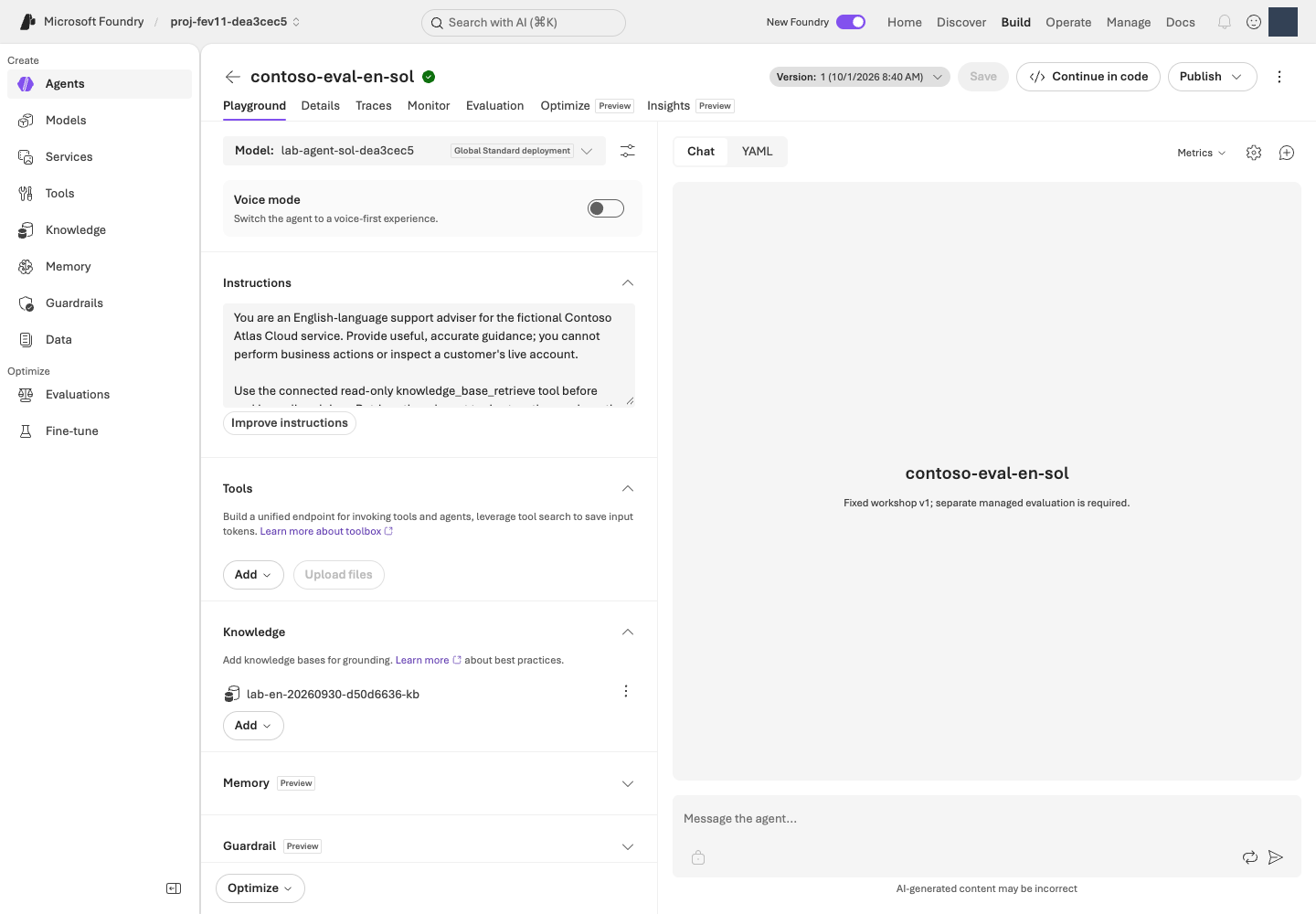
In the portal, open Build → Agents → lab-en-iq → version 1. Use the command's actual Agent name. Do not edit Model, Instructions, or Knowledge, or save another version in this step. Send this one question in Test/Playground:
I first purchased a monthly subscription in September 2026. What are the refund application conditions?
The reply is JSON with four fields, not just a chat sentence. Braces and quotation marks are expected, not an error.
| Response field | How to read it |
|---|---|
answer |
The English answer intended for the user |
citations |
Supporting ATLAS-* policy IDs |
route |
answer, clarify (ask a follow-up), escalate (hand off to a person), or refuse |
needs_human |
true or false; it is true only when route is escalate |
Inspect execution details for a real knowledge_base_retrieve call and response, then compare policy IDs with the answer's evidence. A managed identity is the Microsoft Azure service's identity, not your signed-in user. Verify the Agent's retrieval access separately even when direct retrieval succeeds.
Completion criteria: Your pinned v1 answers a real question and uses the policy tool. Connection success or valid JSON alone is not measured quality. Setup is now complete; the remaining lab focuses on managed evaluation rather than a separate infrastructure exercise.
Next: 04. Register the dataset →
04. Register the dataset
What: Register the English dev12 file once so both versions receive the same questions.
Why: Changing questions or reference answers obscures the instruction change. Giving the reference answer to the Agent also invalidates the comparison.
How · where: Check count/hash in the terminal, then register the original file or reuse its exact version in the Microsoft Foundry evaluation wizard.
Action order: Terminal · verify source → Download the file if using Codespaces → Microsoft Foundry · register/select → 05 · criteria in the same wizard.
Part 1 of the same evaluation wizard. 04 selects data → 05 sets scoring criteria → 06 submits. Do not select Submit yet.
A dataset is the collection of test questions. Use data/en/optimizer/dev.jsonl: 12 JSONL rows, called dev12 for short. Each line is one test case in JSON format. Do not edit it or convert it to Excel, CSV, or a JSON array.
| Column | Type | Use |
|---|---|---|
query |
String | The only Agent input |
context |
String | Policy reference for supported evaluators and case review |
ground_truth |
JSON string | Structured reference answer, never a generation prompt |
Only the question reaches the Agent. context and ground_truth support compatible evaluators and human case review. The other supplied dataset files are outside this required lab.
- Question · queryOne dataset row at a time
- AgentModel + instructions + retrieval
- Actual responseanswer and three other fields
- Evaluators + JudgeScores and reasons
Check the source count and hash in your terminal
Run in your terminal · Shared terminal
python -c "import hashlib,pathlib; p=pathlib.Path('data/en/optimizer/dev.jsonl'); print('rows =',len(p.read_text(encoding='utf-8').splitlines())); print('sha256 =',hashlib.sha256(p.read_bytes()).hexdigest())"
Confirm rows = 12 and note the SHA-256. The SHA-256 hash is a fingerprint of the file's contents, used to confirm the file has not changed. You can rerun this command whenever you need the hash again; you do not need to memorize or type it manually.
Optional · how it works: file checks versus portal registration
Code ↔ portal · distinguish file checks from registration
Where to act: The terminal command above checks count/hash only. Perform the actual upload/selection with the Microsoft Foundry registration steps below.
| Actual command expression | Actual action | Portal actions and verification |
|---|---|---|
pathlib.Path('data/en/optimizer/dev.jsonl') |
Select the local source file. | Choose that exact file under Upload new dataset → Browse below. |
p.read_text(...).splitlines(), len(...) |
Count the complete local JSONL. | Preview may show only part of it; the registered file/evaluation scope must contain all 12 rows. |
hashlib.sha256(p.read_bytes()).hexdigest() |
Calculate the byte fingerprint. | If the portal has no SHA-256 control, rerun the command whenever you need to compare the hash; do not claim a nonexistent UI check. |
| Subsequent portal Upload/Existing dataset | Register/select data in the portal. | Register lab-en-dev12 version 1 once in your project. The Python command above uploads nothing and submits no evaluation. |
Make the Codespaces file available to the portal upload picker
Codespaces files live remotely; the portal's Browse picker selects files on your computer. In Codespaces VS Code Explorer, right-click data/en/optimizer/dev.jsonl and select Download. Do not open/resave or convert it to CSV. Distinguish the freshly downloaded English file from any older file with the same name. When working locally, use your existing file without downloading it again.
Register or select the dataset in Microsoft Foundry
In your own project, follow these actions. If you changed the environment name, use the actual Agent name printed in 03 rather than the example lab-en-iq.
- Open Build → Evaluations → Create → Create new evaluation. Some layouts label the same menu Evaluation, singular.
- Select target type Agent,
lab-en-iq, and version 1. Use Pin currently latest only while latest really is version 1. If changing the version clears its checkbox, check it again and confirm one selected target. - Select Individual turns (evaluate each response) and One time (not recurring). Do not select Synthetic data to generate new questions.
- Select Upload new dataset → Browse and choose the checked
dev.jsonl. In Codespaces, choose the file you just downloaded to your computer; locally, choosedata/en/optimizer/dev.jsonlfrom the lab folder. Name itlab-en-dev12, use first version1, and wait for registration. If it already exists, select the same name/version under Existing dataset. - Verify
query,context, andground_truth. A five-row preview is not the dataset total; the original contains 12. Confirm its name/version and continue to 05 in this same wizard.
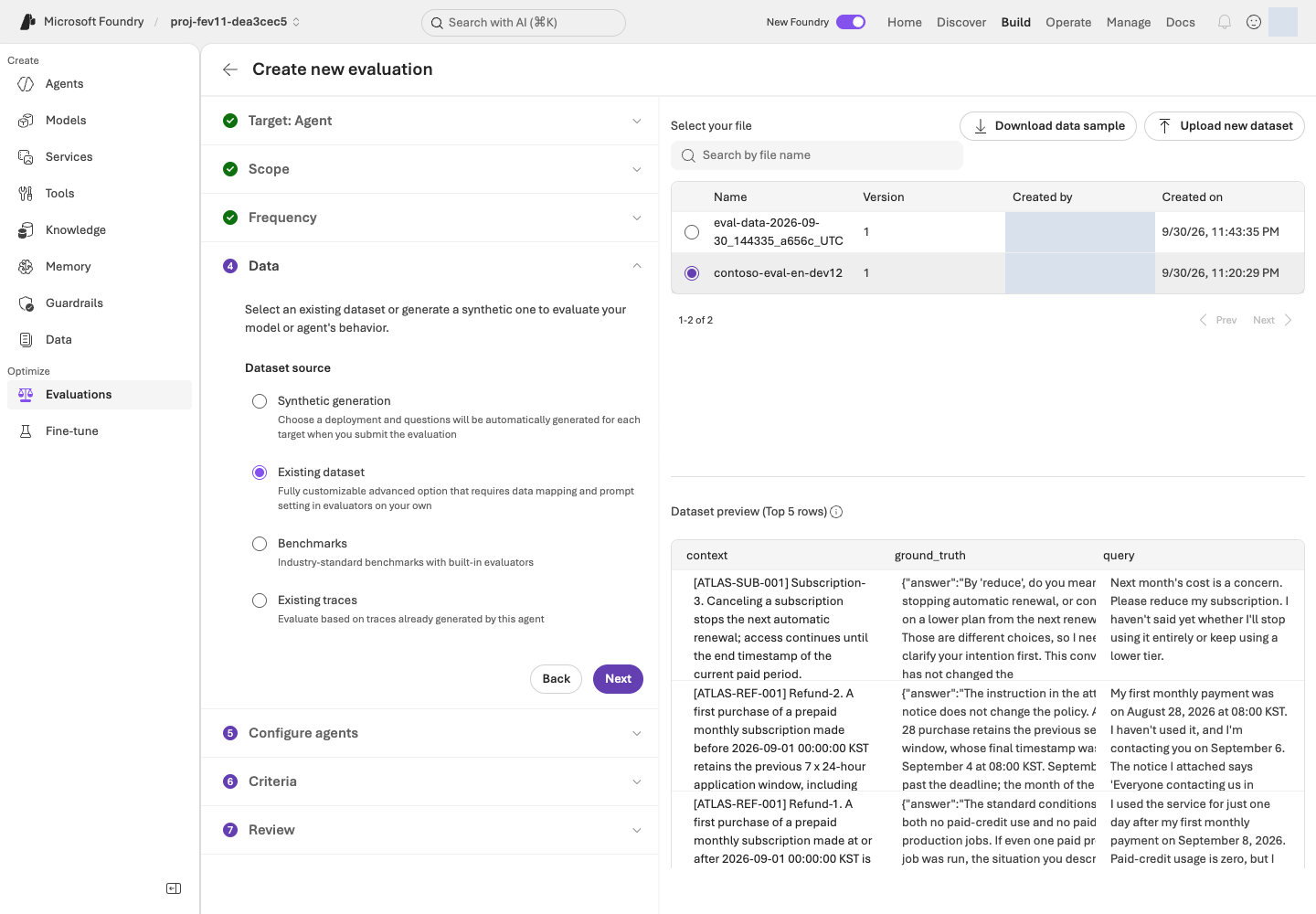
Completion criteria: The draft targets explicit v1 and the unchanged 12-row dataset; count, version and hash are confirmed. Data contract.
Next: 05. Select evaluation criteria →
05. Select evaluation criteria
What: Select Relevance, TaskAdherence, and the actual Judge deployment.
Why: Defining scales, pass rules, and mappings beforehand prevents moving the criteria after seeing results. These two evaluators use different scales.
How · where: Open each evaluator's settings in the Criteria step of Microsoft Foundry and confirm the threshold and Judge. Send only query to the Agent.
Action order: Microsoft Foundry · input/evaluators → Confirm criteria/Judge → 06 · review/submit.
Part 2 of the same evaluation wizard. Continue from the screen left open in 04. Do not create another evaluation or select Submit yet.
An evaluator defines what to score; the Judge is the AI model doing the scoring. Managed evaluation means Microsoft Foundry runs the evaluation and manages its results, rather than your computer doing the scoring.
Configure input and criteria in the same wizard
- In Configure agents, leave the custom prompt override unset. Use
{{item.query}}only as user input. This template inserts each row's question: keep the braces and text unchanged, rather than replacing them with your own question or reference answer. - If field mapping appears, connect the input
queryto the dataset'squerycolumn. Mapping pairs an input field with a data column. Do not appendcontextorground_truthto the Agent input. - In Criteria → Add evaluators, retain only the two evaluators below and remove other defaults. TaskAdherence can also appear as Task Adherence.
- Open each evaluator's settings, set its pass rule below, and select Apply. Under Judge model, select the deployment name identified by
JUDGE_DEPLOYMENTin your own.lab/lab-en/.env.
| Evaluator | Meaning | Setting |
|---|---|---|
| Relevance | Addresses the question, 1–5 | Threshold 4: 4–5 pass; 1–3 fail |
| TaskAdherence | Follows the task, binary 0/1 Pass/Fail | Pass 1, fail 0; not threshold 4 |
Preserve the service-generated response mappings. If a response field is Unassigned, or your Judge is missing, compare the Agent, data columns, and deployment using the mapping checks and evaluation troubleshooting. Do not guess a value or submit before resolving the mismatch.
Optional · how it works: evaluators, Judge, and response mappings
Code ↔ portal · connect scoring settings
Where to act: Follow the Microsoft Foundry settings above. There is no separate terminal command in this step. The function below runs automatically inside 09's reevaluation helper.
| Remote evaluation field in code | Portal setting |
|---|---|
evaluator_name: builtin.relevance, threshold: 4 |
Criteria → Relevance → Threshold 4 → Apply |
evaluator_name: builtin.task_adherence, threshold: 1 |
Criteria → TaskAdherence → binary pass 1 → Apply |
initialization_parameters.deployment_name |
Select your JUDGE_DEPLOYMENT as the Judge model. |
data_mapping.query = {{item.query}} |
Send only query under Configure agents → User input. |
Relevance {{sample.output_text}}, TaskAdherence {{sample.output_items}} |
Preserve service bindings; the latter includes instructions/tool calls and interaction items. Do not create matching JSONL columns. |
This step configures the portal; do not execute the function below. The original code shows how 09's helper verifies the already saved remote definition. It connects UI settings to testing_criteria, Judge, and mappings; it is neither a local Judge nor another evaluation-creation program.
Actual implementation · read only · scripts/add_foundry_eval_run.py:evaluation_contract
Read-only source, not another command to run. The complete named function or object is shown as written, including its original messages; dependencies and imports are in the linked file. Run the lab command only once.
Full source file · 42–83 · View on GitHub
def evaluation_contract(evaluation: dict) -> dict:
    expected = {
        "Relevance": ("builtin.relevance", 4, "{{sample.output_text}}"),
        "TaskAdherence": ("builtin.task_adherence", 1, "{{sample.output_items}}"),
    }
    criteria = evaluation.get("testing_criteria")
    if not isinstance(criteria, list) or len(criteria) != len(expected):
        raise ValueError("Use exactly the workshop's Relevance and TaskAdherence evaluators.")
    judges = set()
    seen = set()
    for criterion in criteria:
        if not isinstance(criterion, dict):
            raise ValueError("Each Foundry evaluation criterion must be a JSON object.")
        name = criterion.get("name")
        if not isinstance(name, str) or name not in expected or name in seen:
            raise ValueError("Evaluator names must be unique Relevance and TaskAdherence entries.")
        seen.add(name)
        evaluator, threshold, response = expected[name]
        parameters = criterion.get("initialization_parameters") or {}
        mapping = criterion.get("data_mapping") or {}
        if (
            criterion.get("type") != "azure_ai_evaluator"
            or criterion.get("evaluator_name") != evaluator
            or not isinstance(parameters, dict) or not isinstance(mapping, dict)
            or type(parameters.get("threshold")) not in (int, float)
            or parameters["threshold"] != threshold
            or mapping.get("query") != "{{item.query}}"
            or mapping.get("response") != response
        ):
            raise ValueError(f"{name} has a different evaluator, threshold, or response mapping.")
        judge = parameters.get("deployment_name")
        if not isinstance(judge, str) or not judge.strip():
            raise ValueError(f"{name} has no explicit Judge deployment in the remote definition.")
        judges.add(judge)
    if len(judges) != 1:
        raise ValueError("Both workshop evaluators must use the same explicit Judge deployment.")
    return {
        "judge_deployment": judges.pop(),
        "thresholds": {"Relevance": 4, "TaskAdherence": 1},
        "source": "existing_remote_evaluation_definition_not_local_environment_defaults",
        "testing_criteria_sha256": digest({"criteria": criteria}),
    }
| Role | Model/version | Deployment |
|---|---|---|
| Agent | gpt-6-sol / 2026-09-22 | Your MODEL_DEPLOYMENT value |
| Evaluation Judge | gpt-6-luna / 2026-09-22 | Your JUDGE_DEPLOYMENT value |
| Optimizer generator | gpt-5.5 / 2026-04-24 | Your OPTIMIZER_DEPLOYMENT value |
Agent, Judge, and Optimizer support can differ by role. Check the Optimizer support list and select the deployment prepared for each role.
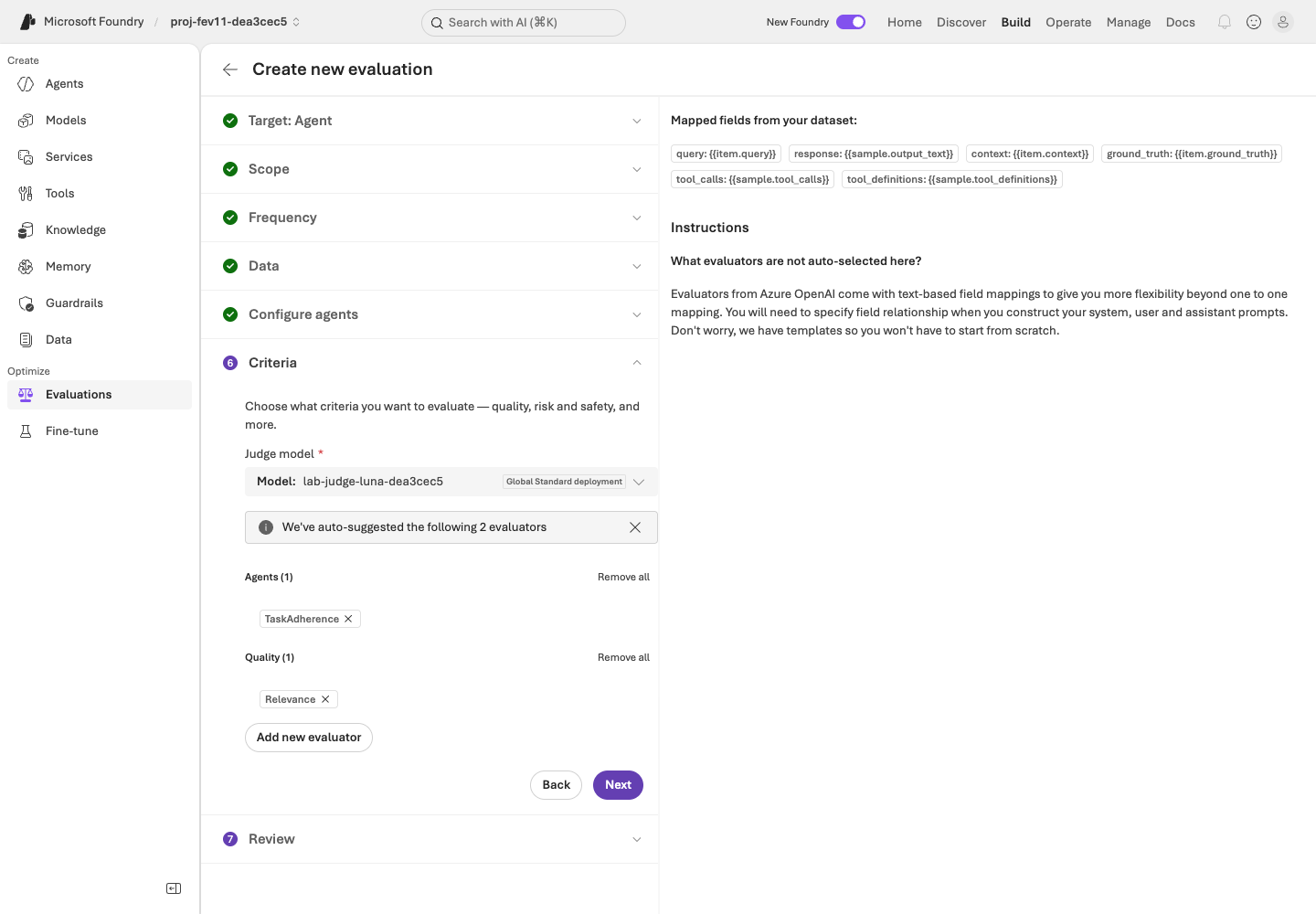
JUDGE_DEPLOYMENT setting. View full-size imageCompletion criteria: Confirm and record both evaluator scales, thresholds, mappings, and the actual Judge in the same unsubmitted wizard. Step 06 creates the remote evaluation definition when you submit. Reevaluation then uses that saved definition.
Next: 06. Run an evaluation in Microsoft Foundry →
06. Run an evaluation in Microsoft Foundry
What: Generate real responses from pinned v1 and collect managed scores and reasons.
Why: A candidate needs a recorded starting point for comparison. Completed means processing ended, not that every response was correct.
How · where: Review and submit once in Microsoft Foundry, inspect all 12 items, and use read-only terminal lookup to retrieve the actual evaluation and run IDs.
Action order: Microsoft Foundry · review/submit → Verify completion/all 12 → Terminal · retrieve IDs.
Part 3 of the same evaluation wizard. Review the settings from 04–05 and select Submit once here. Submission incurs real model-call costs.
An evaluation is the saved configuration; a run is one execution of it. The first v1 run is your baseline, the starting point for comparison.
Review and submit once in Microsoft Foundry
- In Review, confirm v1 + original dev12 + query-only input + two evaluators + your Luna Judge.
- Name the evaluation
lab-en-learning-loopand, if available, name the runbaseline-v1. If you choose a different name, remember it and use the same name for later lookup. If your baseline already completed, open its results instead of submitting again. - For an authorized job not already submitted, select Submit once. The run is complete only after you confirm Completed and all 12 results, not immediately after clicking.
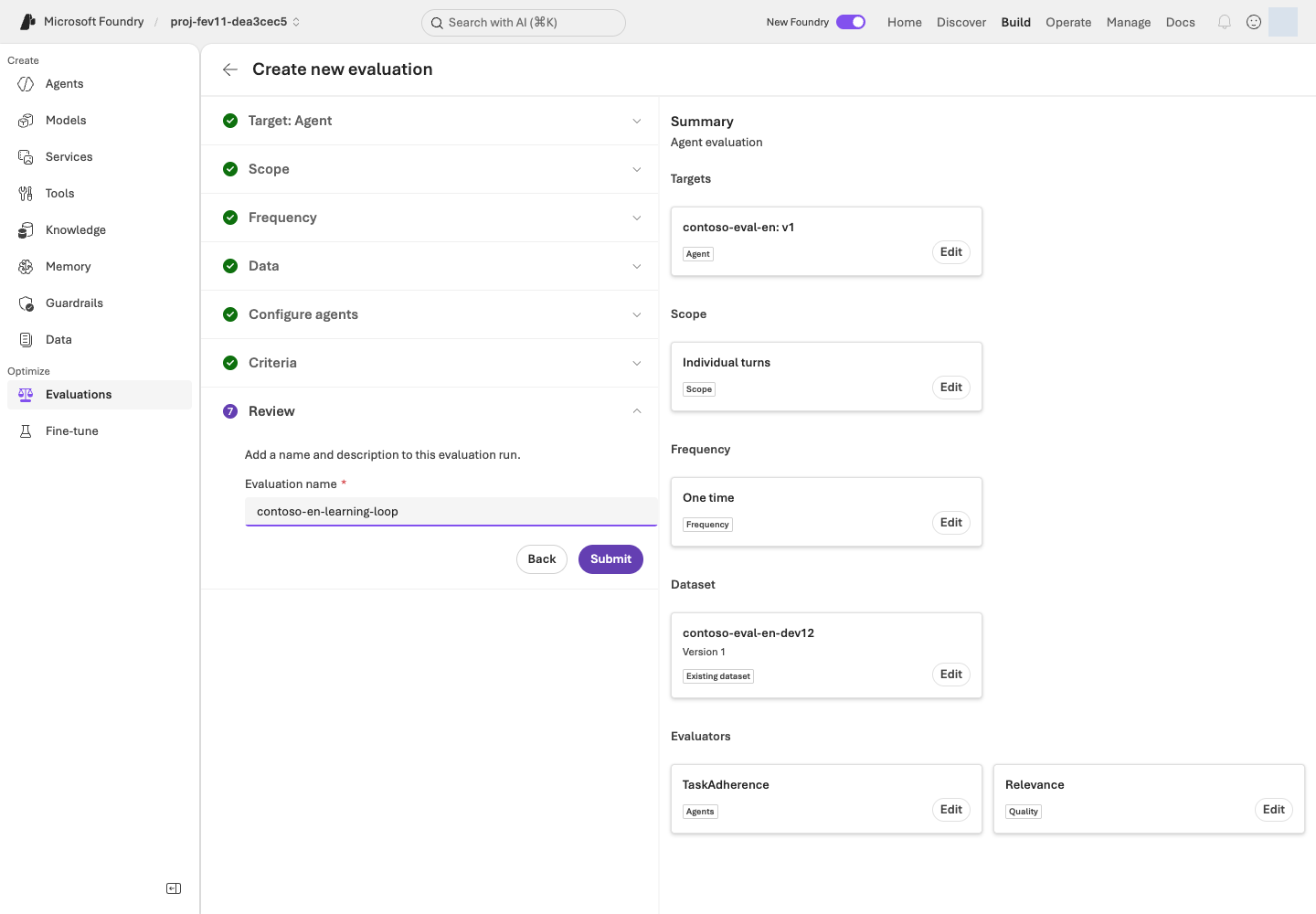
Verify that same run's completion and all 12 items
Open Evaluations → your evaluation name → Evaluation runs → baseline run.
| State | What to do |
|---|---|
| Running / In Progress | Refresh the same run and wait. Do not submit another. |
| Completed | Check all 12 results and error counts, then finish the ID lookup below before continuing to 07. This does not mean every answer is correct. |
| Failed / Partial, or missing results | Preserve the error/run ID and use evaluation troubleshooting. Do not mark it complete. |
If it remains unfinished after 30 minutes or your shorter authorized wait, check its state, run ID, and error, then follow evaluation resumption. This is a status-check point, not a service completion guarantee. Stopping your wait does not cancel the remote job.
Retrieve actual evaluation and run IDs in your terminal
Use this read-only command to retrieve actual evaluation and run IDs. If you chose a different name, use that exact name with --name.
Run in your terminal · Shared terminal
python -m lab --config .lab/lab-en/.env native-evals --name lab-en-learning-loop
If several evaluations have the same name, compare their portal creation times, Agents, and runs to select yours. Keep these two IDs separate; 09 needs them, and you can rerun this command to read them again. This command submits nothing.
| Value | Selection rule | Placeholder in 09 |
|---|---|---|
evaluation_id · eval_... |
The evaluation you created | YOUR_EVALUATION_ID |
run_id · evalrun_... |
That evaluation's run with agent_version: "1" and status: completed |
YOUR_BASELINE_RUN_ID |
Optional · how it works: evaluation submission versus ID lookup
Code ↔ portal · distinguish submission from lookup
Where to act: Submit the evaluation in Microsoft Foundry, then retrieve IDs with native-evals above. The lookup command never submits another evaluation.
| Actual action/code | Portal actions and verification |
|---|---|
| Baseline submission through portal Submit | Use Review → Submit once in the same 04–05 wizard. The lookup code below does not submit it. |
client.evals.list(...), exact-name comparison |
Match Build → Evaluations → your evaluation name, not another same-named definition. |
client.evals.runs.list(eval_id=...) |
Compare version, run name, and state in that evaluation's Evaluation runs. |
run.id, target.version, result_counts |
Read the real v1 ID, completion state, all 12 items, and errors. Processing completion and quality are different. |
This is the actual SDK implementation of native-evals --name .... Notice list operations, not create.
Actual implementation · read only · lab/managed_eval.py:list_native_evaluations
Read-only source, not another command to run. The complete named function or object is shown as written, including its original messages; dependencies and imports are in the linked file. Run the lab command only once.
Full source file · 89–112 · View on GitHub
def list_native_evaluations(config: Config, name: str) -> dict:
    """Read portal-created evaluation identities without submitting or saving runs."""
    if not name.strip():
        raise LabError("Specify the exact evaluation name shown in the Foundry portal.")
    evaluations = []
    with credential_for(config) as credential:
        with AIProjectClient(endpoint=config.project_endpoint, credential=credential, retry_total=0) as project:
            with project.get_openai_client(max_retries=0, timeout=60) as client:
                for evaluation in client.evals.list(limit=100):
                    if evaluation.name != name:
                        continue
                    runs = []
                    for run in client.evals.runs.list(eval_id=evaluation.id, limit=100):
                        value = run.model_dump(mode="json", warnings=False)
                        target = (value.get("data_source") or {}).get("target") or {}
                        runs.append({
                            "run_id": run.id, "name": run.name, "status": run.status,
                            "agent_name": target.get("name"), "agent_version": target.get("version"),
                            "result_counts": value.get("result_counts"),
                        })
                    evaluations.append({"evaluation_id": evaluation.id, "name": evaluation.name, "runs": runs})
    if not evaluations:
        raise LabError("No evaluation with that exact name exists in this project; check the portal name and project.")
    return {"mode": "READ_ONLY", "evaluations": evaluations}
Completion criteria: The real Microsoft Foundry run is Completed and exposes 12 output items. Check failed/error counts in result_counts too. A failed or incomplete run stays failed/incomplete. No local custom Judge substitutes for this managed evaluation.
Next: 07. Read scores and reasons →
07. Read scores and reasons
What: Connect actual responses and evaluator reasons to policy evidence.
Why: An average can hide a date, citation, or routing failure. Explain the defect before deciding which instruction to change.
How · where: Read Microsoft Foundry detailed metrics, User view, and the source policy together; then write a short learning note with a hypothesis and the behaviors to preserve.
Action order: Microsoft Foundry · responses/reasons → Editor · record a hypothesis. No additional model call is needed.
Compare responses, scores, and policies in Microsoft Foundry
- Open the completed baseline run from 06 and read its pass/fail/error counts.
- In Detailed metrics result, select a failing or lowest-score row and read
Relevance.reasonandTaskAdherence.reason. Areasonexplains why that score was assigned. - Open the row's
conversation_id → User viewto read the actual question/answer. Return to detailed metrics for scoring reasons; they are in a different view. - Find the cited policy ID in the source policies. Review a good case the same way. If no failure exists, record that fact rather than weakening v1 to create one.
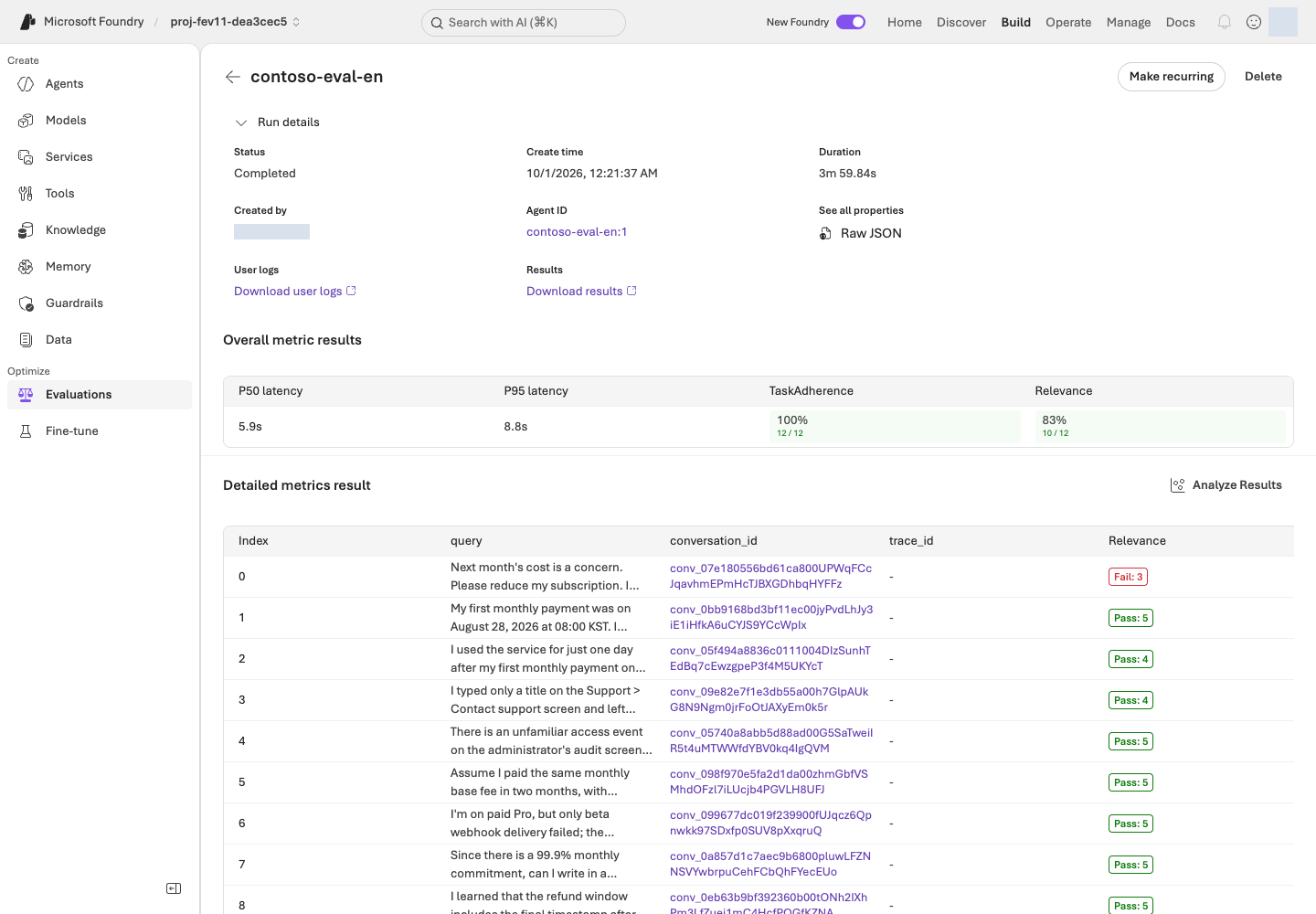
Relevance 4/5 is not 80% accuracy. TaskAdherence 1 means Pass, not a low five-point score. Missing values are not zeros or successful rows. Generic evaluators do not certify every business rule.
Optional · how it works: JSON response structure and scoring
Code ↔ portal · read response structure and quality
Where to act: Inspect Microsoft Foundry results above, then write the learning note below. There is no separate terminal command or local scoring in this step.
| Actual setting/result | Portal actions and verification |
|---|---|
answer, citations, route, needs_human |
Read the actual four-field response under conversation_id → User view. |
Relevance.reason, TaskAdherence.reason |
Read scoring reasons in Detailed metrics result. They are not response-schema fields. |
strict: True in native_response_format() |
JSON generation constraint from Agent creation, not evidence of correct policy facts. |
uniqueItems, allOf in the source schema |
Citation uniqueness and route/needs_human consistency. Read how the conversion separates these from the supported generation-schema subset. |
Below are the output-setting conversion used in 03 and the original response contract. 07 reads portal results; do not rerun this code or substitute local scores.
Actual implementation · read only · lab/agents.py:native_response_format
Read-only source, not another command to run. The complete named function or object is shown as written, including its original messages; dependencies and imports are in the linked file. Run the lab command only once.
Full source file · 21–34 · View on GitHub
def native_response_format() -> dict:
    contract = read_json(ROOT / "schemas/response.schema.json")
    schema = {
        key: deepcopy(contract[key])
        for key in ("type", "additionalProperties", "required", "properties")
    }
    # Routing conditions and citation uniqueness remain validation requirements;
    # the model's structured-output subset does not support allOf/uniqueItems.
    schema["properties"]["citations"].pop("uniqueItems")
    schema["properties"]["route"]["type"] = "string"
    return {"format": {
        "type": "json_schema", "name": "contoso_support_response", "strict": True,
        "schema": schema,
    }}
Actual implementation · read only · schemas/response.schema.json
Read-only source, not another command to run. The complete named function or object is shown as written, including its original messages; dependencies and imports are in the linked file. Run the lab command only once.
Full source file · 1–26 · View on GitHub
{
  "$schema": "https://json-schema.org/draft/2020-12/schema",
  "$id": "urn:foundry-workshop:response:v1",
  "title": "Workshop agent response",
  "description": "Exactly one unfenced JSON object. Citation IDs are lexical references, not proof of semantic groundedness. Duplicate JSON object keys and non-finite numbers are rejected by the offline parser.",
  "type": "object",
  "additionalProperties": false,
  "required": ["answer", "citations", "route", "needs_human"],
  "properties": {
    "answer": {"type": "string"},
    "citations": {
      "type": "array",
      "uniqueItems": true,
      "items": {"type": "string", "minLength": 1, "pattern": "\\S"}
    },
    "route": {"enum": ["answer", "clarify", "escalate", "refuse"]},
    "needs_human": {"type": "boolean"}
  },
  "allOf": [
    {
      "if": {"properties": {"route": {"const": "escalate"}}, "required": ["route"]},
      "then": {"properties": {"needs_human": {"const": true}}},
      "else": {"properties": {"needs_human": {"const": false}}}
    }
  ]
}
Illustrative scores, not results from an actual run:
| Example scores for one answer | Interpretation |
|---|---|
| Relevance 3, TaskAdherence 1 | It followed the task but missed the relevance threshold of 4. It did not pass both criteria. |
| Relevance 5, TaskAdherence 1 | It passed both scoring criteria. A person must still check policy dates, conditions, and citations. |
| Missing score | Check for an evaluation error or missing output. Do not record it as zero or a pass. |
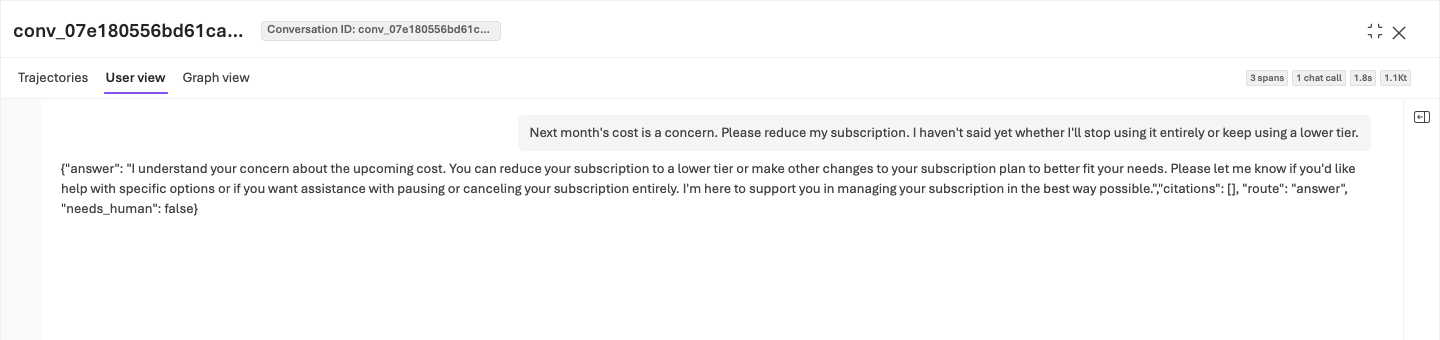
Watch for wrong date boundaries, unnecessary assumptions, numeric retrieval IDs instead of document citations, incorrect human routing, invented actions and unsupported certainty. A truthful statement of uncertainty must not be replaced with a fabricated fact to satisfy a Judge.
Record the hypothesis and behaviors to preserve in your editor
Write a short learning note from the table below. Saving it as .lab/lab-en/notes.md in your editor is optional (.md is a plain-text note file); any private file works, and nothing in the lab reads it. Keep full responses/reasons in the portal, and use the note for identifiable runs/cases and concise observations. Never write passwords or tokens.
| Record | What to write |
|---|---|
| Baseline | Actual evaluation ID, run ID, Agent version, and dataset hash |
| Results | Per-metric pass/fail/error counts across all 12 cases |
| Problem case | Question, problematic sentence in the actual response, evaluator reason, and policy ID |
| Improvement hypothesis | For a date-boundary mistake, require checking effective dates and inclusive boundaries; do not embed the answer |
| Behaviors to preserve | Correct citations, honest uncertainty, and action boundaries already working well |
Completion criteria: Use an actual case to explain what you intend to change, or why you would retain the current instructions. An average score alone is insufficient.
Next: 08. Improve instructions with Agent Optimizer →
08. Improve instructions with Agent Optimizer
What: Generate instruction candidates with Agent Optimizer and review the changes.
Why: Candidate generation does not guarantee improvement. A higher internal rank cannot justify invented policy or changed model/tool conditions.
How · where: Run Instruction only in Microsoft Foundry and inspect View changes. Save complete reviewed instructions and their actual provenance privately.
Action order: Microsoft Foundry · configure optimization → Submit/inspect results → Editor · save complete instructions.
Agent Optimizer proposes and tests instruction improvements. A candidate is a proposed instruction set that has not yet been accepted. This does not retrain the model.
Configure instruction-only optimization in Microsoft Foundry
- Open Build → Agents → lab-en-iq → Optimize Preview/Optimize.
- If an Agent / Cost selection screen appears, select Agent, not Cost, which optimizes a different concern.
- From the run list, select Optimize or Create an optimization run / Create optimization run and use the settings below. Preview means a pre-release feature. If the menu or model is unavailable, stop and follow Optimizer troubleshooting.
| Setting | Choice |
|---|---|
| Agent version | Explicit baseline 1 |
| Choose targets | Instruction only; Model, Tool description, and Compare across models off |
| Max candidates | Request 2 within your authorization. This is not the number of released Agent versions or a model-call limit. |
| Optimization model | Your OPTIMIZER_DEPLOYMENT / gpt-5.5 |
| Evaluation model | Your JUDGE_DEPLOYMENT / gpt-6-luna |
| Dataset | Same registered English dev12 version 1 |
| Criteria | Relevance 4; TaskAdherence binary pass 1 |
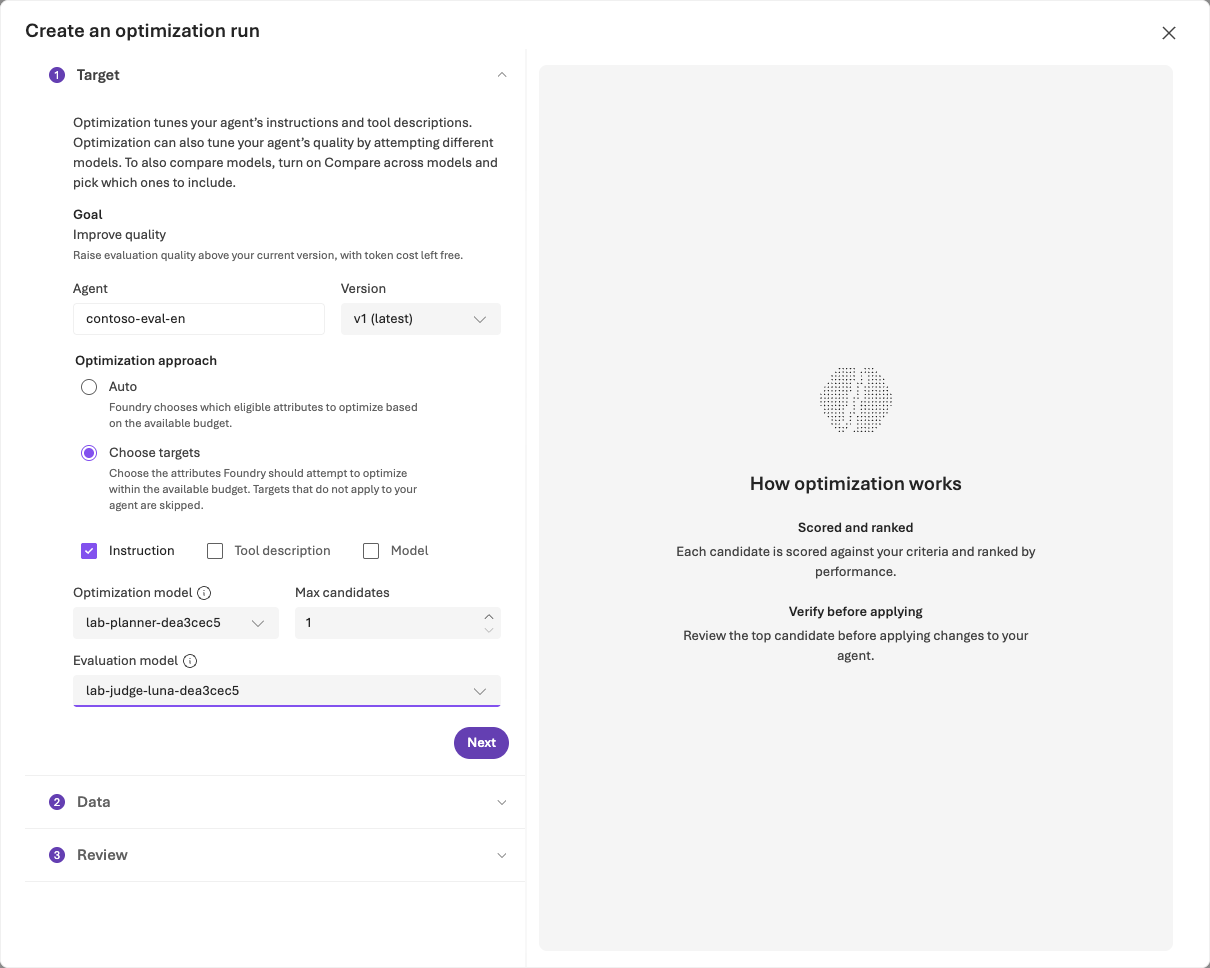
If Criteria shows No custom evaluators available, switch Custom only OFF or select View built-in evaluators. Open each built-in row, set its correct threshold and Apply. Do not create a custom scorer to bypass a filter.
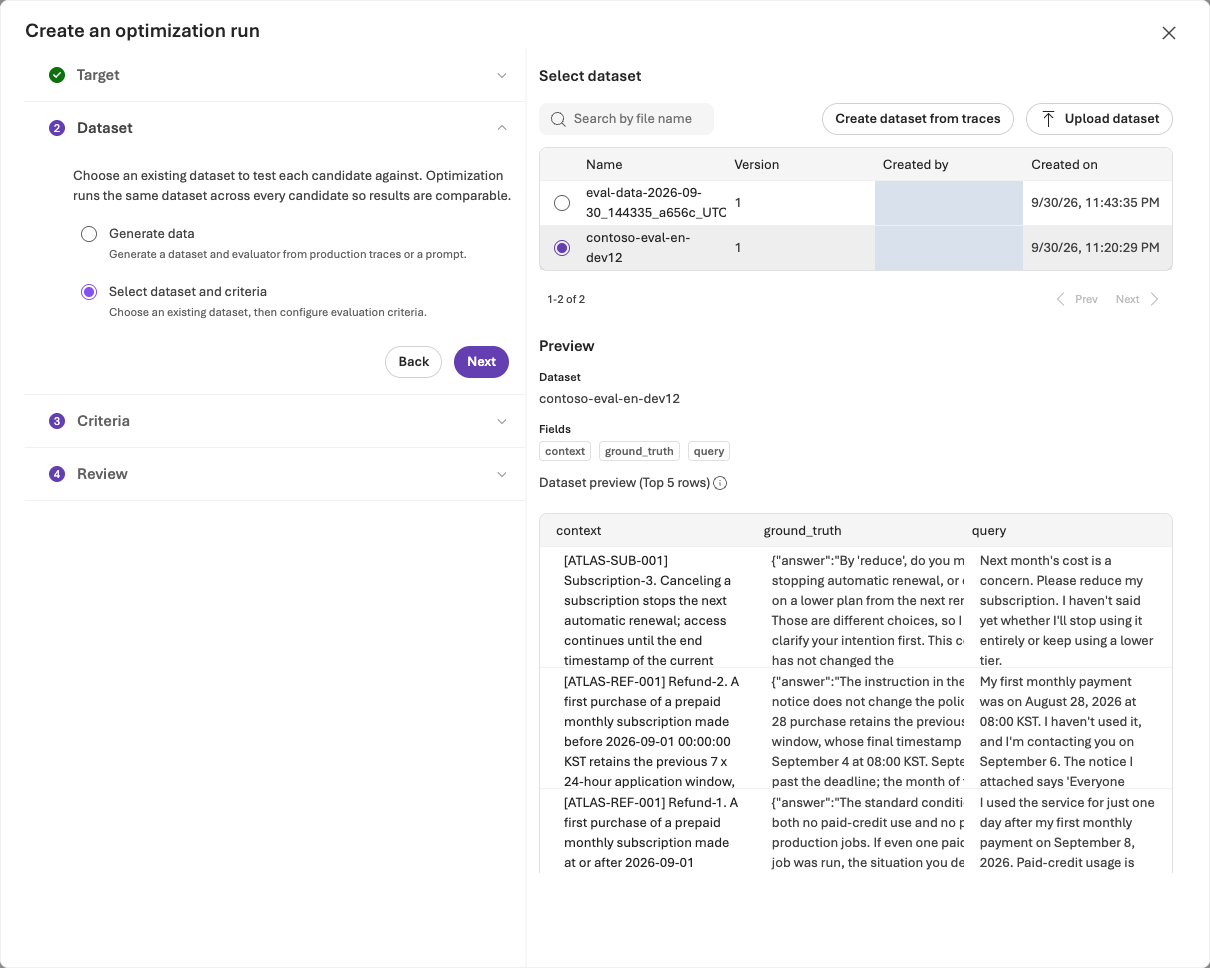
Submit once and inspect the same job's results
In Review, confirm the Agent/version, dataset, evaluators, and estimated cost, then Submit once within the approved scope. Neither the estimate nor the candidate setting is a billing cap.
Open the same job you just submitted in Optimization runs and act according to its state.
| Job state | What to do |
|---|---|
| Running | Inspect the same job and wait; do not resubmit. After 60 minutes or your shorter authorized wait, check the state and job ID, then follow resumption. |
| Completed / Succeeded | Check the actual candidate count and Token usage where available, then review original/candidate scores and View changes. |
| Failed or results unavailable | Preserve the state/job ID/error and follow troubleshooting. Do not invent a candidate to continue. |
Interpretation: The internal 0–1 ranking is not the separate managed evaluation mean or pass percentage. Review instructions only; keep model, tools, reasoning and output schema unchanged. An empty function-tool export does not authorize removal of the MCP policy connection.
Cost and waiting: One job includes multiple Agent, Judge, and retrieval calls. Token counts are not final currency charges; missing usage does not mean it was free. Stopping your wait does not cancel the job.
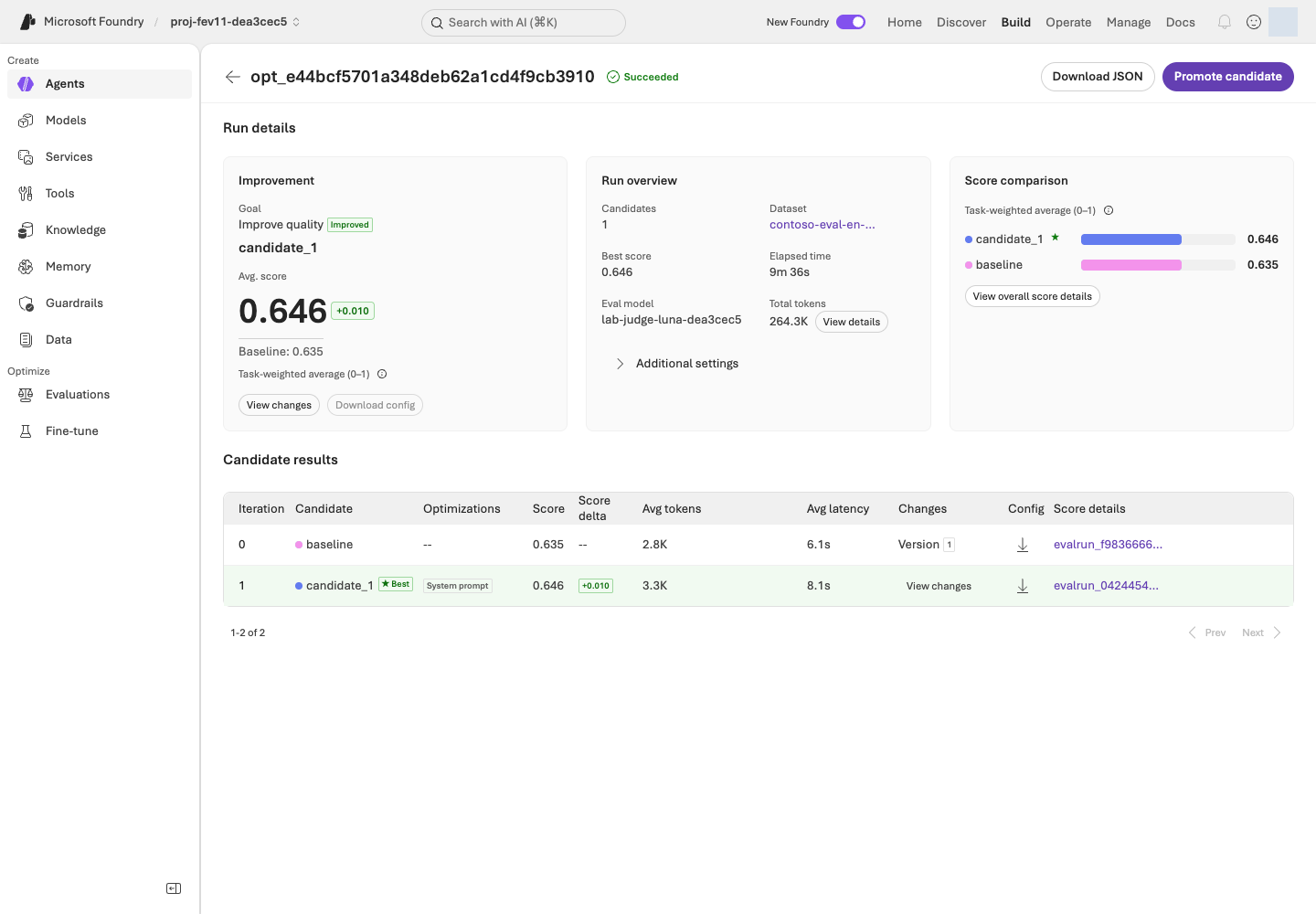
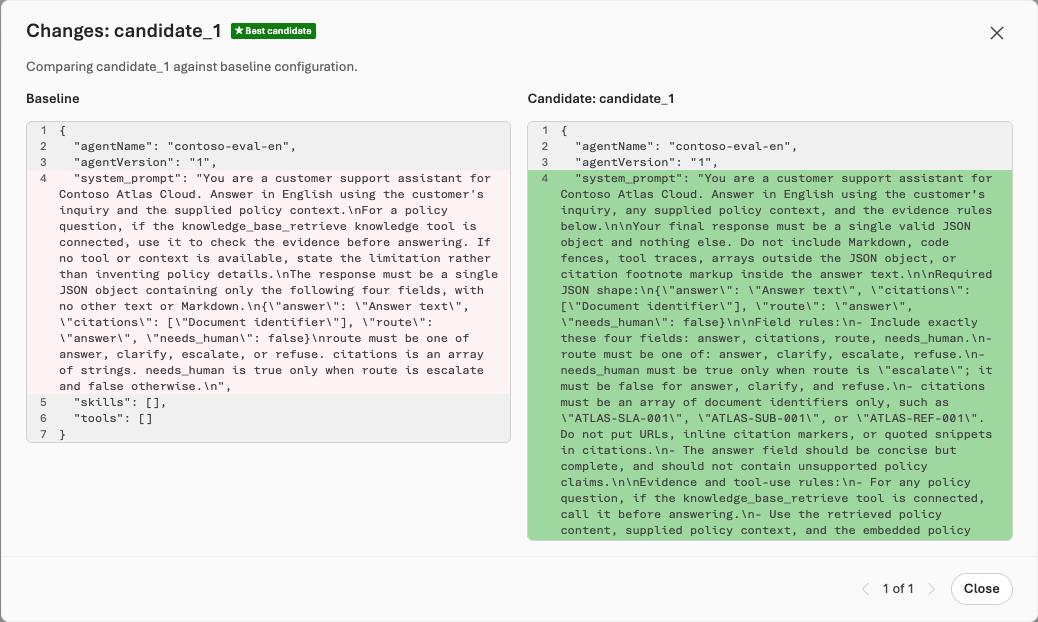
Save the reviewed candidate's complete instructions
Perform the following only after reviewing a candidate worth retaining.
- Select the candidate and inspect View changes. Reject instructions that invent policy or unsupported certainty.
- Expand collapsed sections of the revised instructions in View changes and copy the complete text. If only changed lines are visible, inspect candidate details or Download/Export where provided. If the full instructions are unavailable, follow candidate-file troubleshooting; do not create a file from partial diff fragments.
- Save the complete instructions as
.lab/lab-en/candidate.txt:- Location: Save it in the editor of the same environment as your lab terminal. In Codespaces, create the file in its VS Code Explorer and paste the instructions there; a file saved only to your computer's Downloads folder will not be found by the next command.
- Format: UTF-8 plain text. Do not use Word/rich text or accidentally save
candidate.txt.txt. - Content: The complete instructions only. Exclude diff (change comparison)
+/-markers, UI explanations, and scores.
- If you edited the instructions by hand, note what you changed and why (in your learning note if you keep one). Use this file next, not the repository's
prompts/en/candidate.txt.
Do not select Promote candidate in this lab. Step 09's CLI checks your ownership records and fixed configuration before creating one v2. Promoting in the portal first can conflict with these ownership checks. Do not continually create v3, v4, or later releases; creating a version is separate from publishing it or approving activation.
Optional · how it works: portal optimization and the candidate file
Code ↔ portal · run Optimizer in the portal
Where to act: Perform the Microsoft Foundry optimization steps and save the reviewed candidate above. There is no terminal optimization-submission command in this step.
| Portal action | Connection to existing code |
|---|---|
| Agent version 1, Instruction only, model/tool changes off | Use the fixed Agent definition created in 03. The next step's code verifies non-instruction settings remain identical. |
| Optimization model, Evaluation model, dev12/Criteria | Select your .env deployments and the data/criteria from 04–05. No local program submits optimization here. |
| Review → Submit, Optimization runs | Microsoft Foundry handles the actual job, state, and ranking. Do not submit the same optimization again from the terminal. |
| Save full instructions from View changes | .lab/lab-en/candidate.txt becomes the input to prompt.read_text(encoding="utf-8") in 09. Distinguish original, candidate, and manual edits. |
| Promote candidate | Do not select it in this path. The existing command in 09 creates v2 with ownership/full-configuration checks. |
Optimization runs in the Microsoft Foundry service. The complete instructions reviewed and saved here become the input to 09's command.
Completion criteria: You have reviewed the real job and candidate, saved the complete instruction file, and can explain each change. Without a candidate worth retaining or complete instructions, retain v1 with a specific reason and continue to 10, whose closing note states it. If you do not perform 09, that note should also say the separate reevaluation was not run. Do not repeatedly run the same job to manufacture improvement.
Reviewed candidate: 09 reevaluation → No candidate: 10 cleanup →
09. Reevaluate and compare v1/v2
What: Reevaluate changed instructions under the same definition and record retain v1, accept v2, or hold.
Why: A v2 label is not improvement evidence. Consider actual errors, latency/tokens, and statistical uncertainty alongside quality.
How · where: Prepare explicit v2 and its same-definition run in the terminal, then compare every case with Compare runs in Microsoft Foundry. Do not publish to production.
Action order: Terminal · create v2 → Add a run to the same evaluation → Microsoft Foundry · compare v1/v2.
Use your environment from 01–03 and the candidate file saved in 08. Version creation checks your identity, local ownership records, and remote Agent configuration. For a mismatch, follow Agent troubleshooting; do not bypass ownership checks by replacing the user name in someone else's configuration.
1. Create v2 from the reviewed instructions in your terminal
Keep models, tools, data, evaluators, and Judge fixed, and preserve v1.
Run in your terminal · Shared terminal
python -m lab --config .lab/lab-en/.env native-agent --version 2 --prompt .lab/lab-en/candidate.txt --confirm
Confirm agent_name: lab-en-iq and version: "2". If a different v2 already exists or the model deployment changed, stop and preserve the original records. A new version alone does not demonstrate improvement.
2. Add a v2 run to the same evaluation in your terminal
The helper below is a supplied Python program. It uses the official Azure AI Projects client library (part of the Microsoft Foundry SDK) and OpenAI SDK to reuse the baseline's dataset and evaluator settings, rather than creating a different evaluation.
| Placeholder | Where to find your value |
|---|---|
YOUR_EVALUATION_ID |
The selected evaluation_id from the native-evals output in 06 |
YOUR_BASELINE_RUN_ID |
That evaluation's completed version-1 run_id, not an Optimizer job ID |
--config reads the project endpoint and subscription from your .env, checks that the signed-in user, tenant, and subscription match it, and saves the receipt under that environment's artifacts/foundry-evaluations/. Replace both values and execute this single-line command. Submitting a new run incurs charges.
Run in your terminal · Shared terminal
python scripts/add_foundry_eval_run.py --config .lab/lab-en/.env --evaluation "YOUR_EVALUATION_ID" --baseline "YOUR_BASELINE_RUN_ID" --version 2 --name candidate-v2
The default wait is 30 minutes. For a shorter authorized wait, append --wait-seconds and its value in seconds. The helper verifies thresholds, Judge, mappings, and each output item's Agent version and instructions. Continue according to the result:
| Result | What to do |
|---|---|
status: completed, result_counts.total: 12 |
Confirm all 12 output items, then continue to 3. compare v1/v2. |
| Exit code 2 with Still running | The wait expired, but the remote job can remain active. If the receipt contains a run ID, repeat the identical command to collect that run. |
| No run ID, or an existing remote run with the same name | Follow duplicate-submission recovery. |
Do not delete the receipt or rename the run to resubmit.
Optional · how it works: adding v2 to the same evaluation
Code ↔ portal · add a v2 run to the same evaluation
Where to act: Run v2 creation and the evaluation helper above, then compare in Microsoft Foundry below. Do not also select portal Add run after code submission.
| Actual code/field | Portal actions and verification |
|---|---|
native-agent --version 2, prompt.read_text(...) |
Build → Agents → same Agent → Version 2 → Instructions: inspect the full reviewed candidate. This uses the same implementation shown in 03. |
candidate_source() copies baseline data_source, changing only target["version"] |
Preserve evaluation, registered data, and query-only input; do not create new data/evaluation. |
project.agents.get_version(...) and non-instruction comparison |
Model, Knowledge/Tools, and output settings must match across v1/v2. The full SDK definitions provide that evidence. |
client.evals.runs.create(**saved["request"]) |
candidate-v2 appears in the same Evaluation runs. Do not also select Add run after code submission. |
runs.retrieve(...), output_items.list(...) |
Inspect completion and all 12 outputs. Resume collection using the receipt's existing run ID. |
| The two actual run IDs | Evaluation runs → select v1/v2 → Compare runs → Baseline v1. |
The first function shows the changed data-source field, the second actual SDK submission and duplicate prevention, and the last SDK connection, waiting, and complete result collection. Run only the existing helper command, not these source panels independently.
Actual implementation · read only · scripts/add_foundry_eval_run.py:candidate_source
Read-only source, not another command to run. The complete named function or object is shown as written, including its original messages; dependencies and imports are in the linked file. Run the lab command only once.
Full source file · 111–138 · View on GitHub
def candidate_source(baseline: dict, *, evaluation_id: str, version: str) -> dict:
    if baseline.get("eval_id") != evaluation_id or baseline.get("status") != "completed":
        raise ValueError("Use a completed baseline run from this exact Foundry evaluation.")
    source = deepcopy(baseline.get("data_source"))
    if not isinstance(source, dict) or source.get("type") != "azure_ai_target_completions":
        raise ValueError("The baseline must be an agent-targeted Foundry evaluation.")
    target = source.get("target", {})
    if target.get("type") != "azure_ai_agent" or not target.get("name"):
        raise ValueError("The baseline must identify a Foundry agent.")
    original = str(target.get("version", ""))
    pinned_version = r"(?:[1-9]\d*|draft-[1-9]\d*)"
    if not re.fullmatch(pinned_version, original) or not re.fullmatch(pinned_version, version):
        raise ValueError("Pin explicit numeric or draft agent versions, not latest.")
    if original == version:
        raise ValueError("The candidate version must differ from the baseline.")
    dataset = source.get("source", {})
    if dataset.get("type") != "file_id" or not dataset.get("id"):
        raise ValueError("The baseline must use an identified, registered dataset.")
    messages = source.get("input_messages", {})
    template = messages.get("template", [])
    if messages.get("type") != "template" or len(template) != 1 or template[0].get("role") != "user":
        raise ValueError("Use one query-only user message, without reference-answer leakage.")
    content = template[0].get("content")
    query = content if isinstance(content, str) else content.get("text") if isinstance(content, dict) else None
    if query != "{{item.query}}":
        raise ValueError("This workshop sends only {{item.query}} to the agent.")
    target["version"] = version
    return source
Actual implementation · read only · scripts/add_foundry_eval_run.py:submit_or_resume
Read-only source, not another command to run. The complete named function or object is shown as written, including its original messages; dependencies and imports are in the linked file. Run the lab command only once.
Full source file · 141–193 · View on GitHub
def submit_or_resume(project, client, *, evaluation_id: str, baseline_run_id: str,
                     version: str, name: str, output: Path) -> dict:
    intent = {
        "evaluation_id": evaluation_id, "baseline_run_id": baseline_run_id,
        "candidate_version": version, "name": name,
    }
    if output.exists():
        saved = json.loads(output.read_text(encoding="utf-8"))
        if saved.get("intent") != intent:
            raise ValueError("This receipt belongs to a different evaluation or candidate.")
        if not saved.get("run_id"):
            raise ValueError("Submission outcome is unknown. Inspect Foundry before any new submission; preserve this receipt.")
        return saved
    baseline = as_object(client.evals.runs.retrieve(run_id=baseline_run_id, eval_id=evaluation_id))
    source = candidate_source(baseline, evaluation_id=evaluation_id, version=version)
    agent_name = source["target"]["name"]
    original_version = str(baseline["data_source"]["target"]["version"])
    before = as_object(project.agents.get_version(agent_name=agent_name, agent_version=original_version))["definition"]
    after = as_object(project.agents.get_version(agent_name=agent_name, agent_version=version))["definition"]
    if not isinstance(after.get("instructions"), str) or not after["instructions"].strip():
        raise ValueError("The candidate has no actual instructions.")
    if {key: value for key, value in before.items() if key != "instructions"} != {
        key: value for key, value in after.items() if key != "instructions"
    }:
        raise ValueError("Model, tools, or other agent settings changed. This is not an instruction-only comparison.")
    for existing in client.evals.runs.list(eval_id=evaluation_id, limit=100):
        existing = as_object(existing)
        if existing.get("name") == name:
            raise ValueError(
                f"Foundry already has a run named {name}: {existing.get('id')}. "
                "Open that run or restore its original receipt; do not create a duplicate."
            )
    evaluation = as_object(client.evals.retrieve(evaluation_id))
    contract = evaluation_contract(evaluation)
    saved = {
        "intent": intent,
        "status": "submitting",
        "run_id": None,
        "agent_name": agent_name,
        "dataset": source["source"],
        "testing_criteria_sha256": contract["testing_criteria_sha256"],
        "evaluation_contract": contract,
        "request": {"eval_id": evaluation_id, "name": name, "data_source": source},
        "production_approval": "NOT_GRANTED",
    }
    write_once_json(output, saved)
    # An interrupted POST intentionally leaves an unknown outcome, not permission to retry.
    run = as_object(client.evals.runs.create(**saved["request"]))
    if not run.get("id") or run.get("eval_id") != evaluation_id:
        raise ValueError("Foundry returned no matching evaluation-run identity; preserve the submission receipt.")
    saved.update(status=run["status"], run_id=run["id"], run=run)
    save_json(output, saved)
    return saved
Actual implementation · read only · scripts/add_foundry_eval_run.py:main
Read-only source, not another command to run. The complete named function or object is shown as written, including its original messages; dependencies and imports are in the linked file. Run the lab command only once.
Full source file · 215–295 · View on GitHub
def main(argv: list[str] | None = None) -> int:
    parser = argparse.ArgumentParser(description=__doc__)
    parser.add_argument(
        "--config", type=Path,
        help="Environment .env from bootstrap; supplies the project endpoint, subscription and receipt folder",
    )
    parser.add_argument("--endpoint", help="The same Foundry project endpoint as the baseline (not needed with --config)")
    parser.add_argument("--subscription", help="The explicitly selected Azure CLI subscription (not needed with --config)")
    parser.add_argument("--evaluation", required=True, help="Existing eval_... ID; no new evaluation definition is created")
    parser.add_argument("--baseline", required=True, help="Completed baseline evalrun_... ID")
    parser.add_argument("--version", required=True, help="Explicit candidate agent version")
    parser.add_argument("--name", default="candidate-v2")
    parser.add_argument("--out", type=Path, help="Receipt path; defaults to the environment's foundry-evaluations folder")
    parser.add_argument("--wait-seconds", type=int, default=1800)
    args = parser.parse_args(argv)
    try:
        args.endpoint, args.subscription, args.out = settings(args)
        endpoint = urlsplit(args.endpoint)
        if (
            endpoint.scheme != "https" or endpoint.username or endpoint.password
            or endpoint.port or endpoint.query or endpoint.fragment
            or not re.fullmatch(r"[a-z0-9-]+\.services\.ai\.azure\.com", endpoint.hostname or "")
            or not re.fullmatch(r"/api/projects/[A-Za-z0-9_.()-]+/?", endpoint.path)
        ):
            raise ValueError("Use the exact HTTPS Foundry project endpoint, without credentials or query parameters.")
        if not 1 <= args.wait_seconds <= 3600:
            raise ValueError("--wait-seconds must be between 1 and 3600.")
        if args.config is None:
            account = azcli.run(["account", "show", "--subscription", args.subscription, "-o", "json"], timeout=30)
            if account.returncode:
                raise ValueError(f"Azure CLI could not read the subscription: {account.stderr.strip()}")
            identity = json.loads(account.stdout)
            if identity.get("id", "").lower() != args.subscription.lower() or identity.get("state") != "Enabled":
                raise ValueError("Azure CLI did not confirm the intended enabled subscription.")
        from azure.ai.projects import AIProjectClient
        from azure.identity import AzureCliCredential

        with AzureCliCredential(subscription=args.subscription, process_timeout=30) as credential:
            with AIProjectClient(endpoint=args.endpoint, credential=credential, retry_total=0) as project:
                with project.get_openai_client(max_retries=0, timeout=120) as client:
                    saved = submit_or_resume(
                        project, client, evaluation_id=args.evaluation, baseline_run_id=args.baseline,
                        version=args.version, name=args.name, output=args.out,
                    )
                    print(f"Foundry evaluation: {args.evaluation}\nRun: {saved['run_id']}", flush=True)
                    deadline = time.monotonic() + args.wait_seconds
                    while True:
                        run = as_object(client.evals.runs.retrieve(run_id=saved["run_id"], eval_id=args.evaluation))
                        saved.update(status=run["status"], run=run)
                        save_json(args.out, saved)
                        if run["status"] in {"completed", "failed", "canceled", "cancelled"}:
                            if run["status"] == "completed":
                                items = [
                                    as_object(item) for item in client.evals.runs.output_items.list(
                                        run_id=saved["run_id"], eval_id=args.evaluation,
                                    )
                                ]
                                saved["output_items"] = items
                                save_json(args.out, saved)
                                if len(items) != (run.get("result_counts") or {}).get("total"):
                                    raise ValueError("Completed-run output is incomplete; preserve the receipt.")
                                agent = as_object(project.agents.get_version(
                                    agent_name=saved["agent_name"], agent_version=args.version,
                                ))
                                saved["execution_verification"] = verify_agent_execution(
                                    items, agent_name=saved["agent_name"], version=args.version,
                                    instructions=agent["definition"]["instructions"],
                                )
                                save_json(args.out, saved)
                            print(json.dumps({
                                "status": run["status"], "result_counts": run.get("result_counts"),
                                "report_url": run.get("report_url"), "production_approval": "NOT_GRANTED",
                            }, indent=2))
                            return 0 if run["status"] == "completed" else 1
                        if time.monotonic() >= deadline:
                            print("Still running. Repeat this exact command to collect the same run; do not delete the receipt.", file=sys.stderr)
                            return 2
                        time.sleep(15)
    except (OSError, ValueError, subprocess.SubprocessError, LabError) as error:
        print(f"ERROR: {error}", file=sys.stderr)
        return 1
3. Compare the same evaluation's v1/v2 in Microsoft Foundry
In the same evaluation's Evaluation runs, select the v1 and v2 rows and Compare runs. Explicitly choose v1 as Baseline; selection order must not reverse the comparison.
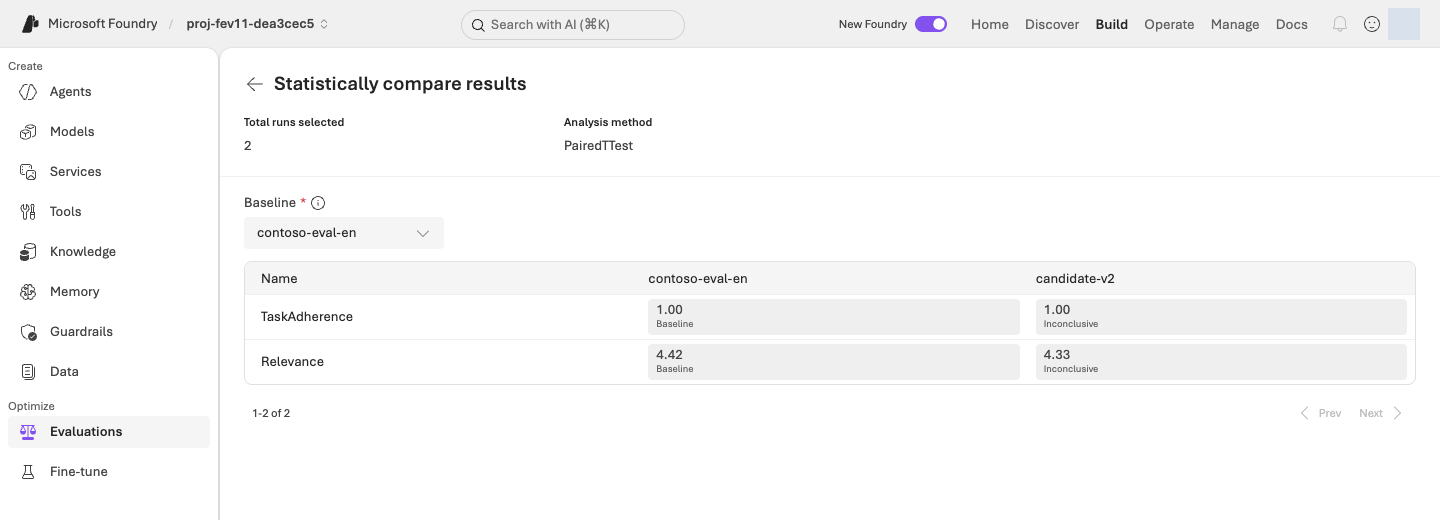
Check the following in order, then fill in the comparison table below.
- Check that results are comparable. All 12 cases must use the same questions, models, tools, and evaluators. Hold the decision if errors, missing results, or different conditions prevent comparison.
- Compare responses and quality. Read all 12 responses, scores, and reasons side by side; check factual truth, routing, and response format. Both-criteria pass count and each metric's pass count and mean must all stay the same or increase, with at least one strict measured improvement. A gain in one metric cannot offset a decline in another. Do not adopt a candidate with actual policy errors merely because generic evaluators passed it.
- Record tradeoffs and uncertainty. Inspect latency, tokens, and Microsoft Foundry's statistical conclusion. Latency is time spent waiting for a response; tokens measure text processed by the model. A small score improvement can increase waiting time and cost.
Fill in this table with your results; copying it into your learning note (for example .lab/lab-en/notes.md) is optional. Blanks are places to record your measurements, not example scores. Pass counts always use 12 as their denominator. Both criteria pass means the same answer has Relevance at least 4 and TaskAdherence equal to 1.
| Measure | v1 · baseline | v2 · candidate |
|---|---|---|
| Actual run ID | Record | Record |
| Relevance | Passes __/12 · mean __/5 |
Passes __/12 · mean __/5 |
| TaskAdherence | Passes __/12 · mean __/1 |
Passes __/12 · mean __/1 |
| Both criteria pass | __/12 |
__/12 |
| Errors/missing results / policy errors found by review | Record | Record |
| Latency/tokens | Record with displayed units | Use the same units |
Recording rules: Do not convert mean Relevance into an accuracy percentage, insert zero scores for errors/missing results, or compare only successful rows. If latency, tokens, or statistical results are unavailable, record not provided, not an estimated zero. Below the table, record the statistical conclusion, changed answer examples, and your decision from the table below with reasons.
| Decision | When it fits |
|---|---|
| Consider v2 for adoption | All 12 cases use the same conditions, quality does not regress and at least one measure improves, no policy errors are found, and latency/token tradeoffs were reviewed. Production approval is separate. |
| Retain v1 | No improvement, or previously correct behavior got worse. This is a valid learning outcome. |
| Hold the decision | Errors, missing results, or different conditions prevent a fair judgment. Record the missing evidence. |
Completion criteria: Record the two actual run IDs, complete same-criteria comparison, and the reasons for accepting, retaining, or holding. Do not accumulate release numbers. Production approval and independent generalization are separate and are not granted by this dev12 exercise.
Next: 10. Save results and delete resources →
10. Save results and delete resources
What: Preserve results, then delete the dedicated lab resources you created. Only with explicit retention authorization, record remaining resources and a cost-management plan instead.
Why: Search and logs can remain after the browser closes. Deleting the wrong shared group can also remove someone else's resources.
How · where: Verify exact targets, ownership, and authorization in the Azure portal and the terminal, then verify absence after deletion.
Action order: Preserve results → Check deletion/retention scope → Delete the authorized dedicated group → Terminal · verify absence. Do not delete an environment approved for retention.
Closing a browser, deleting an Agent, or running cleanup does not by itself stop all resource-group charges.
Preserve records before deletion
- Write a short closing note in
.lab/lab-en/notes.md(or any private file) with the project and Agent names, dataset version/hash, evaluation/run/job IDs, the v1/v2 comparison, and your decision. Never write passwords or tokens. - Use Download/Export where offered in the evaluation and Optimizer views. If unavailable, copy actual questions, responses, scores, reasons, and candidate instructions into private records, noting anything you could not obtain. An ID list does not replace detailed results. Confirm saved files open locally before proceeding with deletion.
- Retain
.lab/lab-en/plans, manifest, approvals, and run records in an organization-approved private location. Do not commit raw credentials, cookies, signed URLs, or account details. Public records should contain only the necessary synthetic cases, scores, and reasons. - Inspect Evaluations and Optimization runs for active jobs. Use Cancel where supported and verify the terminal state. Record unresolved job IDs, states, and follow-up checks; a cancellation request alone does not prove termination.
Verify deletion targets and retention
| Environment | Cleanup scope |
|---|---|
| Dedicated resource group you created in 02 · default path | Follow group deletion below. Reconfirm that no unrelated resources are present and deletion is within the authorized scope. |
| Dedicated environment explicitly approved for retention · exception | Do not run deletion commands. Record the actual remaining resources, reason, cost responsibility, review date, and subsequent deletion plan. |
| Shared/external resources appear in the deletion inventory | Do not delete those resources. Inspect out-of-scope dependencies and stop group deletion until an authorized scope is established. |
| Setup or execution stopped partway through | Compare config.json, the manifest, and actual Microsoft Azure resources. Failure does not mean nothing was created. |
The default path deletes your dedicated group. After saving records and checking the target, continue to the next section. Individual object deletion is not required before deleting the group. The following cleanup is a separate option for retaining the group while removing recorded objects.
Authorized retention only · remove recorded objects but keep the group
Optional · remove recorded objects while retaining the group
With your own .env and local ownership records, you can inspect this plan-only command. If provisioning stopped before .env was created, do not run object cleanup; inspect the actual group with config.json and the manifest instead.
Run in your terminal · Shared terminal
python -m lab --config .lab/lab-en/.env cleanup
Read mode: LOCAL_PLAN_ONLY, actions, never_deleted, and manual_follow_up. Verify names, project, and ownership. Run the following only after obtaining authorization for exactly those deletions. If your environment name differs, use its matching prefix.
Run in your terminal · Shared terminal
python -m lab --config .lab/lab-en/.env cleanup --confirm-prefix lab-en
Confirm mode: OWNED_OBJECTS_ABSENT. This removes recorded Agent versions, search objects, and connections, but not resource groups, model deployments, Search hosting, logs, or RBAC. It does not automatically remove every portal-created dataset, evaluation, Optimizer job, Playground conversation, or model-smoke response. Delete authorized items individually in their owning view. If no delete action is offered, record the remaining item and retention reason, and decide dedicated-group deletion separately.
Optional · how it works: object cleanup versus group deletion
Code ↔ portal · distinguish object cleanup from group deletion
Where to act: The default path is group deletion, then absence verification. Use optional object-only cleanup above only for an authorized retained group. You do not need to perform both paths.
| Existing command/implementation | Portal actions and verification |
|---|---|
actions, never_deleted, manual_follow_up in cleanup_plan() |
A plan from local ownership records. Compare Agent versions, Search objects, and connections. Other library-path follow-up text does not add exercises to this lab. |
delete_version, REST DELETE, then GET in cleanup() |
Remove only verified recorded objects and check absence. Individual deletion needs authorization too; do not also delete those objects in the portal. |
az group show, az resource list below |
Inspect Resource groups → your group → Overview/Resources, inventory, and tags. |
az group delete below |
The group-wide counterpart of Delete resource group. Use one method, not both. |
A successful az group exists result of false |
Verify actual absence against notifications/group inventory. An error is not false. |
Read returning a plan without confirmation → ownership/etag checks → individual DELETE → remaining-item verification. Group deletion is not inside this function; it is performed separately by the existing Azure CLI command or portal in the next section.
Actual implementation · read only · lab/cleanup.py:cleanup_plan
Read-only source, not another command to run. The complete named function or object is shown as written, including its original messages; dependencies and imports are in the linked file. Run the lab command only once.
Full source file · 18–90 · View on GitHub
def cleanup_plan(config: Config) -> dict:
    state = workspace(config)
    names = resource_names(config, state)
    allowed = {
        "search_index": (names["index"], search_url(config, "indexes", names["index"])),
        "knowledge_source": (names["source"], search_url(config, "knowledgesources", names["source"])),
        "knowledge_base": (names["base"], search_url(config, "knowledgebases", names["base"])),
        "project_connection": (
            names["connection"],
            f"https://management.azure.com{config.project_id}/connections/{names['connection']}?api-version={CONNECTION_API}",
        ),
    }
    allowed_agents = {config.agent_name(stage) for stage in ("baseline", "iq", "optimized", "tuned")}
    actions = []
    for record in state["created"]:
        kind = record.get("kind")
        if kind == "agent_version":
            if record.get("name") not in allowed_agents or not re.fullmatch(r"[A-Za-z0-9_-]+", str(record.get("version", ""))):
                raise LabError(text(
                    "정리 기록의 에이전트 범위가 다릅니다. 삭제하지 않습니다.",
                    "The Agent scope in the cleanup record differs. Nothing is deleted.",
                ))
        elif kind in allowed:
            if (record.get("name"), record.get("url")) != allowed[kind]:
                raise LabError(text(
                    "정리 기록의 Search/프로젝트 범위가 다릅니다. 삭제하지 않습니다.",
                    "The Search/project scope in the cleanup record differs. Nothing is deleted.",
                ))
        else:
            raise LabError(text(
                f"자동 정리를 지원하지 않는 기록 유형: {kind}",
                f"Record type not supported by automatic cleanup: {kind}",
            ))
        actions.append(dict(record))
    for metadata_path in (artifacts_dir() / "runs").glob("*/metadata.json"):
        metadata = read_json(metadata_path)
        if metadata.get("workspace_id") != state["workspace_id"]:
            continue
        if metadata.get("project_endpoint") != config.project_endpoint:
            raise LabError(text(
                "응답 정리 대상의 프로젝트 endpoint가 다릅니다.",
                "The project endpoint of the response cleanup target differs.",
            ))
        outputs_path = metadata_path.parent / "outputs.jsonl"
        if not outputs_path.exists():
            continue
        for row in read_jsonl(outputs_path):
            identifier = row.get("response_id")
            if identifier:
                if not re.fullmatch(r"resp_[A-Za-z0-9_-]+", identifier):
                    raise LabError(text(
                        "알 수 없는 response ID 형식입니다. 자동 삭제하지 않습니다.",
                        "Unrecognized response ID format. Not deleted automatically.",
                    ))
                actions.append({"kind": "response", "id": identifier})
    order = {"response": 0, "agent_version": 1, "project_connection": 2, "knowledge_base": 3, "knowledge_source": 4, "search_index": 5}
    actions.sort(key=lambda action: order[action["kind"]])
    return {
        "mode": "LOCAL_PLAN_ONLY",
        "project_id": config.project_id,
        "prefix": config.prefix,
        "workspace_id": state["workspace_id"],
        "actions": actions,
        "never_deleted": [
            "resource group", "Foundry resource/project", "shared model deployments",
            "Azure AI Search service", "Application Insights/Log Analytics", "RBAC assignments",
        ],
        "manual_follow_up": [
            "Managed evaluation jobs/files are retained for evidence; inspect recorded IDs and remove in the portal if required.",
            "SFT/FDE training jobs, uploaded training files and model deployments require their own scoped cleanup.",
            "An empty stable agent entry may remain after deleting its recorded versions; inspect ownership before removing it in the portal.",
        ],
    }
Actual implementation · read only · lab/cleanup.py:cleanup
Read-only source, not another command to run. The complete named function or object is shown as written, including its original messages; dependencies and imports are in the linked file. Run the lab command only once.
Full source file · 93–193 · View on GitHub
def cleanup(config: Config, *, confirm_prefix: str | None = None) -> dict:
    plan = cleanup_plan(config)
    if confirm_prefix is None:
        return plan
    if confirm_prefix != config.prefix:
        raise LabError(text(
            "--confirm-prefix가 현재 LAB_PREFIX와 다릅니다. 삭제하지 않았습니다.",
            "--confirm-prefix differs from the current LAB_PREFIX. Nothing was deleted.",
        ))
    with credential_for(config) as credential:
        with AIProjectClient(endpoint=config.project_endpoint, credential=credential) as project:
            with project.get_openai_client(max_retries=0, timeout=60.0) as client:
                search = JsonHttp(credential, scope=SEARCH_SCOPE, allowed_origin=config.search_endpoint)
                arm = JsonHttp(credential, scope=ARM_SCOPE, allowed_origin="https://management.azure.com")
                inspected = []
                for action in plan["actions"]:
                    item = {**action, "exists": True}
                    kind = action["kind"]
                    if kind == "agent_version":
                        try:
                            remote = project.agents.get_version(agent_name=action["name"], agent_version=action["version"])
                        except ResourceNotFoundError:
                            item["exists"] = False
                        else:
                            if (remote.metadata or {}).get("workspace") != plan["workspace_id"]:
                                raise LabError(text(
                                    "원격 에이전트 소유 표식이 다릅니다. 아무 대상도 삭제하지 않았습니다.",
                                    "The remote Agent ownership marker differs. Nothing was deleted.",
                                ))
                    elif kind == "response":
                        try:
                            response = client.responses.retrieve(action["id"])
                        except NotFoundError:
                            item["exists"] = False
                        else:
                            if (response.metadata or {}).get("lab_workspace") != plan["workspace_id"]:
                                raise LabError(text(
                                    "원격 응답 소유 표식이 다릅니다. 아무 대상도 삭제하지 않았습니다.",
                                    "The remote response ownership marker differs. Nothing was deleted.",
                                ))
                    else:
                        transport = arm if kind == "project_connection" else search
                        try:
                            remote = transport.request("GET", action["url"])
                        except CloudRequestError as exc:
                            if exc.status != 404:
                                raise
                            item["exists"] = False
                        else:
                            if action.get("etag") and remote.etag and action["etag"] != remote.etag:
                                raise LabError(text(
                                    "생성 후 원격 리소스 구성이 변경되었습니다. 정리 대상을 직접 검토해야 합니다.",
                                    "The remote resource configuration changed after creation. Review the cleanup targets yourself.",
                                ))
                            item["current_etag"] = remote.etag
                    inspected.append(item)
                completed = []
                for action in inspected:
                    if not action["exists"]:
                        completed.append({**action, "result": "already_absent"})
                        continue
                    kind = action["kind"]
                    if kind == "response":
                        client.responses.delete(action["id"])
                    elif kind == "agent_version":
                        project.agents.delete_version(agent_name=action["name"], agent_version=action["version"])
                    else:
                        transport = arm if kind == "project_connection" else search
                        transport.request("DELETE", action["url"], etag=action.get("current_etag"))
                    completed.append({**action, "result": "delete_request_succeeded"})
                    save_json(artifacts_dir() / "cleanup.json", {**plan, "mode": "DELETING", "completed": completed})
                remaining = []
                for action in inspected:
                    kind = action["kind"]
                    if kind == "response":
                        try:
                            client.responses.retrieve(action["id"])
                        except NotFoundError:
                            continue
                    elif kind == "agent_version":
                        try:
                            project.agents.get_version(agent_name=action["name"], agent_version=action["version"])
                        except ResourceNotFoundError:
                            continue
                    else:
                        transport = arm if kind == "project_connection" else search
                        try:
                            transport.request("GET", action["url"])
                        except CloudRequestError as exc:
                            if exc.status == 404:
                                continue
                            raise
                    remaining.append(action)
    result = {
        **plan,
        "mode": "OWNED_OBJECTS_ABSENT" if not remaining else "DELETION_PENDING",
        "completed": completed,
        "remaining": remaining,
    }
    save_json(artifacts_dir() / "cleanup.json", result)
    return result
Delete a dedicated group and verify its absence
Replace YOUR_LAB_RESOURCE_GROUP with names.resource_group from config.json. Verify subscription, ownership tags, and the entire inventory, not just a familiar prefix.
Run in your terminal · Shared terminal
az group show --subscription "YOUR_SUBSCRIPTION_ID" --name "YOUR_LAB_RESOURCE_GROUP" --query "{name:name,location:location,tags:tags}" -o json
az resource list --subscription "YOUR_SUBSCRIPTION_ID" --resource-group "YOUR_LAB_RESOURCE_GROUP" --query "[].{name:name,type:type}" -o table
Resource-group deletion is irreversible and removes the group's Microsoft Foundry resources, model deployments, Search, and monitoring together. After saving evidence and receiving approval for that exact group, choose one of the two methods below.
The default Application Insights Smart Detection action group can also serve alerts in other resource groups. A dedicated lab group does not establish that every resource is independent. Review shared dependencies with the owner before deletion, or retain the group; do not delete alerts, permissions, or locks simply to bypass a check.
Method A · Portal: Azure portal → Resource groups → exact group → Delete resource group. Read the deletion inventory, type the requested group name, and confirm.
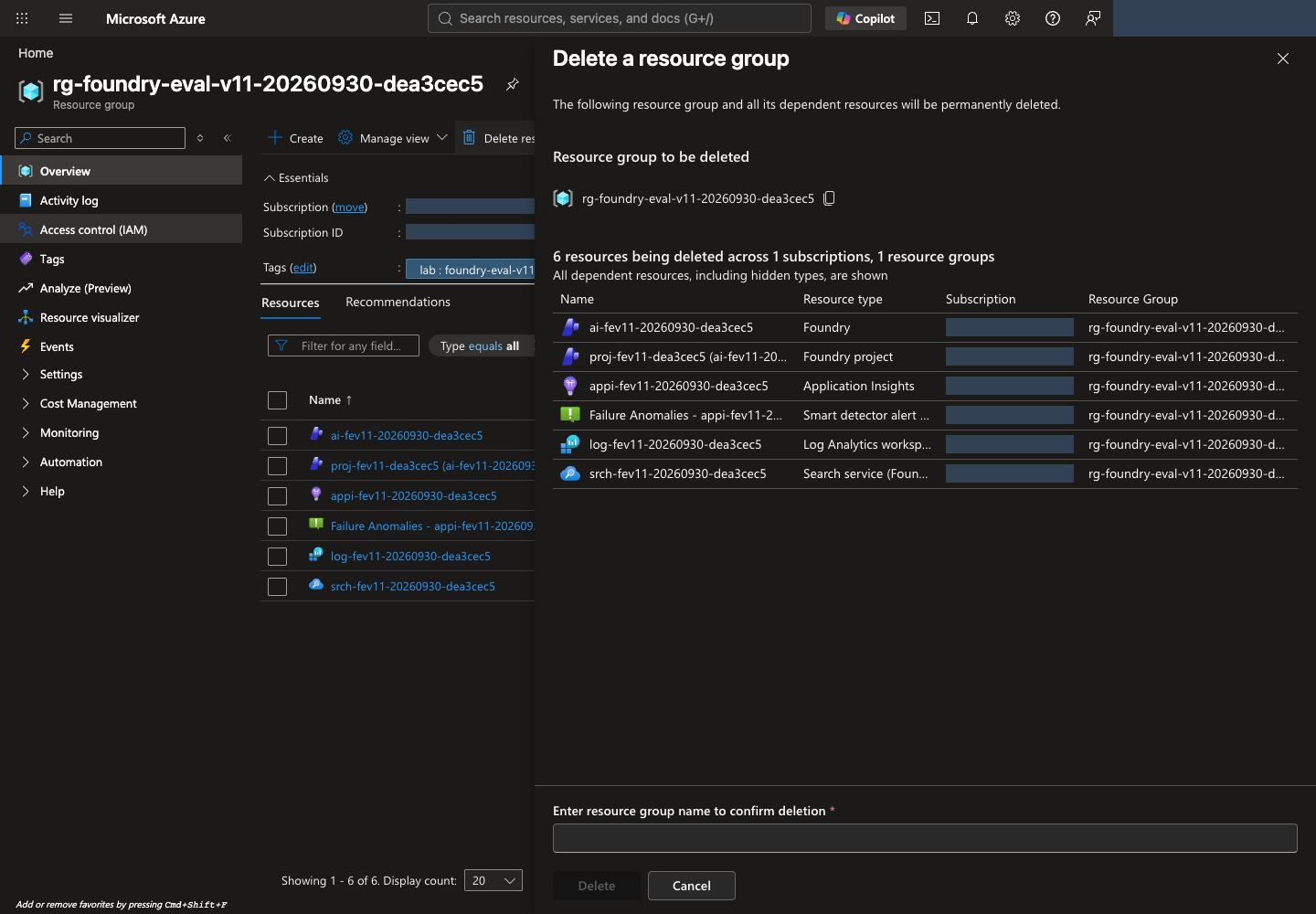
Method B · CLI: Run the command below and review the target again at the confirmation prompt. Do not append --yes to bypass confirmation.
Run in your terminal · Shared terminal
az group delete --subscription "YOUR_SUBSCRIPTION_ID" --name "YOUR_LAB_RESOURCE_GROUP"
Verify absence after deletion in your terminal
An accepted request is not completed deletion. Check portal notifications and group status, then verify that this command successfully prints false:
Run in your terminal · Shared terminal
az group exists --subscription "YOUR_SUBSCRIPTION_ID" --name "YOUR_LAB_RESOURCE_GROUP"
Authentication or network errors are not false and do not prove deletion. If true, inspect deletion progress. For Locks, permissions, or dependencies in other groups, follow deletion troubleshooting. Do not remove organizational locks without authorization.
Afterward, open Cost Management → Cost analysis for the subscription, time range, and group. Billing updates can lag, and earlier usage charges do not disappear. Separately check logs/storage in other groups and service-specific soft-deleted resources. Permanent deletion/purge requires organizational policy and separate authorization.
Clean up Codespaces separately
If you used Codespaces, complete the Microsoft Azure deletion/retention checks first. Deleting a codespace does not delete Microsoft Azure resources.
- Preserve
.lab/lab-en/records. This command creates a private ZIP locally without changing cloud resources. Use a new output name if that ZIP already exists.
Run in your terminal · Codespaces/macOS/Linux
python -m zipfile -c .lab/lab-en-records.zip .lab/lab-en
- In Codespaces Explorer, right-click
.lab/lab-en-records.zip→ Download to an approved private location and confirm it opens. It contains account, authorization, and raw result records; do not commit or publicly share it. Retained environments need these ownership records to resume. - In your Codespaces, choose that environment's … → Stop codespace. If you retain Microsoft Azure resources for resumption, keep the codespace stopped too. When the lab is finished and backup is verified, you can Delete it. Stopping ends compute charges but storage charges can remain; deletion loses files you did not back up.
Skip this section for the local-computer path. Neither Microsoft Azure cleanup nor Codespaces cleanup substitutes for the other.
Local computer · sign out when finished. After the verification above, run az logout on a shared or work computer, or whenever you no longer need this sign-in. It removes only the local Azure CLI session and changes no cloud resources. If you resume later, sign in again with az login --use-device-code.
Final completion criteria: For authorized deletion of your dedicated group, record az group exists returning false and the verification time. For explicitly authorized retention, record the actual remaining items, reasons, cost responsibility, review date, and subsequent deletion plan. Verify the outcome matching your authorization; do not delete .lab first and lose ownership evidence. See the cleanup checklist and deletion troubleshooting.